Category: Blog

Your blog category

  • How to Sell UX Research with Two Simple Questions

    How to Sell UX Research with Two Simple Questions

    Do you find yourself designing screens with only a vague idea of how the things on the screen relate to the things elsewhere in the system? Do you leave stakeholder meetings with unclear directives that often seem to contradict previous conversations? You know a better understanding of user needs would help the team get clear on what you are actually trying to accomplish, but time and budget for research is tight. When it comes to asking for more direct contact with your users, you might feel like poor Oliver Twist, timidly asking, “Please, sir, I want some more.” 

    Here’s the trick. You need to get stakeholders themselves to identify high-risk assumptions and hidden complexity, so that they become just as motivated as you to get answers from users. Basically, you need to make them think it’s their idea. 

    In this article, I’ll show you how to collaboratively expose misalignment and gaps in the team’s shared understanding by bringing the team together around two simple questions:

    1. What are the objects?
    2. What are the relationships between those objects?

    A gauntlet between research and screen design

    These two questions align to the first two steps of the ORCA process, which might become your new best friend when it comes to reducing guesswork. Wait, what’s ORCA?! Glad you asked.

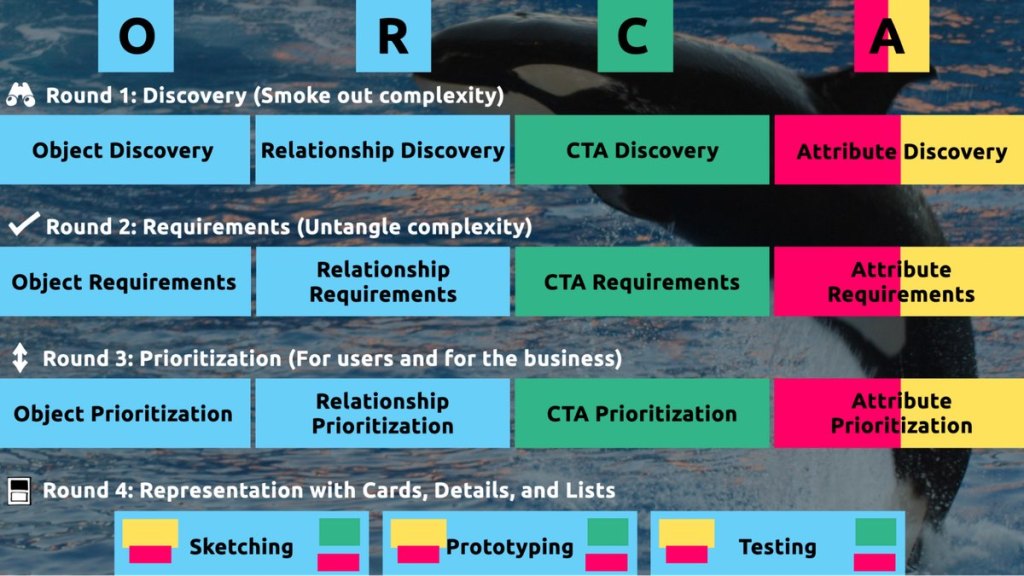
    ORCA stands for Objects, Relationships, CTAs, and Attributes, and it outlines a process for creating solid object-oriented user experiences. Object-oriented UX is my design philosophy. ORCA is an iterative methodology for synthesizing user research into an elegant structural foundation to support screen and interaction design. OOUX and ORCA have made my work as a UX designer more collaborative, effective, efficient, fun, strategic, and meaningful.

    The ORCA process has four iterative rounds and a whopping fifteen steps. In each round we get more clarity on our Os, Rs, Cs, and As.

    I sometimes say that ORCA is a “garbage in, garbage out” process. To ensure that the testable prototype produced in the final round actually tests well, the process needs to be fed by good research. But if you don’t have a ton of research, the beginning of the ORCA process serves another purpose: it helps you sell the need for research.

    In other words, the ORCA process serves as a gauntlet between research and design. With good research, you can gracefully ride the killer whale from research into design. But without good research, the process effectively spits you back into research and with a cache of specific open questions.

    Getting in the same curiosity-boat

    What gets us into trouble is not what we don’t know. It’s what we know for sure that just ain’t so.

    Mark Twain

    The first two steps of the ORCA process—Object Discovery and Relationship Discovery—shine a spotlight on the dark, dusty corners of your team’s misalignments and any inherent complexity that’s been swept under the rug. It begins to expose what this classic comic so beautifully illustrates:

    This is one reason why so many UX designers are frustrated in their job and why many projects fail. And this is also why we often can’t sell research: every decision-maker is confident in their own mental picture. 

    Once we expose hidden fuzzy patches in each picture and the differences between them all, the case for user research makes itself.

    But how we do this is important. However much we might want to, we can’t just tell everyone, “YOU ARE WRONG!” Instead, we need to facilitate and guide our team members to self-identify holes in their picture. When stakeholders take ownership of assumptions and gaps in understanding, BAM! Suddenly, UX research is not such a hard sell, and everyone is aboard the same curiosity-boat.

    Say your users are doctors. And you have no idea how doctors use the system you are tasked with redesigning.

    You might try to sell research by honestly saying: “We need to understand doctors better! What are their pain points? How do they use the current app?” But here’s the problem with that. Those questions are vague, and the answers to them don’t feel acutely actionable.

    Instead, you want your stakeholders themselves to ask super-specific questions. This is more like the kind of conversation you need to facilitate. Let’s listen in:

    “Wait a sec, how often do doctors share patients? Does a patient in this system have primary and secondary doctors?”

    “Can a patient even have more than one primary doctor?”

    “Is it a ‘primary doctor’ or just a ‘primary caregiver’… Can’t that role be a nurse practitioner?”

    “No, caregivers are something else… That’s the patient’s family contacts, right?”

    “So are caregivers in scope for this redesign?”

    “Yeah, because if a caregiver is present at an appointment, the doctor needs to note that. Like, tag the caregiver on the note… Or on the appointment?”

    Now we are getting somewhere. Do you see how powerful it can be getting stakeholders to debate these questions themselves? The diabolical goal here is to shake their confidence—gently and diplomatically.

    When these kinds of questions bubble up collaboratively and come directly from the mouths of your stakeholders and decision-makers, suddenly, designing screens without knowing the answers to these questions seems incredibly risky, even silly.

    If we create software without understanding the real-world information environment of our users, we will likely create software that does not align to the real-world information environment of our users. And this will, hands down, result in a more confusing, more complex, and less intuitive software product.

    The two questions

    But how do we get to these kinds of meaty questions diplomatically, efficiently, collaboratively, and reliably

    We can do this by starting with those two big questions that align to the first two steps of the ORCA process:

    1. What are the objects?
    2. What are the relationships between those objects?

    In practice, getting to these answers is easier said than done. I’m going to show you how these two simple questions can provide the outline for an Object Definition Workshop. During this workshop, these “seed” questions will blossom into dozens of specific questions and shine a spotlight on the need for more user research.

    Prep work: Noun foraging

    In the next section, I’ll show you how to run an Object Definition Workshop with your stakeholders (and entire cross-functional team, hopefully). But first, you need to do some prep work.

    Basically, look for nouns that are particular to the business or industry of your project, and do it across at least a few sources. I call this noun foraging.

    Here are just a few great noun foraging sources:

    • the product’s marketing site
    • the product’s competitors’ marketing sites (competitive analysis, anyone?)
    • the existing product (look at labels!)
    • user interview transcripts
    • notes from stakeholder interviews or vision docs from stakeholders

    Put your detective hat on, my dear Watson. Get resourceful and leverage what you have. If all you have is a marketing website, some screenshots of the existing legacy system, and access to customer service chat logs, then use those.

    As you peruse these sources, watch for the nouns that are used over and over again, and start listing them (preferably on blue sticky notes if you’ll be creating an object map later!).

    You’ll want to focus on nouns that might represent objects in your system. If you are having trouble determining if a noun might be object-worthy, remember the acronym SIP and test for:

    1. Structure
    2. Instances
    3. Purpose

    Think of a library app, for example. Is “book” an object?

    Structure: can you think of a few attributes for this potential object? Title, author, publish date… Yep, it has structure. Check!

    Instance: what are some examples of this potential “book” object? Can you name a few? The Alchemist, Ready Player One, Everybody Poops… OK, check!

    Purpose: why is this object important to the users and business? Well, “book” is what our library client is providing to people and books are why people come to the library… Check, check, check!

    As you are noun foraging, focus on capturing the nouns that have SIP. Avoid capturing components like dropdowns, checkboxes, and calendar pickers—your UX system is not your design system! Components are just the packaging for objects—they are a means to an end. No one is coming to your digital place to play with your dropdown! They are coming for the VALUABLE THINGS and what they can do with them. Those things, or objects, are what we are trying to identify.

    Let’s say we work for a startup disrupting the email experience. This is how I’d start my noun foraging.

    First I’d look at my own email client, which happens to be Gmail. I’d then look at Outlook and the new HEY email. I’d look at Yahoo, Hotmail…I’d even look at Slack and Basecamp and other so-called “email replacers.” I’d read some articles, reviews, and forum threads where people are complaining about email. While doing all this, I would look for and write down the nouns.

    (Before moving on, feel free to go noun foraging for this hypothetical product, too, and then scroll down to see how much our lists match up. Just don’t get lost in your own emails! Come back to me!)

    Drumroll, please…

    Here are a few nouns I came up with during my noun foraging:

    • email message
    • thread
    • contact
    • client
    • rule/automation
    • email address that is not a contact?
    • contact groups
    • attachment
    • Google doc file / other integrated file
    • newsletter? (HEY treats this differently)
    • saved responses and templates

    Scan your list of nouns and pick out words that you are completely clueless about. In our email example, it might be client or automation. Do as much homework as you can before your session with stakeholders: google what’s googleable. But other terms might be so specific to the product or domain that you need to have a conversation about them.

    Aside: here are some real nouns foraged during my own past project work that I needed my stakeholders to help me understand:

    • Record Locator
    • Incentive Home
    • Augmented Line Item
    • Curriculum-Based Measurement Probe

    This is really all you need to prepare for the workshop session: a list of nouns that represent potential objects and a short list of nouns that need to be defined further.

    Facilitate an Object Definition Workshop

    You could actually start your workshop with noun foraging—this activity can be done collaboratively. If you have five people in the room, pick five sources, assign one to every person, and give everyone ten minutes to find the objects within their source. When the time’s up, come together and find the overlap. Affinity mapping is your friend here!

    If your team is short on time and might be reluctant to do this kind of grunt work (which is usually the case) do your own noun foraging beforehand, but be prepared to show your work. I love presenting screenshots of documents and screens with all the nouns already highlighted. Bring the artifacts of your process, and start the workshop with a five-minute overview of your noun foraging journey.

    HOT TIP: before jumping into the workshop, frame the conversation as a requirements-gathering session to help you better understand the scope and details of the system. You don’t need to let them know that you’re looking for gaps in the team’s understanding so that you can prove the need for more user research—that will be our little secret. Instead, go into the session optimistically, as if your knowledgeable stakeholders and PMs and biz folks already have all the answers. 

    Then, let the question whack-a-mole commence.

    1. What is this thing?

    Want to have some real fun? At the beginning of your session, ask stakeholders to privately write definitions for the handful of obscure nouns you might be uncertain about. Then, have everyone show their cards at the same time and see if you get different definitions (you will). This is gold for exposing misalignment and starting great conversations.

    As your discussion unfolds, capture any agreed-upon definitions. And when uncertainty emerges, quietly (but visibly) start an “open questions” parking lot. 😉

    After definitions solidify, here’s a great follow-up:

    2. Do our users know what these things are? What do users call this thing?

    Stakeholder 1: They probably call email clients “apps.” But I’m not sure.

    Stakeholder 2: Automations are often called “workflows,” I think. Or, maybe users think workflows are something different.

    If a more user-friendly term emerges, ask the group if they can agree to use only that term moving forward. This way, the team can better align to the users’ language and mindset.

    OK, moving on. 

    If you have two or more objects that seem to overlap in purpose, ask one of these questions:

    3. Are these the same thing? Or are these different? If they are not the same, how are they different?

    You: Is a saved response the same as a template?

    Stakeholder 1: Yes! Definitely.

    Stakeholder 2: I don’t think so… A saved response is text with links and variables, but a template is more about the look and feel, like default fonts, colors, and placeholder images. 

    Continue to build out your growing glossary of objects. And continue to capture areas of uncertainty in your “open questions” parking lot.

    If you successfully determine that two similar things are, in fact, different, here’s your next follow-up question:

    4. What’s the relationship between these objects?

    You: Are saved responses and templates related in any way?

    Stakeholder 3:  Yeah, a template can be applied to a saved response.

    You, always with the follow-ups: When is the template applied to a saved response? Does that happen when the user is constructing the saved response? Or when they apply the saved response to an email? How does that actually work?

    Listen. Capture uncertainty. Once the list of “open questions” grows to a critical mass, pause to start assigning questions to groups or individuals. Some questions might be for the dev team (hopefully at least one developer is in the room with you). One question might be specifically for someone who couldn’t make it to the workshop. And many questions will need to be labeled “user.” 

    Do you see how we are building up to our UXR sales pitch?

    5. Is this object in scope?

    Your next question narrows the team’s focus toward what’s most important to your users. You can simply ask, “Are saved responses in scope for our first release?,” but I’ve got a better, more devious strategy.

    By now, you should have a list of clearly defined objects. Ask participants to sort these objects from most to least important, either in small breakout groups or individually. Then, like you did with the definitions, have everyone reveal their sort order at once. Surprisingly—or not so surprisingly—it’s not unusual for the VP to rank something like “saved responses” as #2 while everyone else puts it at the bottom of the list. Try not to look too smug as you inevitably expose more misalignment.

    I did this for a startup a few years ago. We posted the three groups’ wildly different sort orders on the whiteboard.

    The CEO stood back, looked at it, and said, “This is why we haven’t been able to move forward in two years.”

    Admittedly, it’s tragic to hear that, but as a professional, it feels pretty awesome to be the one who facilitated a watershed realization.

    Once you have a good idea of in-scope, clearly defined things, this is when you move on to doing more relationship mapping.

    6. Create a visual representation of the objects’ relationships

    We’ve already done a bit of this while trying to determine if two things are different, but this time, ask the team about every potential relationship. For each object, ask how it relates to all the other objects. In what ways are the objects connected? To visualize all the connections, pull out your trusty boxes-and-arrows technique. Here, we are connecting our objects with verbs. I like to keep my verbs to simple “has a” and “has many” statements.

    This system modeling activity brings up all sorts of new questions:

    • Can a saved response have attachments?
    • Can a saved response use a template? If so, if an email uses a saved response with a template, can the user override that template?
    • Do users want to see all the emails they sent that included a particular attachment? For example, “show me all the emails I sent with ProfessionalImage.jpg attached. I’ve changed my professional photo and I want to alert everyone to update it.” 

    Solid answers might emerge directly from the workshop participants. Great! Capture that new shared understanding. But when uncertainty surfaces, continue to add questions to your growing parking lot.

    Light the fuse

    You’ve positioned the explosives all along the floodgates. Now you simply have to light the fuse and BOOM. Watch the buy-in for user research flooooow.

    Before your workshop wraps up, have the group reflect on the list of open questions. Make plans for getting answers internally, then focus on the questions that need to be brought before users.

    Here’s your final step. Take those questions you’ve compiled for user research and discuss the level of risk associated with NOT answering them. Ask, “if we design without an answer to this question, if we make up our own answer and we are wrong, how bad might that turn out?” 

    With this methodology, we are cornering our decision-makers into advocating for user research as they themselves label questions as high-risk. Sorry, not sorry. 

    Now is your moment of truth. With everyone in the room, ask for a reasonable budget of time and money to conduct 6–8 user interviews focused specifically on these questions. 

    HOT TIP: if you are new to UX research, please note that you’ll likely need to rephrase the questions that came up during the workshop before you present them to users. Make sure your questions are open-ended and don’t lead the user into any default answers.

    Final words: Hold the screen design!

    Seriously, if at all possible, do not ever design screens again without first answering these fundamental questions: what are the objects and how do they relate?

    I promise you this: if you can secure a shared understanding between the business, design, and development teams before you start designing screens, you will have less heartache and save more time and money, and (it almost feels like a bonus at this point!) users will be more receptive to what you put out into the world. 

    I sincerely hope this helps you win time and budget to go talk to your users and gain clarity on what you are designing before you start building screens. If you find success using noun foraging and the Object Definition Workshop, there’s more where that came from in the rest of the ORCA process, which will help prevent even more late-in-the-game scope tugs-of-war and strategy pivots. 

    All the best of luck! Now go sell research!
  • A Content Model Is Not a Design System

    A Content Model Is Not a Design System

    Do you remember when having a great website was enough? Now, people are getting answers from Siri, Google search snippets, and mobile apps, not just our websites. Forward-thinking organizations have adopted an omnichannel content strategy, whose mission is to reach audiences across multiple digital channels and platforms.

    But how do you set up a content management system (CMS) to reach your audience now and in the future? I learned the hard way that creating a content model—a definition of content types, attributes, and relationships that let people and systems understand content—with my more familiar design-system thinking would capsize my customer’s omnichannel content strategy. You can avoid that outcome by creating content models that are semantic and that also connect related content. 

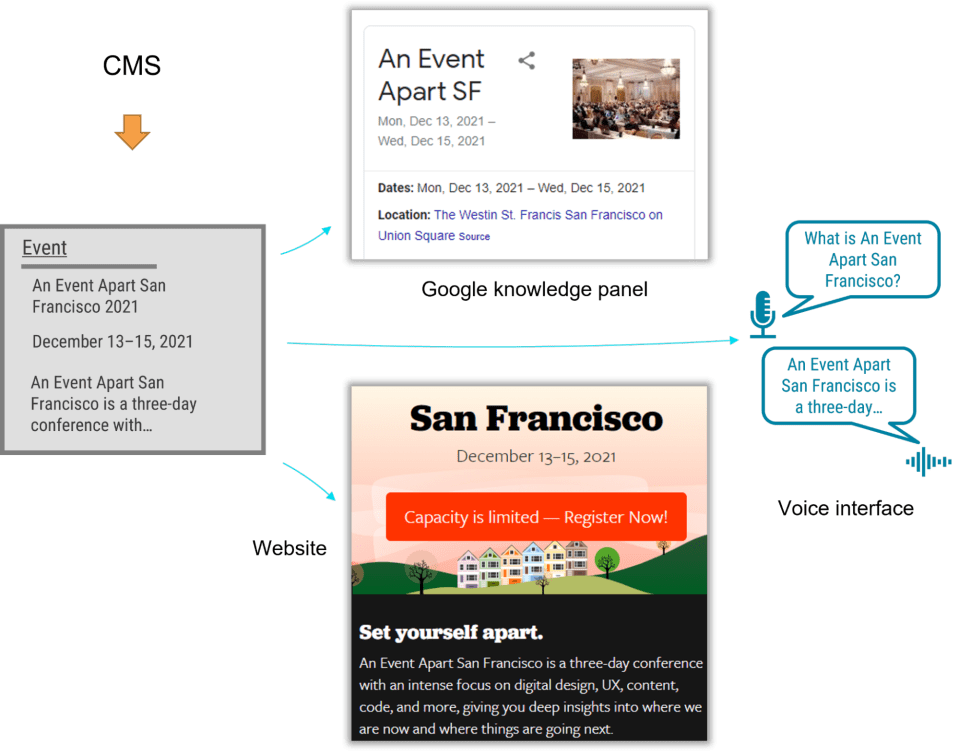
    I recently had the opportunity to lead the CMS implementation for a Fortune 500 company. The client was excited by the benefits of an omnichannel content strategy, including content reuse, multichannel marketing, and robot delivery—designing content to be intelligible to bots, Google knowledge panels, snippets, and voice user interfaces. 

    A content model is a critical foundation for an omnichannel content strategy, and for our content to be understood by multiple systems, the model needed semantic types—types named according to their meaning instead of their presentation. Our goal was to let authors create content and reuse it wherever it was relevant. But as the project proceeded, I realized that supporting content reuse at the scale that my customer needed required the whole team to recognize a new pattern.

    Despite our best intentions, we kept drawing from what we were more familiar with: design systems. Unlike web-focused content strategies, an omnichannel content strategy can’t rely on WYSIWYG tools for design and layout. Our tendency to approach the content model with our familiar design-system thinking constantly led us to veer away from one of the primary purposes of a content model: delivering content to audiences on multiple marketing channels.

    Two essential principles for an effective content model

    We needed to help our designers, developers, and stakeholders understand that we were doing something very different from their prior web projects, where it was natural for everyone to think about content as visual building blocks fitting into layouts. The previous approach was not only more familiar but also more intuitive—at least at first—because it made the designs feel more tangible. We discovered two principles that helped the team understand how a content model differs from the design systems that we were used to:

    1. Content models must define semantics instead of layout.
    2. And content models should connect content that belongs together.

    Semantic content models

    A semantic content model uses type and attribute names that reflect the meaning of the content, not how it will be displayed. For example, in a nonsemantic model, teams might create types like teasers, media blocks, and cards. Although these types might make it easy to lay out content, they don’t help delivery channels understand the content’s meaning, which in turn would have opened the door to the content being presented in each marketing channel. In contrast, a semantic content model uses type names like product, service, and testimonial so that each delivery channel can understand the content and use it as it sees fit. 

    When you’re creating a semantic content model, a great place to start is to look over the types and properties defined by Schema.org, a community-driven resource for type definitions that are intelligible to platforms like Google search.

    A semantic content model has several benefits:

    • Even if your team doesn’t care about omnichannel content, a semantic content model decouples content from its presentation so that teams can evolve the website’s design without needing to refactor its content. In this way, content can withstand disruptive website redesigns. 
    • A semantic content model also provides a competitive edge. By adding structured data based on Schema.org’s types and properties, a website can provide hints to help Google understand the content, display it in search snippets or knowledge panels, and use it to answer voice-interface user questions. Potential visitors could discover your content without ever setting foot in your website.
    • Beyond those practical benefits, you’ll also need a semantic content model if you want to deliver omnichannel content. To use the same content in multiple marketing channels, delivery channels need to be able to understand it. For example, if your content model were to provide a list of questions and answers, it could easily be rendered on a frequently asked questions (FAQ) page, but it could also be used in a voice interface or by a bot that answers common questions.

    For example, using a semantic content model for articles, events, people, and locations lets A List Apart provide cleanly structured data for search engines so that users can read the content on the website, in Google knowledge panels, and even with hypothetical voice interfaces in the future.

    Content models that connect

    After struggling to describe what makes a good content model, I’ve come to realize that the best models are those that are semantic and that also connect related content components (such as a FAQ item’s question and answer pair), instead of slicing up related content across disparate content components. A good content model connects content that should remain together so that multiple delivery channels can use it without needing to first put those pieces back together.

    Think about writing an article or essay. An article’s meaning and usefulness depends upon its parts being kept together. Would one of the headings or paragraphs be meaningful on their own without the context of the full article? On our project, our familiar design-system thinking often led us to want to create content models that would slice content into disparate chunks to fit the web-centric layout. This had a similar impact to an article that were to have been separated from its headline. Because we were slicing content into standalone pieces based on layout, content that belonged together became difficult to manage and nearly impossible for multiple delivery channels to understand.

    To illustrate, let’s look at how connecting related content applies in a real-world scenario. The design team for our customer presented a complex layout for a software product page that included multiple tabs and sections. Our instincts were to follow suit with the content model. Shouldn’t we make it as easy and as flexible as possible to add any number of tabs in the future?

    Because our design-system instincts were so familiar, it felt like we had needed a content type called “tab section” so that multiple tab sections could be added to a page. Each tab section would display various types of content. One tab might provide the software’s overview or its specifications. Another tab might provide a list of resources. 

    Our inclination to break down the content model into “tab section” pieces would have led to an unnecessarily complex model and a cumbersome editing experience, and it would have also created content that couldn’t have been understood by additional delivery channels. For example, how would another system have been able to tell which “tab section” referred to a product’s specifications or its resource list—would that other system have to have resorted to counting tab sections and content blocks? This would have prevented the tabs from ever being reordered, and it would have required adding logic in every other delivery channel to interpret the design system’s layout. Furthermore, if the customer were to have no longer wanted to display this content in a tab layout, it would have been tedious to migrate to a new content model to reflect the new page redesign.

    We had a breakthrough when we discovered that our customer had a specific purpose in mind for each tab: it would reveal specific information such as the software product’s overview, specifications, related resources, and pricing. Once implementation began, our inclination to focus on what’s visual and familiar had obscured the intent of the designs. With a little digging, it didn’t take long to realize that the concept of tabs wasn’t relevant to the content model. The meaning of the content that they were planning to display in the tabs was what mattered.

    In fact, the customer could have decided to display this content in a different way—without tabs—somewhere else. This realization prompted us to define content types for the software product based on the meaningful attributes that the customer had wanted to render on the web. There were obvious semantic attributes like name and description as well as rich attributes like screenshots, software requirements, and feature lists. The software’s product information stayed together because it wasn’t sliced across separate components like “tab sections” that were derived from the content’s presentation. Any delivery channel—including future ones—could understand and present this content.

    Conclusion

    In this omnichannel marketing project, we discovered that the best way to keep our content model on track was to ensure that it was semantic (with type and attribute names that reflected the meaning of the content) and that it kept content together that belonged together (instead of fragmenting it). These two concepts curtailed our temptation to shape the content model based on the design. So if you’re working on a content model to support an omnichannel content strategy—or even if you just want to make sure that Google and other interfaces understand your content—remember:

    • A design system isn’t a content model. Team members may be tempted to conflate them and to make your content model mirror your design system, so you should protect the semantic value and contextual structure of the content strategy during the entire implementation process. This will let every delivery channel consume the content without needing a magic decoder ring.
    • If your team is struggling to make this transition, you can still reap some of the benefits by using Schema.org–based structured data in your website. Even if additional delivery channels aren’t on the immediate horizon, the benefit to search engine optimization is a compelling reason on its own.
    • Additionally, remind the team that decoupling the content model from the design will let them update the designs more easily because they won’t be held back by the cost of content migrations. They’ll be able to create new designs without the obstacle of compatibility between the design and the content, and ​they’ll be ready for the next big thing. 

    By rigorously advocating for these principles, you’ll help your team treat content the way that it deserves—as the most critical asset in your user experience and the best way to connect with your audience.

  • Designers, (Re)define Success First

    Designers, (Re)define Success First

    About two and a half years ago, I introduced the idea of daily ethical design. It was born out of my frustration with the many obstacles to achieving design that’s usable and equitable; protects people’s privacy, agency, and focus; benefits society; and restores nature. I argued that we need to overcome the inconveniences that prevent us from acting ethically and that we need to elevate design ethics to a more practical level by structurally integrating it into our daily work, processes, and tools.

    Unfortunately, we’re still very far from this ideal. 

    At the time, I didn’t know yet how to structurally integrate ethics. Yes, I had found some tools that had worked for me in previous projects, such as using checklists, assumption tracking, and “dark reality” sessions, but I didn’t manage to apply those in every project. I was still struggling for time and support, and at best I had only partially achieved a higher (moral) quality of design—which is far from my definition of structurally integrated.

    I decided to dig deeper for the root causes in business that prevent us from practicing daily ethical design. Now, after much research and experimentation, I believe that I’ve found the key that will let us structurally integrate ethics. And it’s surprisingly simple! But first we need to zoom out to get a better understanding of what we’re up against.

    Influence the system

    Sadly, we’re trapped in a capitalistic system that reinforces consumerism and inequality, and it’s obsessed with the fantasy of endless growth. Sea levels, temperatures, and our demand for energy continue to rise unchallenged, while the gap between rich and poor continues to widen. Shareholders expect ever-higher returns on their investments, and companies feel forced to set short-term objectives that reflect this. Over the last decades, those objectives have twisted our well-intended human-centered mindset into a powerful machine that promotes ever-higher levels of consumption. When we’re working for an organization that pursues “double-digit growth” or “aggressive sales targets” (which is 99 percent of us), that’s very hard to resist while remaining human friendly. Even with our best intentions, and even though we like to say that we create solutions for people, we’re a part of the problem.

    What can we do to change this?

    We can start by acting on the right level of the system. Donella H. Meadows, a system thinker, once listed ways to influence a system in order of effectiveness. When you apply these to design, you get:

    • At the lowest level of effectiveness, you can affect numbers such as usability scores or the number of design critiques. But none of that will change the direction of a company.
    • Similarly, affecting buffers (such as team budgets), stocks (such as the number of designers), flows (such as the number of new hires), and delays (such as the time that it takes to hear about the effect of design) won’t significantly affect a company.
    • Focusing instead on feedback loops such as management control, employee recognition, or design-system investments can help a company become better at achieving its objectives. But that doesn’t change the objectives themselves, which means that the organization will still work against your ethical-design ideals.
    • The next level, information flows, is what most ethical-design initiatives focus on now: the exchange of ethical methods, toolkits, articles, conferences, workshops, and so on. This is also where ethical design has remained mostly theoretical. We’ve been focusing on the wrong level of the system all this time.
    • Take rules, for example—they beat knowledge every time. There can be widely accepted rules, such as how finance works, or a scrum team’s definition of done. But ethical design can also be smothered by unofficial rules meant to maintain profits, often revealed through comments such as “the client didn’t ask for it” or “don’t make it too big.”
    • Changing the rules without holding official power is very hard. That’s why the next level is so influential: self-organization. Experimentation, bottom-up initiatives, passion projects, self-steering teams—all of these are examples of self-organization that improve the resilience and creativity of a company. It’s exactly this diversity of viewpoints that’s needed to structurally tackle big systemic issues like consumerism, wealth inequality, and climate change.
    • Yet even stronger than self-organization are objectives and metrics. Our companies want to make more money, which means that everything and everyone in the company does their best to… make the company more money. And once I realized that profit is nothing more than a measurement, I understood how crucial a very specific, defined metric can be toward pushing a company in a certain direction.

    The takeaway? If we truly want to incorporate ethics into our daily design practice, we must first change the measurable objectives of the company we work for, from the bottom up.

    Redefine success

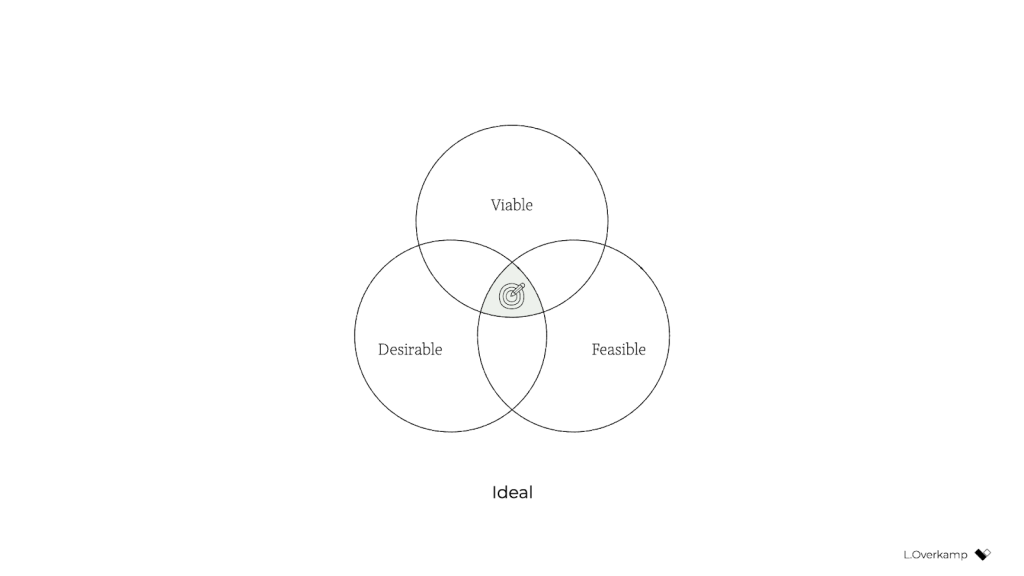
    Traditionally, we consider a product or service successful if it’s desirable to humans, technologically feasible, and financially viable. You tend to see these represented as equals; if you type the three words in a search engine, you’ll find diagrams of three equally sized, evenly arranged circles.

    But in our hearts, we all know that the three dimensions aren’t equally weighted: it’s viability that ultimately controls whether a product will go live. So a more realistic representation might look like this:

    Desirability and feasibility are the means; viability is the goal. Companies—outside of nonprofits and charities—exist to make money.

    A genuinely purpose-driven company would try to reverse this dynamic: it would recognize finance for what it was intended for: a means. So both feasibility and viability are means to achieve what the company set out to achieve. It makes intuitive sense: to achieve most anything, you need resources, people, and money. (Fun fact: the Italian language knows no difference between feasibility and viability; both are simply fattibilità.)

    But simply swapping viable for desirable isn’t enough to achieve an ethical outcome. Desirability is still linked to consumerism because the associated activities aim to identify what people want—whether it’s good for them or not. Desirability objectives, such as user satisfaction or conversion, don’t consider whether a product is healthy for people. They don’t prevent us from creating products that distract or manipulate people or stop us from contributing to society’s wealth inequality. They’re unsuitable for establishing a healthy balance with nature.

    There’s a fourth dimension of success that’s missing: our designs also need to be ethical in the effect that they have on the world.

    This is hardly a new idea. Many similar models exist, some calling the fourth dimension accountability, integrity, or responsibility. What I’ve never seen before, however, is the necessary step that comes after: to influence the system as designers and to make ethical design more practical, we must create objectives for ethical design that are achievable and inspirational. There’s no one way to do this because it highly depends on your culture, values, and industry. But I’ll give you the version that I developed with a group of colleagues at a design agency. Consider it a template to get started.

    Pursue well-being, equity, and sustainability

    We created objectives that address design’s effect on three levels: individual, societal, and global.

    An objective on the individual level tells us what success is beyond the typical focus of usability and satisfaction—instead considering matters such as how much time and attention is required from users. We pursued well-being:

    We create products and services that allow for people’s health and happiness. Our solutions are calm, transparent, nonaddictive, and nonmisleading. We respect our users’ time, attention, and privacy, and help them make healthy and respectful choices.

    An objective on the societal level forces us to consider our impact beyond just the user, widening our attention to the economy, communities, and other indirect stakeholders. We called this objective equity:

    We create products and services that have a positive social impact. We consider economic equality, racial justice, and the inclusivity and diversity of people as teams, users, and customer segments. We listen to local culture, communities, and those we affect.

    Finally, the objective on the global level aims to ensure that we remain in balance with the only home we have as humanity. Referring to it simply as sustainability, our definition was:

    We create products and services that reward sufficiency and reusability. Our solutions support the circular economy: we create value from waste, repurpose products, and prioritize sustainable choices. We deliver functionality instead of ownership, and we limit energy use.

    In short, ethical design (to us) meant achieving wellbeing for each user and an equitable value distribution within society through a design that can be sustained by our living planet. When we introduced these objectives in the company, for many colleagues, design ethics and responsible design suddenly became tangible and achievable through practical—and even familiar—actions.

    Measure impact 

    But defining these objectives still isn’t enough. What truly caught the attention of senior management was the fact that we created a way to measure every design project’s well-being, equity, and sustainability.

    This overview lists example metrics that you can use as you pursue well-being, equity, and sustainability:

    There’s a lot of power in measurement. As the saying goes, what gets measured gets done. Donella Meadows once shared this example:

    “If the desired system state is national security, and that is defined as the amount of money spent on the military, the system will produce military spending. It may or may not produce national security.”

    This phenomenon explains why desirability is a poor indicator of success: it’s typically defined as the increase in customer satisfaction, session length, frequency of use, conversion rate, churn rate, download rate, and so on. But none of these metrics increase the health of people, communities, or ecosystems. What if instead we measured success through metrics for (digital) well-being, such as (reduced) screen time or software energy consumption?

    There’s another important message here. Even if we set an objective to build a calm interface, if we were to choose the wrong metric for calmness—say, the number of interface elements—we could still end up with a screen that induces anxiety. Choosing the wrong metric can completely undo good intentions. 

    Additionally, choosing the right metric is enormously helpful in focusing the design team. Once you go through the exercise of choosing metrics for our objectives, you’re forced to consider what success looks like concretely and how you can prove that you’ve reached your ethical objectives. It also forces you to consider what we as designers have control over: what can I include in my design or change in my process that will lead to the right type of success? The answer to this question brings a lot of clarity and focus.

    And finally, it’s good to remember that traditional businesses run on measurements, and managers love to spend much time discussing charts (ideally hockey-stick shaped)—especially if they concern profit, the one-above-all of metrics. For good or ill, to improve the system, to have a serious discussion about ethical design with managers, we’ll need to speak that business language.

    Practice daily ethical design

    Once you’ve defined your objectives and you have a reasonable idea of the potential metrics for your design project, only then do you have a chance to structurally practice ethical design. It “simply” becomes a matter of using your creativity and choosing from all the knowledge and toolkits already available to you.

    I think this is quite exciting! It opens a whole new set of challenges and considerations for the design process. Should you go with that energy-consuming video or would a simple illustration be enough? Which typeface is the most calm and inclusive? Which new tools and methods do you use? When is the website’s end of life? How can you provide the same service while requiring less attention from users? How do you make sure that those who are affected by decisions are there when those decisions are made? How can you measure our effects?

    The redefinition of success will completely change what it means to do good design.

    There is, however, a final piece of the puzzle that’s missing: convincing your client, product owner, or manager to be mindful of well-being, equity, and sustainability. For this, it’s essential to engage stakeholders in a dedicated kickoff session.

    Kick it off or fall back to status quo

    The kickoff is the most important meeting that can be so easy to forget to include. It consists of two major phases: 1) the alignment of expectations, and 2) the definition of success.

    In the first phase, the entire (design) team goes over the project brief and meets with all the relevant stakeholders. Everyone gets to know one another and express their expectations on the outcome and their contributions to achieving it. Assumptions are raised and discussed. The aim is to get on the same level of understanding and to in turn avoid preventable miscommunications and surprises later in the project.

    For example, for a recent freelance project that aimed to design a digital platform that facilitates US student advisors’ documentation and communication, we conducted an online kickoff with the client, a subject-matter expert, and two other designers. We used a combination of canvases on Miro: one with questions from “Manual of Me” (to get to know each other), a Team Canvas (to express expectations), and a version of the Project Canvas to align on scope, timeline, and other practical matters.

    The above is the traditional purpose of a kickoff. But just as important as expressing expectations is agreeing on what success means for the project—in terms of desirability, viability, feasibility, and ethics. What are the objectives in each dimension?

    Agreement on what success means at such an early stage is crucial because you can rely on it for the remainder of the project. If, for example, the design team wants to build an inclusive app for a diverse user group, they can raise diversity as a specific success criterion during the kickoff. If the client agrees, the team can refer back to that promise throughout the project. “As we agreed in our first meeting, having a diverse user group that includes A and B is necessary to build a successful product. So we do activity X and follow research process Y.” Compare those odds to a situation in which the team didn’t agree to that beforehand and had to ask for permission halfway through the project. The client might argue that that came on top of the agreed scope—and she’d be right.

    In the case of this freelance project, to define success I prepared a round canvas that I call the Wheel of Success. It consists of an inner ring, meant to capture ideas for objectives, and a set of outer rings, meant to capture ideas on how to measure those objectives. The rings are divided into five dimensions of successful design: healthy, equitable, sustainable, desirable, feasible, and viable.

    We went through each dimension, writing down ideas on digital sticky notes. Then we discussed our ideas and verbally agreed on the most important ones. For example, our client agreed that sustainability and progressive enhancement are important success criteria for the platform. And the subject-matter expert emphasized the importance of including students from low-income and disadvantaged groups in the design process.

    After the kickoff, we summarized our ideas and shared understanding in a project brief that captured these aspects:

    • the project’s origin and purpose: why are we doing this project?
    • the problem definition: what do we want to solve?
    • the concrete goals and metrics for each success dimension: what do we want to achieve?
    • the scope, process, and role descriptions: how will we achieve it?

    With such a brief in place, you can use the agreed-upon objectives and concrete metrics as a checklist of success, and your design team will be ready to pursue the right objective—using the tools, methods, and metrics at their disposal to achieve ethical outcomes.

    Conclusion

    Over the past year, quite a few colleagues have asked me, “Where do I start with ethical design?” My answer has always been the same: organize a session with your stakeholders to (re)define success. Even though you might not always be 100 percent successful in agreeing on goals that cover all responsibility objectives, that beats the alternative (the status quo) every time. If you want to be an ethical, responsible designer, there’s no skipping this step.

    To be even more specific: if you consider yourself a strategic designer, your challenge is to define ethical objectives, set the right metrics, and conduct those kick-off sessions. If you consider yourself a system designer, your starting point is to understand how your industry contributes to consumerism and inequality, understand how finance drives business, and brainstorm which levers are available to influence the system on the highest level. Then redefine success to create the space to exercise those levers.

    And for those who consider themselves service designers or UX designers or UI designers: if you truly want to have a positive, meaningful impact, stay away from the toolkits and meetups and conferences for a while. Instead, gather your colleagues and define goals for well-being, equity, and sustainability through design. Engage your stakeholders in a workshop and challenge them to think of ways to achieve and measure those ethical goals. Take their input, make it concrete and visible, ask for their agreement, and hold them to it.

    Otherwise, I’m genuinely sorry to say, you’re wasting your precious time and creative energy.

    Of course, engaging your stakeholders in this way can be uncomfortable. Many of my colleagues expressed doubts such as “What will the client think of this?,” “Will they take me seriously?,” and “Can’t we just do it within the design team instead?” In fact, a product manager once asked me why ethics couldn’t just be a structured part of the design process—to just do it without spending the effort to define ethical objectives. It’s a tempting idea, right? We wouldn’t have to have difficult discussions with stakeholders about what values or which key-performance indicators to pursue. It would let us focus on what we like and do best: designing.

    But as systems theory tells us, that’s not enough. For those of us who aren’t from marginalized groups and have the privilege to be able to speak up and be heard, that uncomfortable space is exactly where we need to be if we truly want to make a difference. We can’t remain within the design-for-designers bubble, enjoying our privileged working-from-home situation, disconnected from the real world out there. For those of us who have the possibility to speak up and be heard: if we solely keep talking about ethical design and it remains at the level of articles and toolkits—we’re not designing ethically. It’s just theory. We need to actively engage our colleagues and clients by challenging them to redefine success in business.

    With a bit of courage, determination, and focus, we can break out of this cage that finance and business-as-usual have built around us and become facilitators of a new type of business that can see beyond financial value. We just need to agree on the right objectives at the start of each design project, find the right metrics, and realize that we already have everything that we need to get started. That’s what it means to do daily ethical design.

    For their inspiration and support over the years, I would like to thank Emanuela Cozzi Schettini, José Gallegos, Annegret Bönemann, Ian Dorr, Vera Rademaker, Virginia Rispoli, Cecilia Scolaro, Rouzbeh Amini, and many others.

  • Breaking Out of the Box

    Breaking Out of the Box

    CSS is about styling boxes. In fact, the whole web is made of boxes, from the browser viewport to elements on a page. But every once in a while a new feature comes along that makes us rethink our design approach.

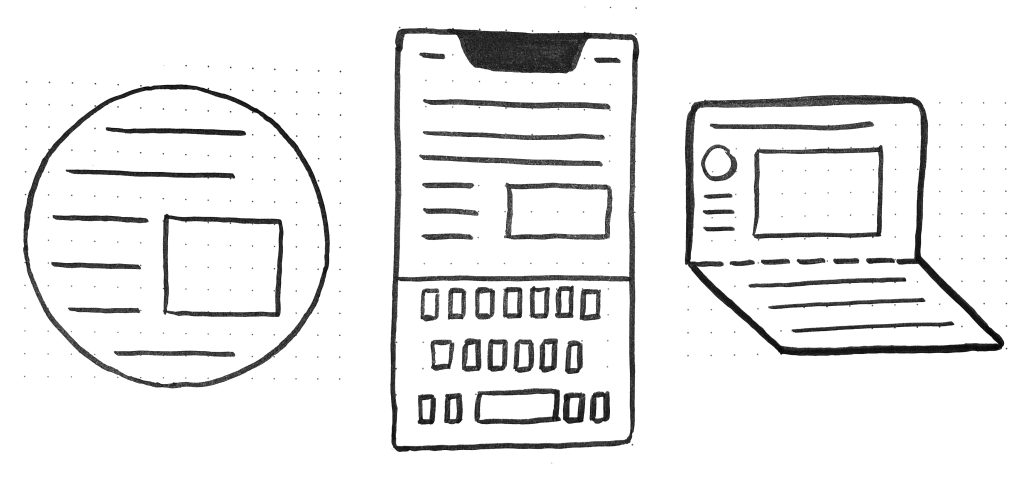
    Round displays, for example, make it fun to play with circular clip areas. Mobile screen notches and virtual keyboards offer challenges to best organize content that stays clear of them. And dual screen or foldable devices make us rethink how to best use available space in a number of different device postures.

    These recent evolutions of the web platform made it both more challenging and more interesting to design products. They’re great opportunities for us to break out of our rectangular boxes.

    I’d like to talk about a new feature similar to the above: the Window Controls Overlay for Progressive Web Apps (PWAs).

    Progressive Web Apps are blurring the lines between apps and websites. They combine the best of both worlds. On one hand, they’re stable, linkable, searchable, and responsive just like websites. On the other hand, they provide additional powerful capabilities, work offline, and read files just like native apps.

    As a design surface, PWAs are really interesting because they challenge us to think about what mixing web and device-native user interfaces can be. On desktop devices in particular, we have more than 40 years of history telling us what applications should look like, and it can be hard to break out of this mental model.

    At the end of the day though, PWAs on desktop are constrained to the window they appear in: a rectangle with a title bar at the top.

    Here’s what a typical desktop PWA app looks like:

    Sure, as the author of a PWA, you get to choose the color of the title bar (using the Web Application Manifest theme_color property), but that’s about it.

    What if we could think outside this box, and reclaim the real estate of the app’s entire window? Doing so would give us a chance to make our apps more beautiful and feel more integrated in the operating system.

    This is exactly what the Window Controls Overlay offers. This new PWA functionality makes it possible to take advantage of the full surface area of the app, including where the title bar normally appears.

    About the title bar and window controls

    Let’s start with an explanation of what the title bar and window controls are.

    The title bar is the area displayed at the top of an app window, which usually contains the app’s name. Window controls are the affordances, or buttons, that make it possible to minimize, maximize, or close the app’s window, and are also displayed at the top.

    Window Controls Overlay removes the physical constraint of the title bar and window controls areas. It frees up the full height of the app window, enabling the title bar and window control buttons to be overlaid on top of the application’s web content. 

    If you are reading this article on a desktop computer, take a quick look at other apps. Chances are they’re already doing something similar to this. In fact, the very web browser you are using to read this uses the top area to display tabs.

    Spotify displays album artwork all the way to the top edge of the application window.

    Microsoft Word uses the available title bar space to display the auto-save and search functionalities, and more.

    The whole point of this feature is to allow you to make use of this space with your own content while providing a way to account for the window control buttons. And it enables you to offer this modified experience on a range of platforms while not adversely affecting the experience on browsers or devices that don’t support Window Controls Overlay. After all, PWAs are all about progressive enhancement, so this feature is a chance to enhance your app to use this extra space when it’s available.

    Let’s use the feature

    For the rest of this article, we’ll be working on a demo app to learn more about using the feature.

    The demo app is called 1DIV. It’s a simple CSS playground where users can create designs using CSS and a single HTML element.

    The app has two pages. The first lists the existing CSS designs you’ve created:

    The second page enables you to create and edit CSS designs:

    Since I’ve added a simple web manifest and service worker, we can install the app as a PWA on desktop. Here is what it looks like on macOS:

    And on Windows:

    Our app is looking good, but the white title bar in the first page is wasted space. In the second page, it would be really nice if the design area went all the way to the top of the app window.

    Let’s use the Window Controls Overlay feature to improve this.

    Enabling Window Controls Overlay

    The feature is still experimental at the moment. To try it, you need to enable it in one of the supported browsers.

    As of now, it has been implemented in Chromium, as a collaboration between Microsoft and Google. We can therefore use it in Chrome or Edge by going to the internal about://flags page, and enabling the Desktop PWA Window Controls Overlay flag.

    Using Window Controls Overlay

    To use the feature, we need to add the following display_override member to our web app’s manifest file:

    {
      "name": "1DIV",
      "description": "1DIV is a mini CSS playground",
      "lang": "en-US",
      "start_url": "/",
      "theme_color": "#ffffff",
      "background_color": "#ffffff",
      "display_override": [
        "window-controls-overlay"
      ],
      "icons": [
        ...
      ]
    }
    

    On the surface, the feature is really simple to use. This manifest change is the only thing we need to make the title bar disappear and turn the window controls into an overlay.

    However, to provide a great experience for all users regardless of what device or browser they use, and to make the most of the title bar area in our design, we’ll need a bit of CSS and JavaScript code.

    Here is what the app looks like now:

    The title bar is gone, which is what we wanted, but our logo, search field, and NEW button are partially covered by the window controls because now our layout starts at the top of the window.

    It’s similar on Windows, with the difference that the close, maximize, and minimize buttons appear on the right side, grouped together with the PWA control buttons:

    Screenshot of the 1DIV app thumbnail display using Window Controls Overlay on the Windows operating system. The separate top bar area is gone, but the window controls are now blocking some of the app’s content.

    Using CSS to keep clear of the window controls

    Along with the feature, new CSS environment variables have been introduced:

    • titlebar-area-x
    • titlebar-area-y
    • titlebar-area-width
    • titlebar-area-height

    You use these variables with the CSS env() function to position your content where the title bar would have been while ensuring it won’t overlap with the window controls. In our case, we’ll use two of the variables to position our header, which contains the logo, search bar, and NEW button. 

    header {
      position: absolute;
      left: env(titlebar-area-x, 0);
      width: env(titlebar-area-width, 100%);
      height: var(--toolbar-height);
    }
    

    The titlebar-area-x variable gives us the distance from the left of the viewport to where the title bar would appear, and titlebar-area-width is its width. (Remember, this is not equivalent to the width of the entire viewport, just the title bar portion, which as noted earlier, doesn’t include the window controls.)

    By doing this, we make sure our content remains fully visible. We’re also defining fallback values (the second parameter in the env() function) for when the variables are not defined (such as on non-supporting browsers, or when the Windows Control Overlay feature is disabled).

    Now our header adapts to its surroundings, and it doesn’t feel like the window control buttons have been added as an afterthought. The app looks a lot more like a native app.

    Changing the window controls background color so it blends in

    Now let’s take a closer look at our second page: the CSS playground editor.

    Not great. Our CSS demo area does go all the way to the top, which is what we wanted, but the way the window controls appear as white rectangles on top of it is quite jarring.

    We can fix this by changing the app’s theme color. There are a couple of ways to define it:

    • PWAs can define a theme color in the web app manifest file using the theme_color manifest member. This color is then used by the OS in different ways. On desktop platforms, it is used to provide a background color to the title bar and window controls.
    • Websites can use the theme-color meta tag as well. It’s used by browsers to customize the color of the UI around the web page. For PWAs, this color can override the manifest theme_color.

    In our case, we can set the manifest theme_color to white to provide the right default color for our app. The OS will read this color value when the app is installed and use it to make the window controls background color white. This color works great for our main page with the list of demos.

    The theme-color meta tag can be changed at runtime, using JavaScript. So we can do that to override the white with the right demo background color when one is opened.

    Here is the function we’ll use:

    function themeWindow(bgColor) {
      document.querySelector("meta[name=theme-color]").setAttribute('content', bgColor);
    }

    With this in place, we can imagine how using color and CSS transitions can produce a smooth change from the list page to the demo page, and enable the window control buttons to blend in with the rest of the app’s interface.

    Dragging the window

    Now, getting rid of the title bar entirely does have an important accessibility consequence: it’s much more difficult to move the application window around.

    The title bar provides a sizable area for users to click and drag, but by using the Window Controls Overlay feature, this area becomes limited to where the control buttons are, and users have to very precisely aim between these buttons to move the window.

    Fortunately, this can be fixed using CSS with the app-region property. This property is, for now, only supported in Chromium-based browsers and needs the -webkit- vendor prefix. 

    To make any element of the app become a dragging target for the window, we can use the following: 

    -webkit-app-region: drag;

    It is also possible to explicitly make an element non-draggable: 

    -webkit-app-region: no-drag; 

    These options can be useful for us. We can make the entire header a dragging target, but make the search field and NEW button within it non-draggable so they can still be used as normal.

    However, because the editor page doesn’t display the header, users wouldn’t be able to drag the window while editing code. So let’s use a different approach. We’ll create another element before our header, also absolutely positioned, and dedicated to dragging the window.

    ...
    .drag {
      position: absolute;
      top: 0;
      width: 100%;
      height: env(titlebar-area-height, 0);
      -webkit-app-region: drag;
    }

    With the above code, we’re making the draggable area span the entire viewport width, and using the titlebar-area-height variable to make it as tall as what the title bar would have been. This way, our draggable area is aligned with the window control buttons as shown below.

    And, now, to make sure our search field and button remain usable:

    header .search,
    header .new {
      -webkit-app-region: no-drag;
    }

    With the above code, users can click and drag where the title bar used to be. It is an area that users expect to be able to use to move windows on desktop, and we’re not breaking this expectation, which is good.

    Adapting to window resize

    It may be useful for an app to know both whether the window controls overlay is visible and when its size changes. In our case, if the user made the window very narrow, there wouldn’t be enough space for the search field, logo, and button to fit, so we’d want to push them down a bit.

    The Window Controls Overlay feature comes with a JavaScript API we can use to do this: navigator.windowControlsOverlay.

    The API provides three interesting things:

    • navigator.windowControlsOverlay.visible lets us know whether the overlay is visible.
    • navigator.windowControlsOverlay.getBoundingClientRect() lets us know the position and size of the title bar area.
    • navigator.windowControlsOverlay.ongeometrychange lets us know when the size or visibility changes.

    Let’s use this to be aware of the size of the title bar area and move the header down if it’s too narrow.

    if (navigator.windowControlsOverlay) {
      navigator.windowControlsOverlay.addEventListener('geometrychange', () => {
        const { width } = navigator.windowControlsOverlay.getBoundingClientRect();
        document.body.classList.toggle('narrow', width < 250);
      });
    }

    In the example above, we set the narrow class on the body of the app if the title bar area is narrower than 250px. We could do something similar with a media query, but using the windowControlsOverlay API has two advantages for our use case:

    • It’s only fired when the feature is supported and used; we don’t want to adapt the design otherwise.
    • We get the size of the title bar area across operating systems, which is great because the size of the window controls is different on Mac and Windows. Using a media query wouldn’t make it possible for us to know exactly how much space remains.
    .narrow header {
      top: env(titlebar-area-height, 0);
      left: 0;
      width: 100%;
    }

    Using the above CSS code, we can move our header down to stay clear of the window control buttons when the window is too narrow, and move the thumbnails down accordingly.

    Thirty pixels of exciting design opportunities


    Using the Window Controls Overlay feature, we were able to take our simple demo app and turn it into something that feels so much more integrated on desktop devices. Something that reaches out of the usual window constraints and provides a custom experience for its users.

    In reality, this feature only gives us about 30 pixels of extra room and comes with challenges on how to deal with the window controls. And yet, this extra room and those challenges can be turned into exciting design opportunities.

    More devices of all shapes and forms get invented all the time, and the web keeps on evolving to adapt to them. New features get added to the web platform to allow us, web authors, to integrate more and more deeply with those devices. From watches or foldable devices to desktop computers, we need to evolve our design approach for the web. Building for the web now lets us think outside the rectangular box.

    So let’s embrace this. Let’s use the standard technologies already at our disposal, and experiment with new ideas to provide tailored experiences for all devices, all from a single codebase!


    If you get a chance to try the Window Controls Overlay feature and have feedback about it, you can open issues on the spec’s repository. It’s still early in the development of this feature, and you can help make it even better. Or, you can take a look at the feature’s existing documentation, or this demo app and its source code

  • Mobile-First CSS: Is It Time for a Rethink?

    Mobile-First CSS: Is It Time for a Rethink?

    The mobile-first design methodology is great—it focuses on what really matters to the user, it’s well-practiced, and it’s been a common design pattern for years. So developing your CSS mobile-first should also be great, too…right? 

    Well, not necessarily. Classic mobile-first CSS development is based on the principle of overwriting style declarations: you begin your CSS with default style declarations, and overwrite and/or add new styles as you add breakpoints with min-width media queries for larger viewports (for a good overview see “What is Mobile First CSS and Why Does It Rock?”). But all those exceptions create complexity and inefficiency, which in turn can lead to an increased testing effort and a code base that’s harder to maintain. Admit it—how many of us willingly want that?

    On your own projects, mobile-first CSS may yet be the best tool for the job, but first you need to evaluate just how appropriate it is in light of the visual design and user interactions you’re working on. To help you get started, here’s how I go about tackling the factors you need to watch for, and I’ll discuss some alternate solutions if mobile-first doesn’t seem to suit your project.

    Advantages of mobile-first

    Some of the things to like with mobile-first CSS development—and why it’s been the de facto development methodology for so long—make a lot of sense:

    Development hierarchy. One thing you undoubtedly get from mobile-first is a nice development hierarchy—you just focus on the mobile view and get developing. 

    Tried and tested. It’s a tried and tested methodology that’s worked for years for a reason: it solves a problem really well.

    Prioritizes the mobile view. The mobile view is the simplest and arguably the most important, as it encompasses all the key user journeys, and often accounts for a higher proportion of user visits (depending on the project). 

    Prevents desktop-centric development. As development is done using desktop computers, it can be tempting to initially focus on the desktop view. But thinking about mobile from the start prevents us from getting stuck later on; no one wants to spend their time retrofitting a desktop-centric site to work on mobile devices!

    Disadvantages of mobile-first

    Setting style declarations and then overwriting them at higher breakpoints can lead to undesirable ramifications:

    More complexity. The farther up the breakpoint hierarchy you go, the more unnecessary code you inherit from lower breakpoints. 

    Higher CSS specificity. Styles that have been reverted to their browser default value in a class name declaration now have a higher specificity. This can be a headache on large projects when you want to keep the CSS selectors as simple as possible.

    Requires more regression testing. Changes to the CSS at a lower view (like adding a new style) requires all higher breakpoints to be regression tested.

    The browser can’t prioritize CSS downloads. At wider breakpoints, classic mobile-first min-width media queries don’t leverage the browser’s capability to download CSS files in priority order.

    The problem of property value overrides

    There is nothing inherently wrong with overwriting values; CSS was designed to do just that. Still, inheriting incorrect values is unhelpful and can be burdensome and inefficient. It can also lead to increased style specificity when you have to overwrite styles to reset them back to their defaults, something that may cause issues later on, especially if you are using a combination of bespoke CSS and utility classes. We won’t be able to use a utility class for a style that has been reset with a higher specificity.

    With this in mind, I’m developing CSS with a focus on the default values much more these days. Since there’s no specific order, and no chains of specific values to keep track of, this frees me to develop breakpoints simultaneously. I concentrate on finding common styles and isolating the specific exceptions in closed media query ranges (that is, any range with a max-width set). 

    This approach opens up some opportunities, as you can look at each breakpoint as a clean slate. If a component’s layout looks like it should be based on Flexbox at all breakpoints, it’s fine and can be coded in the default style sheet. But if it looks like Grid would be much better for large screens and Flexbox for mobile, these can both be done entirely independently when the CSS is put into closed media query ranges. Also, developing simultaneously requires you to have a good understanding of any given component in all breakpoints up front. This can help surface issues in the design earlier in the development process. We don’t want to get stuck down a rabbit hole building a complex component for mobile, and then get the designs for desktop and find they are equally complex and incompatible with the HTML we created for the mobile view! 

    Though this approach isn’t going to suit everyone, I encourage you to give it a try. There are plenty of tools out there to help with concurrent development, such as Responsively App, Blisk, and many others. 

    Having said that, I don’t feel the order itself is particularly relevant. If you are comfortable with focusing on the mobile view, have a good understanding of the requirements for other breakpoints, and prefer to work on one device at a time, then by all means stick with the classic development order. The important thing is to identify common styles and exceptions so you can put them in the relevant stylesheet—a sort of manual tree-shaking process! Personally, I find this a little easier when working on a component across breakpoints, but that’s by no means a requirement.

    Closed media query ranges in practice 

    In classic mobile-first CSS we overwrite the styles, but we can avoid this by using media query ranges. To illustrate the difference (I’m using SCSS for brevity), let’s assume there are three visual designs: 

    • smaller than 768
    • from 768 to below 1024
    • 1024 and anything larger 

    Take a simple example where a block-level element has a default padding of “20px,” which is overwritten at tablet to be “40px” and set back to “20px” on desktop.

    Classic min-width mobile-first

    .my-block {
      padding: 20px;
      @media (min-width: 768px) {
        padding: 40px;
      }
      @media (min-width: 1024px) {
        padding: 20px;
      }
    }

    Closed media query range

    .my-block {
      padding: 20px;
      @media (min-width: 768px) and (max-width: 1023.98px) {
        padding: 40px;
      }
    }

    The subtle difference is that the mobile-first example sets the default padding to “20px” and then overwrites it at each breakpoint, setting it three times in total. In contrast, the second example sets the default padding to “20px” and only overrides it at the relevant breakpoint where it isn’t the default value (in this instance, tablet is the exception).

    The goal is to: 

    • Only set styles when needed. 
    • Not set them with the expectation of overwriting them later on, again and again. 

    To this end, closed media query ranges are our best friend. If we need to make a change to any given view, we make it in the CSS media query range that applies to the specific breakpoint. We’ll be much less likely to introduce unwanted alterations, and our regression testing only needs to focus on the breakpoint we have actually edited. 

    Taking the above example, if we find that .my-block spacing on desktop is already accounted for by the margin at that breakpoint, and since we want to remove the padding altogether, we could do this by setting the mobile padding in a closed media query range.

    .my-block {
      @media (max-width: 767.98px) {
        padding: 20px;
      }
      @media (min-width: 768px) and (max-width: 1023.98px) {
        padding: 40px;
      }
    }

    The browser default padding for our block is “0,” so instead of adding a desktop media query and using unset or “0” for the padding value (which we would need with mobile-first), we can wrap the mobile padding in a closed media query (since it is now also an exception) so it won’t get picked up at wider breakpoints. At the desktop breakpoint, we won’t need to set any padding style, as we want the browser default value.

    Bundling versus separating the CSS

    Back in the day, keeping the number of requests to a minimum was very important due to the browser’s limit of concurrent requests (typically around six). As a consequence, the use of image sprites and CSS bundling was the norm, with all the CSS being downloaded in one go, as one stylesheet with highest priority. 

    With HTTP/2 and HTTP/3 now on the scene, the number of requests is no longer the big deal it used to be. This allows us to separate the CSS into multiple files by media query. The clear benefit of this is the browser can now request the CSS it currently needs with a higher priority than the CSS it doesn’t. This is more performant and can reduce the overall time page rendering is blocked.

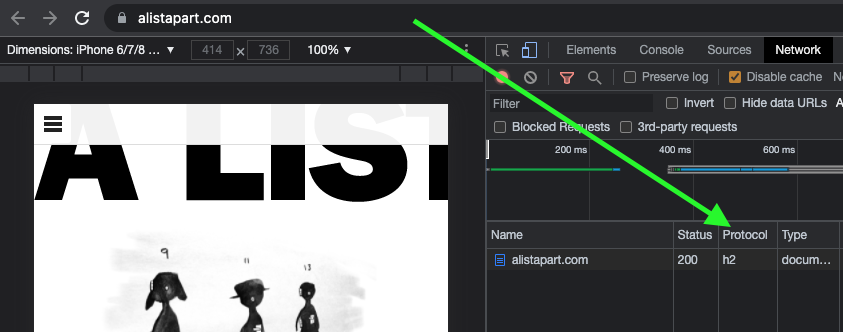
    Which HTTP version are you using?

    To determine which version of HTTP you’re using, go to your website and open your browser’s dev tools. Next, select the Network tab and make sure the Protocol column is visible. If “h2” is listed under Protocol, it means HTTP/2 is being used. 

    Note: to view the Protocol in your browser’s dev tools, go to the Network tab, reload your page, right-click any column header (e.g., Name), and check the Protocol column.

    Also, if your site is still using HTTP/1...WHY?!! What are you waiting for? There is excellent user support for HTTP/2.

    Splitting the CSS

    Separating the CSS into individual files is a worthwhile task. Linking the separate CSS files using the relevant media attribute allows the browser to identify which files are needed immediately (because they’re render-blocking) and which can be deferred. Based on this, it allocates each file an appropriate priority.

    In the following example of a website visited on a mobile breakpoint, we can see the mobile and default CSS are loaded with “Highest” priority, as they are currently needed to render the page. The remaining CSS files (print, tablet, and desktop) are still downloaded in case they’ll be needed later, but with “Lowest” priority. 

    With bundled CSS, the browser will have to download the CSS file and parse it before rendering can start.

    While, as noted, with the CSS separated into different files linked and marked up with the relevant media attribute, the browser can prioritize the files it currently needs. Using closed media query ranges allows the browser to do this at all widths, as opposed to classic mobile-first min-width queries, where the desktop browser would have to download all the CSS with Highest priority. We can’t assume that desktop users always have a fast connection. For instance, in many rural areas, internet connection speeds are still slow. 

    The media queries and number of separate CSS files will vary from project to project based on project requirements, but might look similar to the example below.

    Bundled CSS


    This single file contains all the CSS, including all media queries, and it will be downloaded with Highest priority.

    Separated CSS


    Separating the CSS and specifying a media attribute value on each link tag allows the browser to prioritize what it currently needs. Out of the five files listed above, two will be downloaded with Highest priority: the default file, and the file that matches the current media query. The others will be downloaded with Lowest priority.

    Depending on the project’s deployment strategy, a change to one file (mobile.css, for example) would only require the QA team to regression test on devices in that specific media query range. Compare that to the prospect of deploying the single bundled site.css file, an approach that would normally trigger a full regression test.

    Moving on

    The uptake of mobile-first CSS was a really important milestone in web development; it has helped front-end developers focus on mobile web applications, rather than developing sites on desktop and then attempting to retrofit them to work on other devices.

    I don’t think anyone wants to return to that development model again, but it’s important we don’t lose sight of the issue it highlighted: that things can easily get convoluted and less efficient if we prioritize one particular device—any device—over others. For this reason, focusing on the CSS in its own right, always mindful of what is the default setting and what’s an exception, seems like the natural next step. I’ve started noticing small simplifications in my own CSS, as well as other developers’, and that testing and maintenance work is also a bit more simplified and productive. 

    In general, simplifying CSS rule creation whenever we can is ultimately a cleaner approach than going around in circles of overrides. But whichever methodology you choose, it needs to suit the project. Mobile-first may—or may not—turn out to be the best choice for what’s involved, but first you need to solidly understand the trade-offs you’re stepping into.

  • Personalization Pyramid: A Framework for Designing with User Data

    Personalization Pyramid: A Framework for Designing with User Data

    As a UX professional in today’s data-driven landscape, it’s increasingly likely that you’ve been asked to design a personalized digital experience, whether it’s a public website, user portal, or native application. Yet while there continues to be no shortage of marketing hype around personalization platforms, we still have very few standardized approaches for implementing personalized UX.

    That’s where we come in. After completing dozens of personalization projects over the past few years, we gave ourselves a goal: could you create a holistic personalization framework specifically for UX practitioners? The Personalization Pyramid is a designer-centric model for standing up human-centered personalization programs, spanning data, segmentation, content delivery, and overall goals. By using this approach, you will be able to understand the core components of a contemporary, UX-driven personalization program (or at the very least know enough to get started). 

    Getting Started

    For the sake of this article, we’ll assume you’re already familiar with the basics of digital personalization. A good overview can be found here: Website Personalization Planning. While UX projects in this area can take on many different forms, they often stem from similar starting points.      

    Common scenarios for starting a personalization project:

    • Your organization or client purchased a content management system (CMS) or marketing automation platform (MAP) or related technology that supports personalization
    • The CMO, CDO, or CIO has identified personalization as a goal
    • Customer data is disjointed or ambiguous
    • You are running some isolated targeting campaigns or A/B testing
    • Stakeholders disagree on personalization approach
    • Mandate of customer privacy rules (e.g. GDPR) requires revisiting existing user targeting practices

    Regardless of where you begin, a successful personalization program will require the same core building blocks. We’ve captured these as the “levels” on the pyramid. Whether you are a UX designer, researcher, or strategist, understanding the core components can help make your contribution successful.  

    From top to bottom, the levels include:

    1. North Star: What larger strategic objective is driving the personalization program? 
    2. Goals: What are the specific, measurable outcomes of the program? 
    3. Touchpoints: Where will the personalized experience be served?
    4. Contexts and Campaigns: What personalization content will the user see?
    5. User Segments: What constitutes a unique, usable audience? 
    6. Actionable Data: What reliable and authoritative data is captured by our technical platform to drive personalization?  
    7. Raw Data: What wider set of data is conceivably available (already in our setting) allowing you to personalize?

    We’ll go through each of these levels in turn. To help make this actionable, we created an accompanying deck of cards to illustrate specific examples from each level. We’ve found them helpful in personalization brainstorming sessions, and will include examples for you here.

    Starting at the Top

    The components of the pyramid are as follows:

    North Star

    A north star is what you are aiming for overall with your personalization program (big or small). The North Star defines the (one) overall mission of the personalization program. What do you wish to accomplish? North Stars cast a shadow. The bigger the star, the bigger the shadow. Example of North Starts might include: 

    1. Function: Personalize based on basic user inputs. Examples: “Raw” notifications, basic search results, system user settings and configuration options, general customization, basic optimizations
    2. Feature: Self-contained personalization componentry. Examples: “Cooked” notifications, advanced optimizations (geolocation), basic dynamic messaging, customized modules, automations, recommenders
    3. Experience: Personalized user experiences across multiple interactions and user flows. Examples: Email campaigns, landing pages, advanced messaging (i.e. C2C chat) or conversational interfaces, larger user flows and content-intensive optimizations (localization).
    4. Product: Highly differentiating personalized product experiences. Examples: Standalone, branded experiences with personalization at their core, like the “algotorial” playlists by Spotify such as Discover Weekly.

    Goals

    As in any good UX design, personalization can help accelerate designing with customer intentions. Goals are the tactical and measurable metrics that will prove the overall program is successful. A good place to start is with your current analytics and measurement program and metrics you can benchmark against. In some cases, new goals may be appropriate. The key thing to remember is that personalization itself is not a goal, rather it is a means to an end. Common goals include:

    • Conversion
    • Time on task
    • Net promoter score (NPS)
    • Customer satisfaction 

    Touchpoints

    Touchpoints are where the personalization happens. As a UX designer, this will be one of your largest areas of responsibility. The touchpoints available to you will depend on how your personalization and associated technology capabilities are instrumented, and should be rooted in improving a user’s experience at a particular point in the journey. Touchpoints can be multi-device (mobile, in-store, website) but also more granular (web banner, web pop-up etc.). Here are some examples:

    Channel-level Touchpoints

    • Email: Role
    • Email: Time of open
    • In-store display (JSON endpoint)
    • Native app
    • Search

    Wireframe-level Touchpoints

    • Web overlay
    • Web alert bar
    • Web banner
    • Web content block
    • Web menu

    If you’re designing for web interfaces, for example, you will likely need to include personalized “zones” in your wireframes. The content for these can be presented programmatically in touchpoints based on our next step, contexts and campaigns.

    Contexts and Campaigns

    Once you’ve outlined some touchpoints, you can consider the actual personalized content a user will receive. Many personalization tools will refer to these as “campaigns” (so, for example, a campaign on a web banner for new visitors to the website). These will programmatically be shown at certain touchpoints to certain user segments, as defined by user data. At this stage, we find it helpful to consider two separate models: a context model and a content model. The context helps you consider the level of engagement of the user at the personalization moment, for example a user casually browsing information vs. doing a deep-dive. Think of it in terms of information retrieval behaviors. The content model can then help you determine what type of personalization to serve based on the context (for example, an “Enrich” campaign that shows related articles may be a suitable supplement to extant content).

    Personalization Context Model:

    1. Browse
    2. Skim
    3. Nudge
    4. Feast

    Personalization Content Model:

    1. Alert
    2. Make Easier
    3. Cross-Sell
    4. Enrich

    We’ve written extensively about each of these models elsewhere, so if you’d like to read more you can check out Colin’s Personalization Content Model and Jeff’s Personalization Context Model

    User Segments

    User segments can be created prescriptively or adaptively, based on user research (e.g. via rules and logic tied to set user behaviors or via A/B testing). At a minimum you will likely need to consider how to treat the unknown or first-time visitor, the guest or returning visitor for whom you may have a stateful cookie (or equivalent post-cookie identifier), or the authenticated visitor who is logged in. Here are some examples from the personalization pyramid:

    • Unknown
    • Guest
    • Authenticated
    • Default
    • Referred
    • Role
    • Cohort
    • Unique ID

    Actionable Data

    Every organization with any digital presence has data. It’s a matter of asking what data you can ethically collect on users, its inherent reliability and value, as to how can you use it (sometimes known as “data activation.”) Fortunately, the tide is turning to first-party data: a recent study by Twilio estimates some 80% of businesses are using at least some type of first-party data to personalize the customer experience. 

    First-party data represents multiple advantages on the UX front, including being relatively simple to collect, more likely to be accurate, and less susceptible to the “creep factor” of third-party data. So a key part of your UX strategy should be to determine what the best form of data collection is on your audiences. Here are some examples:

    There is a progression of profiling when it comes to recognizing and making decisioning about different audiences and their signals. It tends to move towards more granular constructs about smaller and smaller cohorts of users as time and confidence and data volume grow.

    While some combination of implicit / explicit data is generally a prerequisite for any implementation (more commonly referred to as first party and third-party data) ML efforts are typically not cost-effective directly out of the box. This is because a strong data backbone and content repository is a prerequisite for optimization. But these approaches should be considered as part of the larger roadmap and may indeed help accelerate the organization’s overall progress. Typically at this point you will partner with key stakeholders and product owners to design a profiling model. The profiling model includes defining approach to configuring profiles, profile keys, profile cards and pattern cards. A multi-faceted approach to profiling which makes it scalable.

    Pulling it Together

    While the cards comprise the starting point to an inventory of sorts (we provide blanks for you to tailor your own), a set of potential levers and motivations for the style of personalization activities you aspire to deliver, they are more valuable when thought of in a grouping. 

    In assembling a card “hand”, one can begin to trace the entire trajectory from leadership focus down through a strategic and tactical execution. It is also at the heart of the way both co-authors have conducted workshops in assembling a program backlog—which is a fine subject for another article.

    In the meantime, what is important to note is that each colored class of card is helpful to survey in understanding the range of choices potentially at your disposal, it is threading through and making concrete decisions about for whom this decisioning will be made: where, when, and how.

    Lay Down Your Cards

    Any sustainable personalization strategy must consider near, mid and long-term goals. Even with the leading CMS platforms like Sitecore and Adobe or the most exciting composable CMS DXP out there, there is simply no “easy button” wherein a personalization program can be stood up and immediately view meaningful results. That said, there is a common grammar to all personalization activities, just like every sentence has nouns and verbs. These cards attempt to map that territory.

  • To Ignite a Personalization Practice, Run this Prepersonalization Workshop

    To Ignite a Personalization Practice, Run this Prepersonalization Workshop

    Picture this. You’ve joined a squad at your company that’s designing new product features with an emphasis on automation or AI. Or your company has just implemented a personalization engine. Either way, you’re designing with data. Now what? When it comes to designing for personalization, there are many cautionary tales, no overnight successes, and few guides for the perplexed. 

    Between the fantasy of getting it right and the fear of it going wrong—like when we encounter “persofails” in the vein of a company repeatedly imploring everyday consumers to buy additional toilet seats—the personalization gap is real. It’s an especially confounding place to be a digital professional without a map, a compass, or a plan.

    For those of you venturing into personalization, there’s no Lonely Planet and few tour guides because effective personalization is so specific to each organization’s talent, technology, and market position. 

    But you can ensure that your team has packed its bags sensibly.

    There’s a DIY formula to increase your chances for success. At minimum, you’ll defuse your boss’s irrational exuberance. Before the party you’ll need to effectively prepare.

    We call it prepersonalization.

    Behind the music

    Consider Spotify’s DJ feature, which debuted this past year.

    We’re used to seeing the polished final result of a personalization feature. Before the year-end award, the making-of backstory, or the behind-the-scenes victory lap, a personalized feature had to be conceived, budgeted, and prioritized. Before any personalization feature goes live in your product or service, it lives amid a backlog of worthy ideas for expressing customer experiences more dynamically.

    So how do you know where to place your personalization bets? How do you design consistent interactions that won’t trip up users or—worse—breed mistrust? We’ve found that for many budgeted programs to justify their ongoing investments, they first needed one or more workshops to convene key stakeholders and internal customers of the technology. Make yours count.

    ​From Big Tech to fledgling startups, we’ve seen the same evolution up close with our clients. In our experiences with working on small and large personalization efforts, a program’s ultimate track record—and its ability to weather tough questions, work steadily toward shared answers, and organize its design and technology efforts—turns on how effectively these prepersonalization activities play out.

    Time and again, we’ve seen effective workshops separate future success stories from unsuccessful efforts, saving countless time, resources, and collective well-being in the process.

    A personalization practice involves a multiyear effort of testing and feature development. It’s not a switch-flip moment in your tech stack. It’s best managed as a backlog that often evolves through three steps: 

    1. customer experience optimization (CXO, also known as A/B testing or experimentation)
    2. always-on automations (whether rules-based or machine-generated)
    3. mature features or standalone product development (such as Spotify’s DJ experience)

    This is why we created our progressive personalization framework and why we’re field-testing an accompanying deck of cards: we believe that there’s a base grammar, a set of “nouns and verbs” that your organization can use to design experiences that are customized, personalized, or automated. You won’t need these cards. But we strongly recommend that you create something similar, whether that might be digital or physical.

    Set your kitchen timer

    How long does it take to cook up a prepersonalization workshop? The surrounding assessment activities that we recommend including can (and often do) span weeks. For the core workshop, we recommend aiming for two to three days. Here’s a summary of our broader approach along with details on the essential first-day activities.

    The full arc of the wider workshop is threefold:

    1. Kickstart: This sets the terms of engagement as you focus on the opportunity as well as the readiness and drive of your team and your leadership. .
    2. Plan your work: This is the heart of the card-based workshop activities where you specify a plan of attack and the scope of work.
    3. Work your plan: This phase is all about creating a competitive environment for team participants to individually pitch their own pilots that each contain a proof-of-concept project, its business case, and its operating model.

    Give yourself at least a day, split into two large time blocks, to power through a concentrated version of those first two phases.

    Kickstart: Whet your appetite

    We call the first lesson the “landscape of connected experience.” It explores the personalization possibilities in your organization. A connected experience, in our parlance, is any UX requiring the orchestration of multiple systems of record on the backend. This could be a content-management system combined with a marketing-automation platform. It could be a digital-asset manager combined with a customer-data platform.

    Spark conversation by naming consumer examples and business-to-business examples of connected experience interactions that you admire, find familiar, or even dislike. This should cover a representative range of personalization patterns, including automated app-based interactions (such as onboarding sequences or wizards), notifications, and recommenders. We have a catalog of these in the cards. Here’s a list of 142 different interactions to jog your thinking.

    This is all about setting the table. What are the possible paths for the practice in your organization? If you want a broader view, here’s a long-form primer and a strategic framework.

    Assess each example that you discuss for its complexity and the level of effort that you estimate that it would take for your team to deliver that feature (or something similar). In our cards, we divide connected experiences into five levels: functions, features, experiences, complete products, and portfolios. Size your own build here. This will help to focus the conversation on the merits of ongoing investment as well as the gap between what you deliver today and what you want to deliver in the future.

    Next, have your team plot each idea on the following 2×2 grid, which lays out the four enduring arguments for a personalized experience. This is critical because it emphasizes how personalization can not only help your external customers but also affect your own ways of working. It’s also a reminder (which is why we used the word argument earlier) of the broader effort beyond these tactical interventions.

    Each team member should vote on where they see your product or service putting its emphasis. Naturally, you can’t prioritize all of them. The intention here is to flesh out how different departments may view their own upsides to the effort, which can vary from one to the next. Documenting your desired outcomes lets you know how the team internally aligns across representatives from different departments or functional areas.

    The third and final kickstart activity is about naming your personalization gap. Is your customer journey well documented? Will data and privacy compliance be too big of a challenge? Do you have content metadata needs that you have to address? (We’re pretty sure that you do: it’s just a matter of recognizing the relative size of that need and its remedy.) In our cards, we’ve noted a number of program risks, including common team dispositions. Our Detractor card, for example, lists six stakeholder behaviors that hinder progress.

    Effectively collaborating and managing expectations is critical to your success. Consider the potential barriers to your future progress. Press the participants to name specific steps to overcome or mitigate those barriers in your organization. As studies have shown, personalization efforts face many common barriers.

    At this point, you’ve hopefully discussed sample interactions, emphasized a key area of benefit, and flagged key gaps? Good—you’re ready to continue.

    Hit that test kitchen

    Next, let’s look at what you’ll need to bring your personalization recipes to life. Personalization engines, which are robust software suites for automating and expressing dynamic content, can intimidate new customers. Their capabilities are sweeping and powerful, and they present broad options for how your organization can conduct its activities. This presents the question: Where do you begin when you’re configuring a connected experience?

    What’s important here is to avoid treating the installed software like it were a dream kitchen from some fantasy remodeling project (as one of our client executives memorably put it). These software engines are more like test kitchens where your team can begin devising, tasting, and refining the snacks and meals that will become a part of your personalization program’s regularly evolving menu.

    The ultimate menu of the prioritized backlog will come together over the course of the workshop. And creating “dishes” is the way that you’ll have individual team stakeholders construct personalized interactions that serve their needs or the needs of others.

    The dishes will come from recipes, and those recipes have set ingredients.

    Verify your ingredients

    Like a good product manager, you’ll make sure—andyou’ll validate with the right stakeholders present—that you have all the ingredients on hand to cook up your desired interaction (or that you can work out what needs to be added to your pantry). These ingredients include the audience that you’re targeting, content and design elements, the context for the interaction, and your measure for how it’ll come together. 

    This isn’t just about discovering requirements. Documenting your personalizations as a series of if-then statements lets the team: 

    1. compare findings toward a unified approach for developing features, not unlike when artists paint with the same palette; 
    2. specify a consistent set of interactions that users find uniform or familiar; 
    3. and develop parity across performance measurements and key performance indicators too. 

    This helps you streamline your designs and your technical efforts while you deliver a shared palette of core motifs of your personalized or automated experience.

    Compose your recipe

    What ingredients are important to you? Think of a who-what-when-why construct

    • Who are your key audience segments or groups?
    • What kind of content will you give them, in what design elements, and under what circumstances?
    • And for which business and user benefits?

    We first developed these cards and card categories five years ago. We regularly play-test their fit with conference audiences and clients. And we still encounter new possibilities. But they all follow an underlying who-what-when-why logic.

    Here are three examples for a subscription-based reading app, which you can generally follow along with right to left in the cards in the accompanying photo below. 

    1. Nurture personalization: When a guest or an unknown visitor interacts with  a product title, a banner or alert bar appears that makes it easier for them to encounter a related title they may want to read, saving them time.
    2. Welcome automation: When there’s a newly registered user, an email is generated to call out the breadth of the content catalog and to make them a happier subscriber.
    3. Winback automation: Before their subscription lapses or after a recent failed renewal, a user is sent an email that gives them a promotional offer to suggest that they reconsider renewing or to remind them to renew.

    A useful preworkshop activity may be to think through a first draft of what these cards might be for your organization, although we’ve also found that this process sometimes flows best through cocreating the recipes themselves. Start with a set of blank cards, and begin labeling and grouping them through the design process, eventually distilling them to a refined subset of highly useful candidate cards.

    You can think of the later stages of the workshop as moving from recipes toward a cookbook in focus—like a more nuanced customer-journey mapping. Individual “cooks” will pitch their recipes to the team, using a common jobs-to-be-done format so that measurability and results are baked in, and from there, the resulting collection will be prioritized for finished design and delivery to production.

    Better kitchens require better architecture

    Simplifying a customer experience is a complicated effort for those who are inside delivering it. Beware anyone who says otherwise. With that being said,  “Complicated problems can be hard to solve, but they are addressable with rules and recipes.”

    When personalization becomes a laugh line, it’s because a team is overfitting: they aren’t designing with their best data. Like a sparse pantry, every organization has metadata debt to go along with its technical debt, and this creates a drag on personalization effectiveness. Your AI’s output quality, for example, is indeed limited by your IA. Spotify’s poster-child prowess today was unfathomable before they acquired a seemingly modest metadata startup that now powers its underlying information architecture.

    You can definitely stand the heat…

    Personalization technology opens a doorway into a confounding ocean of possible designs. Only a disciplined and highly collaborative approach will bring about the necessary focus and intention to succeed. So banish the dream kitchen. Instead, hit the test kitchen to save time, preserve job satisfaction and security, and safely dispense with the fanciful ideas that originate upstairs of the doers in your organization. There are meals to serve and mouths to feed.

    This workshop framework gives you a fighting shot at lasting success as well as sound beginnings. Wiring up your information layer isn’t an overnight affair. But if you use the same cookbook and shared recipes, you’ll have solid footing for success. We designed these activities to make your organization’s needs concrete and clear, long before the hazards pile up.

    While there are associated costs toward investing in this kind of technology and product design, your ability to size up and confront your unique situation and your digital capabilities is time well spent. Don’t squander it. The proof, as they say, is in the pudding.

  • The Wax and the Wane of the Web

    The Wax and the Wane of the Web

    I offer a single bit of advice to friends and family when they become new parents: When you start to think that you’ve got everything figured out, everything will change. Just as you start to get the hang of feedings, diapers, and regular naps, it’s time for solid food, potty training, and overnight sleeping. When you figure those out, it’s time for preschool and rare naps. The cycle goes on and on.

    The same applies for those of us working in design and development these days. Having worked on the web for almost three decades at this point, I’ve seen the regular wax and wane of ideas, techniques, and technologies. Each time that we as developers and designers get into a regular rhythm, some new idea or technology comes along to shake things up and remake our world.

    How we got here

    I built my first website in the mid-’90s. Design and development on the web back then was a free-for-all, with few established norms. For any layout aside from a single column, we used table elements, often with empty cells containing a single pixel spacer GIF to add empty space. We styled text with numerous font tags, nesting the tags every time we wanted to vary the font style. And we had only three or four typefaces to choose from: Arial, Courier, or Times New Roman. When Verdana and Georgia came out in 1996, we rejoiced because our options had nearly doubled. The only safe colors to choose from were the 216 “web safe” colors known to work across platforms. The few interactive elements (like contact forms, guest books, and counters) were mostly powered by CGI scripts (predominantly written in Perl at the time). Achieving any kind of unique look involved a pile of hacks all the way down. Interaction was often limited to specific pages in a site.

    The birth of web standards

    At the turn of the century, a new cycle started. Crufty code littered with table layouts and font tags waned, and a push for web standards waxed. Newer technologies like CSS got more widespread adoption by browsers makers, developers, and designers. This shift toward standards didn’t happen accidentally or overnight. It took active engagement between the W3C and browser vendors and heavy evangelism from folks like the Web Standards Project to build standards. A List Apart and books like Designing with Web Standards by Jeffrey Zeldman played key roles in teaching developers and designers why standards are important, how to implement them, and how to sell them to their organizations. And approaches like progressive enhancement introduced the idea that content should be available for all browsers—with additional enhancements available for more advanced browsers. Meanwhile, sites like the CSS Zen Garden showcased just how powerful and versatile CSS can be when combined with a solid semantic HTML structure.

    Server-side languages like PHP, Java, and .NET overtook Perl as the predominant back-end processors, and the cgi-bin was tossed in the trash bin. With these better server-side tools came the first era of web applications, starting with content-management systems (particularly in the blogging space with tools like Blogger, Grey Matter, Movable Type, and WordPress). In the mid-2000s, AJAX opened doors for asynchronous interaction between the front end and back end. Suddenly, pages could update their content without needing to reload. A crop of JavaScript frameworks like Prototype, YUI, and jQuery arose to help developers build more reliable client-side interaction across browsers that had wildly varying levels of standards support. Techniques like image replacement let crafty designers and developers display fonts of their choosing. And technologies like Flash made it possible to add animations, games, and even more interactivity.

    These new technologies, standards, and techniques reinvigorated the industry in many ways. Web design flourished as designers and developers explored more diverse styles and layouts. But we still relied on tons of hacks. Early CSS was a huge improvement over table-based layouts when it came to basic layout and text styling, but its limitations at the time meant that designers and developers still relied heavily on images for complex shapes (such as rounded or angled corners) and tiled backgrounds for the appearance of full-length columns (among other hacks). Complicated layouts required all manner of nested floats or absolute positioning (or both). Flash and image replacement for custom fonts was a great start toward varying the typefaces from the big five, but both hacks introduced accessibility and performance problems. And JavaScript libraries made it easy for anyone to add a dash of interaction to pages, although at the cost of doubling or even quadrupling the download size of simple websites.

    The web as software platform

    The symbiosis between the front end and back end continued to improve, and that led to the current era of modern web applications. Between expanded server-side programming languages (which kept growing to include Ruby, Python, Go, and others) and newer front-end tools like React, Vue, and Angular, we could build fully capable software on the web. Alongside these tools came others, including collaborative version control, build automation, and shared package libraries. What was once primarily an environment for linked documents became a realm of infinite possibilities.

    At the same time, mobile devices became more capable, and they gave us internet access in our pockets. Mobile apps and responsive design opened up opportunities for new interactions anywhere and any time.

    This combination of capable mobile devices and powerful development tools contributed to the waxing of social media and other centralized tools for people to connect and consume. As it became easier and more common to connect with others directly on Twitter, Facebook, and even Slack, the desire for hosted personal sites waned. Social media offered connections on a global scale, with both the good and bad that that entails.

    Want a much more extensive history of how we got here, with some other takes on ways that we can improve? Jeremy Keith wrote “Of Time and the Web.” Or check out the “Web Design History Timeline” at the Web Design Museum. Neal Agarwal also has a fun tour through “Internet Artifacts.”

    Where we are now

    In the last couple of years, it’s felt like we’ve begun to reach another major inflection point. As social-media platforms fracture and wane, there’s been a growing interest in owning our own content again. There are many different ways to make a website, from the tried-and-true classic of hosting plain HTML files to static site generators to content management systems of all flavors. The fracturing of social media also comes with a cost: we lose crucial infrastructure for discovery and connection. Webmentions, RSS, ActivityPub, and other tools of the IndieWeb can help with this, but they’re still relatively underimplemented and hard to use for the less nerdy. We can build amazing personal websites and add to them regularly, but without discovery and connection, it can sometimes feel like we may as well be shouting into the void.

    Browser support for CSS, JavaScript, and other standards like web components has accelerated, especially through efforts like Interop. New technologies gain support across the board in a fraction of the time that they used to. I often learn about a new feature and check its browser support only to find that its coverage is already above 80 percent. Nowadays, the barrier to using newer techniques often isn’t browser support but simply the limits of how quickly designers and developers can learn what’s available and how to adopt it.

    Today, with a few commands and a couple of lines of code, we can prototype almost any idea. All the tools that we now have available make it easier than ever to start something new. But the upfront cost that these frameworks may save in initial delivery eventually comes due as upgrading and maintaining them becomes a part of our technical debt.

    If we rely on third-party frameworks, adopting new standards can sometimes take longer since we may have to wait for those frameworks to adopt those standards. These frameworks—which used to let us adopt new techniques sooner—have now become hindrances instead. These same frameworks often come with performance costs too, forcing users to wait for scripts to load before they can read or interact with pages. And when scripts fail (whether through poor code, network issues, or other environmental factors), there’s often no alternative, leaving users with blank or broken pages.

    Where do we go from here?

    Today’s hacks help to shape tomorrow’s standards. And there’s nothing inherently wrong with embracing hacks—for now—to move the present forward. Problems only arise when we’re unwilling to admit that they’re hacks or we hesitate to replace them. So what can we do to create the future we want for the web?

    Build for the long haul. Optimize for performance, for accessibility, and for the user. Weigh the costs of those developer-friendly tools. They may make your job a little easier today, but how do they affect everything else? What’s the cost to users? To future developers? To standards adoption? Sometimes the convenience may be worth it. Sometimes it’s just a hack that you’ve grown accustomed to. And sometimes it’s holding you back from even better options.

    Start from standards. Standards continue to evolve over time, but browsers have done a remarkably good job of continuing to support older standards. The same isn’t always true of third-party frameworks. Sites built with even the hackiest of HTML from the ’90s still work just fine today. The same can’t always be said of sites built with frameworks even after just a couple years.

    Design with care. Whether your craft is code, pixels, or processes, consider the impacts of each decision. The convenience of many a modern tool comes at the cost of not always understanding the underlying decisions that have led to its design and not always considering the impact that those decisions can have. Rather than rushing headlong to “move fast and break things,” use the time saved by modern tools to consider more carefully and design with deliberation.

    Always be learning. If you’re always learning, you’re also growing. Sometimes it may be hard to pinpoint what’s worth learning and what’s just today’s hack. You might end up focusing on something that won’t matter next year, even if you were to focus solely on learning standards. (Remember XHTML?) But constant learning opens up new connections in your brain, and the hacks that you learn one day may help to inform different experiments another day.

    Play, experiment, and be weird! This web that we’ve built is the ultimate experiment. It’s the single largest human endeavor in history, and yet each of us can create our own pocket within it. Be courageous and try new things. Build a playground for ideas. Make goofy experiments in your own mad science lab. Start your own small business. There has never been a more empowering place to be creative, take risks, and explore what we’re capable of.

    Share and amplify. As you experiment, play, and learn, share what’s worked for you. Write on your own website, post on whichever social media site you prefer, or shout it from a TikTok. Write something for A List Apart! But take the time to amplify others too: find new voices, learn from them, and share what they’ve taught you.

    Go forth and make

    As designers and developers for the web (and beyond), we’re responsible for building the future every day, whether that may take the shape of personal websites, social media tools used by billions, or anything in between. Let’s imbue our values into the things that we create, and let’s make the web a better place for everyone. Create that thing that only you are uniquely qualified to make. Then share it, make it better, make it again, or make something new. Learn. Make. Share. Grow. Rinse and repeat. Every time you think that you’ve mastered the web, everything will change.

  • Opportunities for AI in Accessibility

    Opportunities for AI in Accessibility

    In reading Joe Dolson’s recent piece on the intersection of AI and accessibility, I absolutely appreciated the skepticism that he has for AI in general as well as for the ways that many have been using it. In fact, I’m very skeptical of AI myself, despite my role at Microsoft as an accessibility innovation strategist who helps run the AI for Accessibility grant program. As with any tool, AI can be used in very constructive, inclusive, and accessible ways; and it can also be used in destructive, exclusive, and harmful ones. And there are a ton of uses somewhere in the mediocre middle as well.

    I’d like you to consider this a “yes… and” piece to complement Joe’s post. I’m not trying to refute any of what he’s saying but rather provide some visibility to projects and opportunities where AI can make meaningful differences for people with disabilities. To be clear, I’m not saying that there aren’t real risks or pressing issues with AI that need to be addressed—there are, and we’ve needed to address them, like, yesterday—but I want to take a little time to talk about what’s possible in hopes that we’ll get there one day.

    Alternative text

    Joe’s piece spends a lot of time talking about computer-vision models generating alternative text. He highlights a ton of valid issues with the current state of things. And while computer-vision models continue to improve in the quality and richness of detail in their descriptions, their results aren’t great. As he rightly points out, the current state of image analysis is pretty poor—especially for certain image types—in large part because current AI systems examine images in isolation rather than within the contexts that they’re in (which is a consequence of having separate “foundation” models for text analysis and image analysis). Today’s models aren’t trained to distinguish between images that are contextually relevant (that should probably have descriptions) and those that are purely decorative (which might not need a description) either. Still, I still think there’s potential in this space.

    As Joe mentions, human-in-the-loop authoring of alt text should absolutely be a thing. And if AI can pop in to offer a starting point for alt text—even if that starting point might be a prompt saying What is this BS? That’s not right at all… Let me try to offer a starting point—I think that’s a win.

    Taking things a step further, if we can specifically train a model to analyze image usage in context, it could help us more quickly identify which images are likely to be decorative and which ones likely require a description. That will help reinforce which contexts call for image descriptions and it’ll improve authors’ efficiency toward making their pages more accessible.

    While complex images—like graphs and charts—are challenging to describe in any sort of succinct way (even for humans), the image example shared in the GPT4 announcement points to an interesting opportunity as well. Let’s suppose that you came across a chart whose description was simply the title of the chart and the kind of visualization it was, such as: Pie chart comparing smartphone usage to feature phone usage among US households making under $30,000 a year. (That would be a pretty awful alt text for a chart since that would tend to leave many questions about the data unanswered, but then again, let’s suppose that that was the description that was in place.) If your browser knew that that image was a pie chart (because an onboard model concluded this), imagine a world where users could ask questions like these about the graphic:

    • Do more people use smartphones or feature phones?
    • How many more?
    • Is there a group of people that don’t fall into either of these buckets?
    • How many is that?

    Setting aside the realities of large language model (LLM) hallucinations—where a model just makes up plausible-sounding “facts”—for a moment, the opportunity to learn more about images and data in this way could be revolutionary for blind and low-vision folks as well as for people with various forms of color blindness, cognitive disabilities, and so on. It could also be useful in educational contexts to help people who can see these charts, as is, to understand the data in the charts.

    Taking things a step further: What if you could ask your browser to simplify a complex chart? What if you could ask it to isolate a single line on a line graph? What if you could ask your browser to transpose the colors of the different lines to work better for form of color blindness you have? What if you could ask it to swap colors for patterns? Given these tools’ chat-based interfaces and our existing ability to manipulate images in today’s AI tools, that seems like a possibility.

    Now imagine a purpose-built model that could extract the information from that chart and convert it to another format. For example, perhaps it could turn that pie chart (or better yet, a series of pie charts) into more accessible (and useful) formats, like spreadsheets. That would be amazing!

    Matching algorithms

    Safiya Umoja Noble absolutely hit the nail on the head when she titled her book Algorithms of Oppression. While her book was focused on the ways that search engines reinforce racism, I think that it’s equally true that all computer models have the potential to amplify conflict, bias, and intolerance. Whether it’s Twitter always showing you the latest tweet from a bored billionaire, YouTube sending us into a Q-hole, or Instagram warping our ideas of what natural bodies look like, we know that poorly authored and maintained algorithms are incredibly harmful. A lot of this stems from a lack of diversity among the people who shape and build them. When these platforms are built with inclusively baked in, however, there’s real potential for algorithm development to help people with disabilities.

    Take Mentra, for example. They are an employment network for neurodivergent people. They use an algorithm to match job seekers with potential employers based on over 75 data points. On the job-seeker side of things, it considers each candidate’s strengths, their necessary and preferred workplace accommodations, environmental sensitivities, and so on. On the employer side, it considers each work environment, communication factors related to each job, and the like. As a company run by neurodivergent folks, Mentra made the decision to flip the script when it came to typical employment sites. They use their algorithm to propose available candidates to companies, who can then connect with job seekers that they are interested in; reducing the emotional and physical labor on the job-seeker side of things.

    When more people with disabilities are involved in the creation of algorithms, that can reduce the chances that these algorithms will inflict harm on their communities. That’s why diverse teams are so important.

    Imagine that a social media company’s recommendation engine was tuned to analyze who you’re following and if it was tuned to prioritize follow recommendations for people who talked about similar things but who were different in some key ways from your existing sphere of influence. For example, if you were to follow a bunch of nondisabled white male academics who talk about AI, it could suggest that you follow academics who are disabled or aren’t white or aren’t male who also talk about AI. If you took its recommendations, perhaps you’d get a more holistic and nuanced understanding of what’s happening in the AI field. These same systems should also use their understanding of biases about particular communities—including, for instance, the disability community—to make sure that they aren’t recommending any of their users follow accounts that perpetuate biases against (or, worse, spewing hate toward) those groups.

    Other ways that AI can helps people with disabilities

    If I weren’t trying to put this together between other tasks, I’m sure that I could go on and on, providing all kinds of examples of how AI could be used to help people with disabilities, but I’m going to make this last section into a bit of a lightning round. In no particular order:

    • Voice preservation. You may have seen the VALL-E paper or Apple’s Global Accessibility Awareness Day announcement or you may be familiar with the voice-preservation offerings from Microsoft, Acapela, or others. It’s possible to train an AI model to replicate your voice, which can be a tremendous boon for people who have ALS (Lou Gehrig’s disease) or motor-neuron disease or other medical conditions that can lead to an inability to talk. This is, of course, the same tech that can also be used to create audio deepfakes, so it’s something that we need to approach responsibly, but the tech has truly transformative potential.
    • Voice recognition. Researchers like those in the Speech Accessibility Project are paying people with disabilities for their help in collecting recordings of people with atypical speech. As I type, they are actively recruiting people with Parkinson’s and related conditions, and they have plans to expand this to other conditions as the project progresses. This research will result in more inclusive data sets that will let more people with disabilities use voice assistants, dictation software, and voice-response services as well as control their computers and other devices more easily, using only their voice.
    • Text transformation. The current generation of LLMs is quite capable of adjusting existing text content without injecting hallucinations. This is hugely empowering for people with cognitive disabilities who may benefit from text summaries or simplified versions of text or even text that’s prepped for Bionic Reading.

    The importance of diverse teams and data

    We need to recognize that our differences matter. Our lived experiences are influenced by the intersections of the identities that we exist in. These lived experiences—with all their complexities (and joys and pain)—are valuable inputs to the software, services, and societies that we shape. Our differences need to be represented in the data that we use to train new models, and the folks who contribute that valuable information need to be compensated for sharing it with us. Inclusive data sets yield more robust models that foster more equitable outcomes.

    Want a model that doesn’t demean or patronize or objectify people with disabilities? Make sure that you have content about disabilities that’s authored by people with a range of disabilities, and make sure that that’s well represented in the training data.

    Want a model that doesn’t use ableist language? You may be able to use existing data sets to build a filter that can intercept and remediate ableist language before it reaches readers. That being said, when it comes to sensitivity reading, AI models won’t be replacing human copy editors anytime soon. 

    Want a coding copilot that gives you accessible recommendations from the jump? Train it on code that you know to be accessible.


    I have no doubt that AI can and will harm people… today, tomorrow, and well into the future. But I also believe that we can acknowledge that and, with an eye towards accessibility (and, more broadly, inclusion), make thoughtful, considerate, and intentional changes in our approaches to AI that will reduce harm over time as well. Today, tomorrow, and well into the future.


    Many thanks to Kartik Sawhney for helping me with the development of this piece, Ashley Bischoff for her invaluable editorial assistance, and, of course, Joe Dolson for the prompt.

  • I am a creative.

    I am a creative.

    I am a creative. What I do is alchemy. It is a mystery. I do not so much do it, as let it be done through me.

    I am a creative. Not all creative people like this label. Not all see themselves this way. Some creative people see science in what they do. That is their truth, and I respect it. Maybe I even envy them, a little. But my process is different—my being is different.

    Apologizing and qualifying in advance is a distraction. That’s what my brain does to sabotage me. I set it aside for now. I can come back later to apologize and qualify. After I’ve said what I came to say. Which is hard enough. 

    Except when it is easy and flows like a river of wine.

    Sometimes it does come that way. Sometimes what I need to create comes in an instant. I have learned not to say it at that moment, because if you admit that sometimes the idea just comes and it is the best idea and you know it is the best idea, they think you don’t work hard enough.

    Sometimes I work and work and work until the idea comes. Sometimes it comes instantly and I don’t tell anyone for three days. Sometimes I’m so excited by the idea that came instantly that I blurt it out, can’t help myself. Like a boy who found a prize in his Cracker Jacks. Sometimes I get away with this. Sometimes other people agree: yes, that is the best idea. Most times they don’t and I regret having  given way to enthusiasm. 

    Enthusiasm is best saved for the meeting where it will make a difference. Not the casual get-together that precedes that meeting by two other meetings. Nobody knows why we have all these meetings. We keep saying we’re doing away with them, but then just finding other ways to have them. Sometimes they are even good. But other times they are a distraction from the actual work. The proportion between when meetings are useful, and when they are a pitiful distraction, varies, depending on what you do and where you do it. And who you are and how you do it. Again I digress. I am a creative. That is the theme.

    Sometimes many hours of hard and patient work produce something that is barely serviceable. Sometimes I have to accept that and move on to the next project.

    Don’t ask about process. I am a creative.

    I am a creative. I don’t control my dreams. And I don’t control my best ideas.

    I can hammer away, surround myself with facts or images, and sometimes that works. I can go for a walk, and sometimes that works. I can be making dinner and there’s a Eureka having nothing to do with sizzling oil and bubbling pots. Often I know what to do the instant I wake up. And then, almost as often, as I become conscious and part of the world again, the idea that would have saved me turns to vanishing dust in a mindless wind of oblivion. For creativity, I believe, comes from that other world. The one we enter in dreams, and perhaps, before birth and after death. But that’s for poets to wonder, and I am not a poet. I am a creative. And it’s for theologians to mass armies about in their creative world that they insist is real. But that is another digression. And a depressing one. Maybe on a much more important topic than whether I am a creative or not. But still a digression from what I came here to say.

    Sometimes the process is avoidance. And agony. You know the cliché about the tortured artist? It’s true, even when the artist (and let’s put that noun in quotes) is trying to write a soft drink jingle, a callback in a tired sitcom, a budget request.

    Some people who hate being called creative may be closeted creatives, but that’s between them and their gods. No offense meant. Your truth is true, too. But mine is for me. 

    Creatives recognize creatives.

    Creatives recognize creatives like queers recognize queers, like real rappers recognize real rappers, like cons know cons. Creatives feel massive respect for creatives. We love, honor, emulate, and practically deify the great ones. To deify any human is, of course, a tragic mistake. We have been warned. We know better. We know people are just people. They squabble, they are lonely, they regret their most important decisions, they are poor and hungry, they can be cruel, they can be just as stupid as we can, because, like us, they are clay. But. But. But they make this amazing thing. They birth something that did not exist before them, and could not exist without them. They are the mothers of ideas. And I suppose, since it’s just lying there, I have to add that they are the mothers of invention. Ba dum bum! OK, that’s done. Continue.

    Creatives belittle our own small achievements, because we compare them to those of the great ones. Beautiful animation! Well, I’m no Miyazaki. Now THAT is greatness. That is greatness straight from the mind of God. This half-starved little thing that I made? It more or less fell off the back of the turnip truck. And the turnips weren’t even fresh.

    Creatives knows that, at best, they are Salieri. Even the creatives who are Mozart believe that. 

    I am a creative. I haven’t worked in advertising in 30 years, but in my nightmares, it’s my former creative directors who judge me. And they are right to do so. I am too lazy, too facile, and when it really counts, my mind goes blank. There is no pill for creative dysfunction.

    I am a creative. Every deadline I make is an adventure that makes Indiana Jones look like a pensioner snoring in a deck chair. The longer I remain a creative, the faster I am when I do my work and the longer I brood and walk in circles and stare blankly before I do that work. 

    I am still 10 times faster than people who are not creative, or people who have only been creative a short while, or people who have only been professionally creative a short while. It’s just that, before I work 10 times as fast as they do, I spend twice as long as they do putting the work off. I am that confident in my ability to do a great job when I put my mind to it. I am that addicted to the adrenaline rush of postponement. I am still that afraid of the jump.

    I am not an artist.

    I am a creative. Not an artist. Though I dreamed, as a lad, of someday being that. Some of us belittle our gifts and dislike ourselves because we are not Michelangelos and Warhols. That is narcissism—but at least we aren’t in politics.

    I am a creative. Though I believe in reason and science, I decide by intuition and impulse. And live with what follows—the catastrophes as well as the triumphs. 

    I am a creative. Every word I’ve said here will annoy other creatives, who see things differently. Ask two creatives a question, get three opinions. Our disagreement, our passion about it, and our commitment to our own truth are, at least to me, the proofs that we are creatives, no matter how we may feel about it.

    I am a creative. I lament my lack of taste in the areas about which I know very little, which is to say almost all areas of human knowledge. And I trust my taste above all other things in the areas closest to my heart, or perhaps, more accurately, to my obsessions. Without my obsessions, I would probably have to spend my time looking life in the eye, and almost none of us can do that for long. Not honestly. Not really. Because much in life, if you really look at it, is unbearable.

    I am a creative. I believe, as a parent believes, that when I am gone, some small good part of me will carry on in the mind of at least one other person.

    Working saves me from worrying about work.

    I am a creative. I live in dread of my small gift suddenly going away.

    I am a creative. I am too busy making the next thing to spend too much time deeply considering that almost nothing I make will come anywhere near the greatness I comically aspire to.

    I am a creative. I believe in the ultimate mystery of process. I believe in it so much, I am even fool enough to publish an essay I dictated into a tiny machine and didn’t take time to review or revise. I won’t do this often, I promise. But I did it just now, because, as afraid as I might be of your seeing through my pitiful gestures toward the beautiful, I was even more afraid of forgetting what I came to say. 

    There. I think I’ve said it.