Category: Blog

Your blog category

  • How to Sell UX Research with Two Simple Questions

    How to Sell UX Research with Two Simple Questions

    Do you find yourself designing screens with only a vague idea of how the things on the screen relate to the things elsewhere in the system? Do you leave stakeholder meetings with unclear directives that often seem to contradict previous conversations? You know a better understanding of user needs would help the team get clear on what you are actually trying to accomplish, but time and budget for research is tight. When it comes to asking for more direct contact with your users, you might feel like poor Oliver Twist, timidly asking, “Please, sir, I want some more.” 

    Here’s the trick. You need to get stakeholders themselves to identify high-risk assumptions and hidden complexity, so that they become just as motivated as you to get answers from users. Basically, you need to make them think it’s their idea. 

    In this article, I’ll show you how to collaboratively expose misalignment and gaps in the team’s shared understanding by bringing the team together around two simple questions:

    1. What are the objects?
    2. What are the relationships between those objects?

    A gauntlet between research and screen design

    These two questions align to the first two steps of the ORCA process, which might become your new best friend when it comes to reducing guesswork. Wait, what’s ORCA?! Glad you asked.

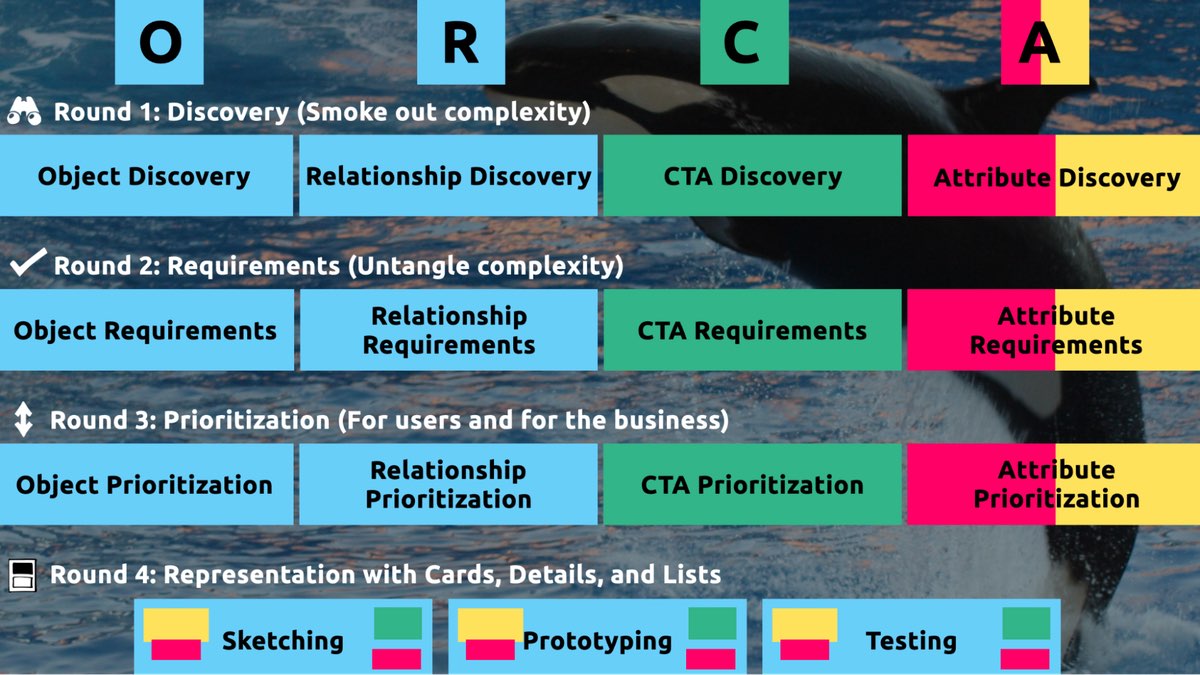
    ORCA stands for Objects, Relationships, CTAs, and Attributes, and it outlines a process for creating solid object-oriented user experiences. Object-oriented UX is my design philosophy. ORCA is an iterative methodology for synthesizing user research into an elegant structural foundation to support screen and interaction design. OOUX and ORCA have made my work as a UX designer more collaborative, effective, efficient, fun, strategic, and meaningful.

    The ORCA process has four iterative rounds and a whopping fifteen steps. In each round we get more clarity on our Os, Rs, Cs, and As.

    I sometimes say that ORCA is a “garbage in, garbage out” process. To ensure that the testable prototype produced in the final round actually tests well, the process needs to be fed by good research. But if you don’t have a ton of research, the beginning of the ORCA process serves another purpose: it helps you sell the need for research.

    In other words, the ORCA process serves as a gauntlet between research and design. With good research, you can gracefully ride the killer whale from research into design. But without good research, the process effectively spits you back into research and with a cache of specific open questions.

    Getting in the same curiosity-boat

    What gets us into trouble is not what we don’t know. It’s what we know for sure that just ain’t so.

    Mark Twain

    The first two steps of the ORCA process—Object Discovery and Relationship Discovery—shine a spotlight on the dark, dusty corners of your team’s misalignments and any inherent complexity that’s been swept under the rug. It begins to expose what this classic comic so beautifully illustrates:

    This is one reason why so many UX designers are frustrated in their job and why many projects fail. And this is also why we often can’t sell research: every decision-maker is confident in their own mental picture. 

    Once we expose hidden fuzzy patches in each picture and the differences between them all, the case for user research makes itself.

    But how we do this is important. However much we might want to, we can’t just tell everyone, “YOU ARE WRONG!” Instead, we need to facilitate and guide our team members to self-identify holes in their picture. When stakeholders take ownership of assumptions and gaps in understanding, BAM! Suddenly, UX research is not such a hard sell, and everyone is aboard the same curiosity-boat.

    Say your users are doctors. And you have no idea how doctors use the system you are tasked with redesigning.

    You might try to sell research by honestly saying: “We need to understand doctors better! What are their pain points? How do they use the current app?” But here’s the problem with that. Those questions are vague, and the answers to them don’t feel acutely actionable.

    Instead, you want your stakeholders themselves to ask super-specific questions. This is more like the kind of conversation you need to facilitate. Let’s listen in:

    “Wait a sec, how often do doctors share patients? Does a patient in this system have primary and secondary doctors?”

    “Can a patient even have more than one primary doctor?”

    “Is it a ‘primary doctor’ or just a ‘primary caregiver’… Can’t that role be a nurse practitioner?”

    “No, caregivers are something else… That’s the patient’s family contacts, right?”

    “So are caregivers in scope for this redesign?”

    “Yeah, because if a caregiver is present at an appointment, the doctor needs to note that. Like, tag the caregiver on the note… Or on the appointment?”

    Now we are getting somewhere. Do you see how powerful it can be getting stakeholders to debate these questions themselves? The diabolical goal here is to shake their confidence—gently and diplomatically.

    When these kinds of questions bubble up collaboratively and come directly from the mouths of your stakeholders and decision-makers, suddenly, designing screens without knowing the answers to these questions seems incredibly risky, even silly.

    If we create software without understanding the real-world information environment of our users, we will likely create software that does not align to the real-world information environment of our users. And this will, hands down, result in a more confusing, more complex, and less intuitive software product.

    The two questions

    But how do we get to these kinds of meaty questions diplomatically, efficiently, collaboratively, and reliably

    We can do this by starting with those two big questions that align to the first two steps of the ORCA process:

    1. What are the objects?
    2. What are the relationships between those objects?

    In practice, getting to these answers is easier said than done. I’m going to show you how these two simple questions can provide the outline for an Object Definition Workshop. During this workshop, these “seed” questions will blossom into dozens of specific questions and shine a spotlight on the need for more user research.

    Prep work: Noun foraging

    In the next section, I’ll show you how to run an Object Definition Workshop with your stakeholders (and entire cross-functional team, hopefully). But first, you need to do some prep work.

    Basically, look for nouns that are particular to the business or industry of your project, and do it across at least a few sources. I call this noun foraging.

    Here are just a few great noun foraging sources:

    • the product’s marketing site
    • the product’s competitors’ marketing sites (competitive analysis, anyone?)
    • the existing product (look at labels!)
    • user interview transcripts
    • notes from stakeholder interviews or vision docs from stakeholders

    Put your detective hat on, my dear Watson. Get resourceful and leverage what you have. If all you have is a marketing website, some screenshots of the existing legacy system, and access to customer service chat logs, then use those.

    As you peruse these sources, watch for the nouns that are used over and over again, and start listing them (preferably on blue sticky notes if you’ll be creating an object map later!).

    You’ll want to focus on nouns that might represent objects in your system. If you are having trouble determining if a noun might be object-worthy, remember the acronym SIP and test for:

    1. Structure
    2. Instances
    3. Purpose

    Think of a library app, for example. Is “book” an object?

    Structure: can you think of a few attributes for this potential object? Title, author, publish date… Yep, it has structure. Check!

    Instance: what are some examples of this potential “book” object? Can you name a few? The Alchemist, Ready Player One, Everybody Poops… OK, check!

    Purpose: why is this object important to the users and business? Well, “book” is what our library client is providing to people and books are why people come to the library… Check, check, check!

    As you are noun foraging, focus on capturing the nouns that have SIP. Avoid capturing components like dropdowns, checkboxes, and calendar pickers—your UX system is not your design system! Components are just the packaging for objects—they are a means to an end. No one is coming to your digital place to play with your dropdown! They are coming for the VALUABLE THINGS and what they can do with them. Those things, or objects, are what we are trying to identify.

    Let’s say we work for a startup disrupting the email experience. This is how I’d start my noun foraging.

    First I’d look at my own email client, which happens to be Gmail. I’d then look at Outlook and the new HEY email. I’d look at Yahoo, Hotmail…I’d even look at Slack and Basecamp and other so-called “email replacers.” I’d read some articles, reviews, and forum threads where people are complaining about email. While doing all this, I would look for and write down the nouns.

    (Before moving on, feel free to go noun foraging for this hypothetical product, too, and then scroll down to see how much our lists match up. Just don’t get lost in your own emails! Come back to me!)

    Drumroll, please…

    Here are a few nouns I came up with during my noun foraging:

    • email message
    • thread
    • contact
    • client
    • rule/automation
    • email address that is not a contact?
    • contact groups
    • attachment
    • Google doc file / other integrated file
    • newsletter? (HEY treats this differently)
    • saved responses and templates

    Scan your list of nouns and pick out words that you are completely clueless about. In our email example, it might be client or automation. Do as much homework as you can before your session with stakeholders: google what’s googleable. But other terms might be so specific to the product or domain that you need to have a conversation about them.

    Aside: here are some real nouns foraged during my own past project work that I needed my stakeholders to help me understand:

    • Record Locator
    • Incentive Home
    • Augmented Line Item
    • Curriculum-Based Measurement Probe

    This is really all you need to prepare for the workshop session: a list of nouns that represent potential objects and a short list of nouns that need to be defined further.

    Facilitate an Object Definition Workshop

    You could actually start your workshop with noun foraging—this activity can be done collaboratively. If you have five people in the room, pick five sources, assign one to every person, and give everyone ten minutes to find the objects within their source. When the time’s up, come together and find the overlap. Affinity mapping is your friend here!

    If your team is short on time and might be reluctant to do this kind of grunt work (which is usually the case) do your own noun foraging beforehand, but be prepared to show your work. I love presenting screenshots of documents and screens with all the nouns already highlighted. Bring the artifacts of your process, and start the workshop with a five-minute overview of your noun foraging journey.

    HOT TIP: before jumping into the workshop, frame the conversation as a requirements-gathering session to help you better understand the scope and details of the system. You don’t need to let them know that you’re looking for gaps in the team’s understanding so that you can prove the need for more user research—that will be our little secret. Instead, go into the session optimistically, as if your knowledgeable stakeholders and PMs and biz folks already have all the answers. 

    Then, let the question whack-a-mole commence.

    1. What is this thing?

    Want to have some real fun? At the beginning of your session, ask stakeholders to privately write definitions for the handful of obscure nouns you might be uncertain about. Then, have everyone show their cards at the same time and see if you get different definitions (you will). This is gold for exposing misalignment and starting great conversations.

    As your discussion unfolds, capture any agreed-upon definitions. And when uncertainty emerges, quietly (but visibly) start an “open questions” parking lot. 😉

    After definitions solidify, here’s a great follow-up:

    2. Do our users know what these things are? What do users call this thing?

    Stakeholder 1: They probably call email clients “apps.” But I’m not sure.

    Stakeholder 2: Automations are often called “workflows,” I think. Or, maybe users think workflows are something different.

    If a more user-friendly term emerges, ask the group if they can agree to use only that term moving forward. This way, the team can better align to the users’ language and mindset.

    OK, moving on. 

    If you have two or more objects that seem to overlap in purpose, ask one of these questions:

    3. Are these the same thing? Or are these different? If they are not the same, how are they different?

    You: Is a saved response the same as a template?

    Stakeholder 1: Yes! Definitely.

    Stakeholder 2: I don’t think so… A saved response is text with links and variables, but a template is more about the look and feel, like default fonts, colors, and placeholder images. 

    Continue to build out your growing glossary of objects. And continue to capture areas of uncertainty in your “open questions” parking lot.

    If you successfully determine that two similar things are, in fact, different, here’s your next follow-up question:

    4. What’s the relationship between these objects?

    You: Are saved responses and templates related in any way?

    Stakeholder 3:  Yeah, a template can be applied to a saved response.

    You, always with the follow-ups: When is the template applied to a saved response? Does that happen when the user is constructing the saved response? Or when they apply the saved response to an email? How does that actually work?

    Listen. Capture uncertainty. Once the list of “open questions” grows to a critical mass, pause to start assigning questions to groups or individuals. Some questions might be for the dev team (hopefully at least one developer is in the room with you). One question might be specifically for someone who couldn’t make it to the workshop. And many questions will need to be labeled “user.” 

    Do you see how we are building up to our UXR sales pitch?

    5. Is this object in scope?

    Your next question narrows the team’s focus toward what’s most important to your users. You can simply ask, “Are saved responses in scope for our first release?,” but I’ve got a better, more devious strategy.

    By now, you should have a list of clearly defined objects. Ask participants to sort these objects from most to least important, either in small breakout groups or individually. Then, like you did with the definitions, have everyone reveal their sort order at once. Surprisingly—or not so surprisingly—it’s not unusual for the VP to rank something like “saved responses” as #2 while everyone else puts it at the bottom of the list. Try not to look too smug as you inevitably expose more misalignment.

    I did this for a startup a few years ago. We posted the three groups’ wildly different sort orders on the whiteboard.

    The CEO stood back, looked at it, and said, “This is why we haven’t been able to move forward in two years.”

    Admittedly, it’s tragic to hear that, but as a professional, it feels pretty awesome to be the one who facilitated a watershed realization.

    Once you have a good idea of in-scope, clearly defined things, this is when you move on to doing more relationship mapping.

    6. Create a visual representation of the objects’ relationships

    We’ve already done a bit of this while trying to determine if two things are different, but this time, ask the team about every potential relationship. For each object, ask how it relates to all the other objects. In what ways are the objects connected? To visualize all the connections, pull out your trusty boxes-and-arrows technique. Here, we are connecting our objects with verbs. I like to keep my verbs to simple “has a” and “has many” statements.

    This system modeling activity brings up all sorts of new questions:

    • Can a saved response have attachments?
    • Can a saved response use a template? If so, if an email uses a saved response with a template, can the user override that template?
    • Do users want to see all the emails they sent that included a particular attachment? For example, “show me all the emails I sent with ProfessionalImage.jpg attached. I’ve changed my professional photo and I want to alert everyone to update it.” 

    Solid answers might emerge directly from the workshop participants. Great! Capture that new shared understanding. But when uncertainty surfaces, continue to add questions to your growing parking lot.

    Light the fuse

    You’ve positioned the explosives all along the floodgates. Now you simply have to light the fuse and BOOM. Watch the buy-in for user research flooooow.

    Before your workshop wraps up, have the group reflect on the list of open questions. Make plans for getting answers internally, then focus on the questions that need to be brought before users.

    Here’s your final step. Take those questions you’ve compiled for user research and discuss the level of risk associated with NOT answering them. Ask, “if we design without an answer to this question, if we make up our own answer and we are wrong, how bad might that turn out?” 

    With this methodology, we are cornering our decision-makers into advocating for user research as they themselves label questions as high-risk. Sorry, not sorry. 

    Now is your moment of truth. With everyone in the room, ask for a reasonable budget of time and money to conduct 6–8 user interviews focused specifically on these questions. 

    HOT TIP: if you are new to UX research, please note that you’ll likely need to rephrase the questions that came up during the workshop before you present them to users. Make sure your questions are open-ended and don’t lead the user into any default answers.

    Final words: Hold the screen design!

    Seriously, if at all possible, do not ever design screens again without first answering these fundamental questions: what are the objects and how do they relate?

    I promise you this: if you can secure a shared understanding between the business, design, and development teams before you start designing screens, you will have less heartache and save more time and money, and (it almost feels like a bonus at this point!) users will be more receptive to what you put out into the world. 

    I sincerely hope this helps you win time and budget to go talk to your users and gain clarity on what you are designing before you start building screens. If you find success using noun foraging and the Object Definition Workshop, there’s more where that came from in the rest of the ORCA process, which will help prevent even more late-in-the-game scope tugs-of-war and strategy pivots. 

    All the best of luck! Now go sell research!
  • Mobile-First CSS: Is It Time for a Rethink?

    Mobile-First CSS: Is It Time for a Rethink?

    The mobile-first style approach is fantastic because it concentrates on what is most important to the consumer, it’s well-practiced, and it’s a well-known layout design for years. But developing your CSS mobile-first should also be fantastic, too…right?

    Well, not necessarily. Classic mobile-first CSS development is based on the principle of overwriting style declarations: you begin your CSS with default style declarations, and overwrite and/or add new styles as you add breakpoints with min-width media queries for larger viewports (for a good overview see “What is Mobile First CSS and Why Does It Rock?”). But all those exceptions create complexity and inefficiency, which in turn can lead to an increased testing effort and a code base that’s harder to maintain. Admit it—how many of us willingly want that?

    Mobile-first CSS may yet be the best option for your own projects, but you need to first determine how ideal it is in light of the physical design and user interactions you’re trying to create. To help you get started, here’s how I go about tackling the elements you need to watch for, and I’ll discuss some alternative remedies if mobile-first doesn’t seem to fit your job.

    benefits of mobile-first technology

    Some of the benefits of mobile-first CSS creation, and why it’s been the de facto growth practice for so long, make a lot of sense:

    Development order. A good development hierarchy is something you can definitely get from mobile-first; you just get developing while paying attention to the mobile view.

    tested and verified. It’s a tried and tested technique that’s worked for years for a cause: it solves a problem actually also.

    prioritizes the portable watch. The smart see is the simplest and perhaps the most crucial because it covers all of the crucial consumer journeys and frequently accounts for more user visits ( depending on the project ) in terms of both simple and crucial aspects.

    Inhibits desktop-centric growth. It can be tempting to first focus on the desktop perspective because desktop computers are used for growth. No one wants to spend their time retrofitting a desktop-centric website to function on mobile devices, but thinking about smart from the beginning prevents us from getting stuck in the future!

    Drawbacks of mobile-first

    Model declarations can be set at higher breakpoints and therefore overwritten at higher breakpoints:

    more complicated. The farther up the target order you go, the more unnecessary script you inherit from lower thresholds.

    higher CSS sensitivity A group name declaration’s default style has then a higher specificity that has been returned to the browser’s default value. This can be a pain on big projects when you want to preserve the CSS candidates as simple as possible.

    Takes more analysis analysis. All higher thresholds must be regression tested if CSS changes at lower views ( such as adding a new fashion ).

    The browser can’t prioritize CSS downloads. At wider breakpoints, classic mobile-first min-width media queries don’t leverage the browser’s capability to download CSS files in priority order.

    Property price issue overrules its own.

    There is nothing intrinsically wrong with overwriting principles, CSS was designed to do just that. Even so, inheriting wrong values can be laborious and ineffective. When you have to replace styles to restore them back to their defaults, which may cause issues after, especially if you are using a combination of bespoke CSS and power classes, it can also lead to more fashion precision. We won’t be able to use a power school for a design that has been restore with a higher precision.

    With this in mind, I’m developing CSS with a focus on the default values much more these days. Since there’s no specific order, and no chains of specific values to keep track of, this frees me to develop breakpoints simultaneously. I concentrate on finding common styles and isolating the specific exceptions in closed media query ranges (that is, any range with a max-width set). 

    As you can view each target as a blank slate, this strategy opens up some opportunities. If a product’s layout appears to be based on Flexbox at all baselines, that is acceptable and can be coded in the definition style sheet. But if it looks like Grid would be much better for large windows and Flexbox for portable, these can both be done entirely freely when the CSS is put into finished media keyword ranges. Additionally, developing simultaneously requires you to have a thorough understanding of any given component in all breakpoints right away. This can help identify design flaws earlier in the development process. We don’t want to get stuck down a rabbit hole building a complex component for mobile, and then get the designs for desktop and find they are equally complex and incompatible with the HTML we created for the mobile view!

    Although this strategy won’t work for everyone, I urge you to try it. Responsively App, Blisk, and many others are among the many tools available to assist with concurrent development.

    Having said that, I don’t feel the order itself is particularly relevant. Stick to the classic development order if you like to concentrate on the mobile view, understand the requirements for other breakpoints, and prefer to work on multiple devices at once. The key is to find common styles and exceptions so that you can include them in the appropriate stylesheet, which is a kind of manual tree-shaking procedure! Personally, I find this a little easier when working on a component across breakpoints, but that’s by no means a requirement.

    Closed media query ranges are used in real life

    We overwrite the styles in the classic mobile-first CSS, but we can prevent this by using media query ranges. To illustrate the difference ( I’m using SCSS for brevity ), let’s assume there are three visual designs:

    • smaller than 768
    • from 768 to less than 1024
    • 1024 and anything larger

    Take a simple example where a block-level element has a default padding of “20px,” which is overwritten at tablet to be “40px” and set back to “20px” on desktop.

    Classic min-width mobile-first

    .my-block { padding: 20px; @media (min-width: 768px) { padding: 40px; } @media (min-width: 1024px) { padding: 20px; }}

    Closed media query range

    .my-block { padding: 20px; @media (min-width: 768px) and (max-width: 1023.98px) { padding: 40px; }}

    The subtle difference is that the mobile-first example sets the default padding to “20px” and then overwrites it at each breakpoint, setting it three times in total. In contrast, the second example sets the default padding to “20px” and only overrides it at the relevant breakpoint where it isn’t the default value (in this instance, tablet is the exception).

    The goal is to: 

    • Only set styles when needed. 
    • Not set them with the expectation of overwriting them later on, again and again. 

    To this end, closed media query ranges are our best friend. If we need to make a change to any given view, we make it in the CSS media query range that applies to the specific breakpoint. We’ll be much less likely to introduce unwanted alterations, and our regression testing only needs to focus on the breakpoint we have actually edited. 

    Taking the above example, if we find that .my-block spacing on desktop is already accounted for by the margin at that breakpoint, and since we want to remove the padding altogether, we could do this by setting the mobile padding in a closed media query range.

    .my-block {  @media (max-width: 767.98px) {    padding: 20px;  }  @media (min-width: 768px) and (max-width: 1023.98px) {    padding: 40px;  }}

    The browser default padding for our block is “0,” so instead of adding a desktop media query and using unset or “0” for the padding value (which we would need with mobile-first), we can wrap the mobile padding in a closed media query (since it is now also an exception) so it won’t get picked up at wider breakpoints. At the desktop breakpoint, we won’t need to set any padding style, as we want the browser default value.

    Bundling versus separating the CSS

    Back in the day, keeping the number of requests to a minimum was very important because the browser's concurrent requests limit (typically around six ) was high. In consequence, using image sprites and CSS bundling was the norm, with all the CSS being downloaded as a single stylesheet with the highest priority.

    With HTTP/2 and HTTP/3 now on the scene, the number of requests is no longer the big deal it used to be. By using a media query, we can break CSS into several files. The obvious benefit of this is that the browser can now request the CSS it currently requires with a higher priority than the CSS it doesn't. This is more performant and can reduce the overall time page rendering is blocked.

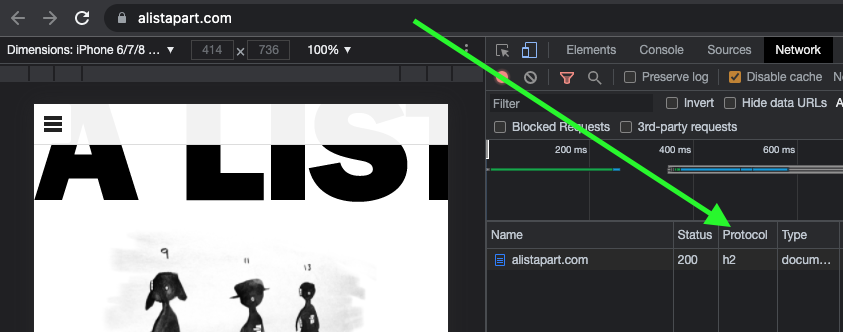
    What version of HTTP do you use?

    Go to your website and open the dev tools in your browser to find out which version of HTTP you're using. Next, select the Network tab and make sure the Protocol column is visible. If "h2" is included in the protocol list, that indicates that HTTP/2 is being used.

    Note: To check the Protocol column in your browser's dev tools, right-click any column header ( such as Name ), go to the Network tab, reload your page, and then check the Protocol column.

    Also, if your website is still using HTTP/1... WHY?! What are you waiting for? Excellent user support exists for HTTP/2.

    CSS is split in half.

    Separating the CSS into individual files is a worthwhile task. Linking the separate CSS files using the relevant media attribute allows the browser to identify which files are needed immediately (because they’re render-blocking) and which can be deferred. Based on this, it allocates each file an appropriate priority.

    In the following example of a website visited on a mobile breakpoint, we can see the mobile and default CSS are loaded with" Highest" priority, as they are currently needed to render the page. The last three CSS files ( print, tablet, and desktop ) are still being downloaded in case they're needed later, but with" Lowest" priority.

    Before rendering can begin, the browser will need to download the CSS file and parse it using bundled CSS before rendering can begin.

    While, as noted, with the CSS separated into different files linked and marked up with the relevant media attribute, the browser can prioritize the files it currently needs. Using closed media query ranges allows the browser to do this at all widths, as opposed to classic mobile-first min-width queries, where the desktop browser would have to download all the CSS with Highest priority. We can’t assume that desktop users always have a fast connection. For instance, in many rural areas, internet connection speeds are still slow. 

    Depending on project requirements, the media queries and the number of separate CSS files will vary from project to project, but the example below might look similar.

    CSS is bundled


    This single file contains all the CSS, including all media queries, and it will be downloaded with Highest priority.

    Separated CSS


    Separating the CSS and specifying a media attribute value on each link tag allows the browser to prioritize what it currently needs. Out of the five files listed above, two will be downloaded with Highest priority: the default file, and the file that matches the current media query. The others will be downloaded with Lowest priority.

    Depending on the project’s deployment strategy, a change to one file (mobile.css, for example) would only require the QA team to regression test on devices in that specific media query range. Compare that to the prospect of deploying the single bundled site.css file, an approach that would normally trigger a full regression test.

    Moving on

    The adoption of mobile-first CSS was a significant development milestone because it allowed front-end developers to concentrate on mobile web applications rather than creating websites for desktop use and attempting to retrofit them to work on other devices.

    I don't think anyone wants to return to that development model again, but it's important we don't lose sight of the issue it highlighted: that things can easily get convoluted and less efficient if we prioritize one particular device—any device—over others. For this reason, it seems natural to concentrate on the CSS in its own right, always mindful of what is the default setting and what constitutes an exception, as a result. I've started to notice subtle simplifications in the CSS I write for myself as well as other developers, and that the testing and maintenance work is also a little more organized and effective.

    In general, simplifying CSS rule creation whenever we can is ultimately a cleaner approach than going around in circles of overrides. However, the project must fit the methodology you choose. For the reasons given, mobile-first may turn out to be the best option for the situation, but first you must fully comprehend the trade-offs you're entering.

  • Designers, (Re)define Success First

    Designers, (Re)define Success First

    I introduced the concept of normal social style about two and a half years earlier. It was born out of my disappointment with the many obstacles to achieving style that’s accessible and equal, protects people’s protection, firm, and target, benefits society, and restores nature. I argued that we must overcome the difficulties that prevent us from acting morally and that we must architecturally integrate design ethics into our daily routine, procedures, and tools to raise it to a more realistic level.

    However, we’re still very far from this best.

    At the time, I didn’t realize yet how to functionally combine morality. Yes, I did discover some tools in past projects that had worked for me, such as using checklists, assumption monitoring, and “dark fact” sessions, but I wasn’t able to use them in every task. I was still struggling for time and support, and at best I had only partially achieved a higher ( moral ) quality of design—which is far from my definition of structurally integrated.

    I made a deeper investigation into the causes of business failure that prevent us from practicing social pattern every day. Today, after much research and experimentation, I believe that I’ve found the code that will let us functionally combine ethics. And it’s amazingly easy! However, we must second move out to understand what we’re going through.

    Control the system

    Unfortunately, we’re confined to a capitalist system that encourages consumerism and inequality and is obsessed with the irrationality of infinite expansion. Sea levels, temperature, and our demand for energy continue to rise unquestioned, while the divide between rich and poor continues to increase. Owners expect ever-higher returns on their investments, and firms feel forced to set short-term goals that reflect this. Over the past few years, those goals have transformed our well-meaning human-centered attitude into a potent tool that encourages ever-higher levels of consumption. When we’re working for an organization that pursues “double-digit growth” or “aggressive sales targets” ( which is 99 percent of us ), that’s very hard to resist while remaining human friendly. Yet with our best intentions, and despite the fact that we like to claim that we provide solutions for people, we’re a part of the issue.

    What can we do to alter this?

    We may begin by acting on the appropriate level of the system. System intellectual Donna H. Meadows when outlined ways to increase the effectiveness of a system. When you apply these to style, you get:

      You can change figures like functionality results or the number of layout critiques at the lowest level of effectiveness. But none of that may change the direction of a business.
    • Similarly, affecting buffers ( such as team budgets ), stocks ( such as the number of designers ), flows ( such as the number of new hires ), and delays ( such as the time that it takes to hear about the effect of design ) won’t significantly affect a company.
    • Instead of focusing on feedback loops like control power, employee reputation, or design-system investments, a company can become more effective at achieving its goals. But that doesn’t alter the goals themselves, which means that the business will also work against your ethical-design ideals.
    • The change of moral methods, toolkits, articles, conferences, workshops, and other topics are what most ethical-design initiatives are currently focusing on at the next level, details flows. This is also where social style has remained largely theoretical. We’ve been focusing on the wrong level of the system all this day.
    • Consider rules, for instance; they consistently surpass information. There can be commonly accepted guidelines, such as how fund works, or a sprint group’s concept of done. However, illegal laws intended to maintain profits is also smother social design, which are frequently revealed through statements like” the customer didn’t ask for it” or “don’t make it very big.”
    • Changing the rules without holding official power is very hard. That’s why the next level is so influential: self-organization. Bottom-up initiatives, passion projects, self-steering teams, and experimentation all contribute to a company’s resilience and creativity. It’s exactly this diversity of viewpoints that’s needed to structurally tackle big systemic issues like consumerism, wealth inequality, and climate change.
    • But objectives and metrics are even more powerful than self-organization. Our companies want to make more money, which means that everything and everyone in the company does their best to… make the company more money. And once I realized that profit is nothing more than a measurement, I understood how crucial a very specific, defined metric can be toward pushing a company in a certain direction.

    What is the conclusion? If we truly want to incorporate ethics into our daily design practice, we must first change the measurable objectives of the company we work for, from the bottom up.

    Redefine success

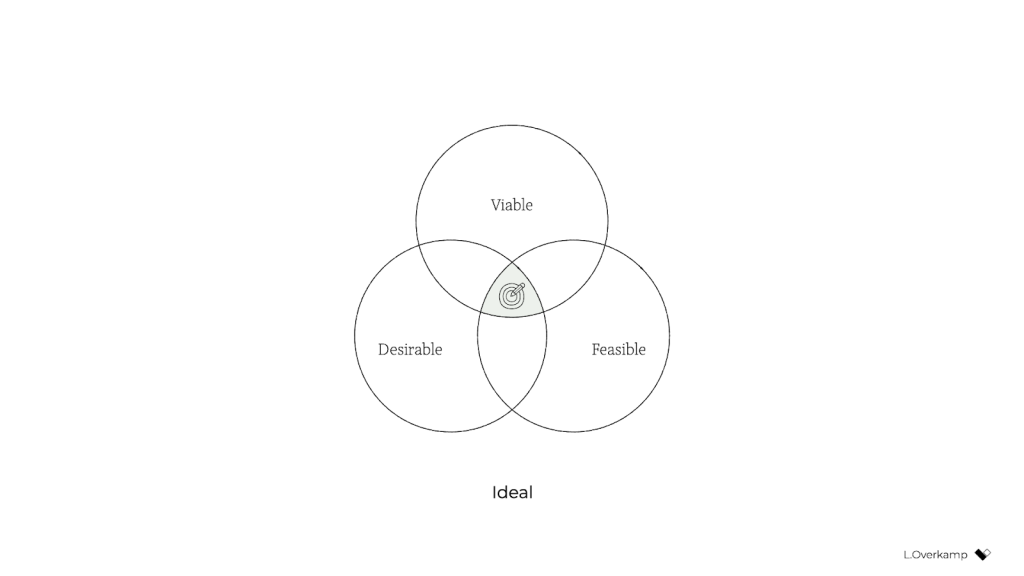
    Traditionally, we consider a product or service successful if it’s desirable to humans, technologically feasible, and financially viable. You tend to see these represented as equals, if you type the three words in a search engine, you’ll find diagrams of three equally sized, evenly arranged circles.

    However, we all know that the three dimensions are not equally important: viability is ultimately what determines whether a product will go live. So a more realistic representation might look like this:

    Viability is the aim, while feasibility and desire are the means. Companies—outside of nonprofits and charities—exist to make money.

    A genuinely purpose-driven company would try to reverse this dynamic: it would recognize finance for what it was intended for: a means. Therefore, both feasibility and viability are important factors in the company’s efforts to accomplish what they stated. It makes intuitive sense: to achieve most anything, you need resources, people, and money. Fun fact: the Italian language does not distinguish between viability and feasibility; both are merely fattibilità.

    But simply swapping viable for desirable isn’t enough to achieve an ethical outcome. Desirability is still linked to consumerism because the associated activities aim to identify what people want—whether it’s good for them or not. When deciding whether a product is safe for people, such as user satisfaction or conversion, durability goals are unimportant. They don’t prevent us from creating products that distract or manipulate people or stop us from contributing to society’s wealth inequality. They are unable to restore a healthy relationship with nature.

    There’s a fourth dimension of success that’s missing: our designs also need to be ethical in the effect that they have on the world.

    This is hardly a new idea. There are many variations of these models, some calling the fourth dimension accountability, integrity, or responsibility. What I’ve never seen before, however, is the necessary step that comes after: to influence the system as designers and to make ethical design more practical, we must create objectives for ethical design that are achievable and inspirational. There is no single way to accomplish this because it depends greatly on your country’s values, culture, and industry. But I’ll give you the version that I developed with a group of colleagues at a design agency. Consider it a template to get started.

    pursue equity, sustainability, and well-being.

    We created objectives that address design’s effect on three levels: individual, societal, and global.

    An objective on a personal level teaches us that success transcends the typical area of user experience and satisfaction, taking into account factors like how much time and effort are required of users. We pursued well-being:

    We create products and services that allow for people’s health and happiness. Our solutions are non-misleading, transparent, and calm. We respect our users ‘ time, attention, and privacy, and help them make healthy and respectful choices.

    We must consider our impact beyond the user, expanding our focus to the economy, communities, and other indirect stakeholders, as a result of having an objective on the societal level. We called this objective equity:

    We create products and services that have a positive social impact. We think of racial justice, inclusiveness and diversity of people as teams, users, and customer segments, as well as racial justice and economic equality. We listen to local culture, communities, and those we affect.

    Finally, the global goal of maintaining harmony with humanity’s sole home is the ultimate goal. Referring to it simply as sustainability, our definition was:

    We create products and services that reward sufficiency and reusability. Our solutions promote the circular economy by generating value from waste, reusing products, and giving priority to sustainable choices. We deliver functionality instead of ownership, and we limit energy use.

    In essence, ethical design ( to us ) meant achieving the wellbeing of each user and an equitable value distribution within society through a design that can sustain our living planet. When we introduced these objectives in the company, for many colleagues, design ethics and responsible design suddenly became tangible and achievable through practical—and even familiar—actions.

    Measure impact

    However, defining these goals is still insufficient. What truly caught the attention of senior management was the fact that we created a way to measure every design project’s well-being, equity, and sustainability.

    In this overview, you can use examples of metrics to measure your progress toward equity, well-being, and sustainability:

    There’s a lot of power in measurement. As the saying goes, what gets measured gets done. Donella Meadows once provided this illustration:

    ” If the desired system state is national security, and that is defined as the amount of money spent on the military, the system will produce military spending. It may or may not lead to national security.

    This phenomenon explains why desirability is a poor indicator of success: it’s typically defined as the increase in customer satisfaction, session length, frequency of use, conversion rate, churn rate, download rate, and so on. But none of these metrics increase the health of people, communities, or ecosystems. What if we instead used metrics for ( digital ) well-being, like ( reduced ) screen time or software energy consumption, to measure success?

    There’s another important message here. Even if we set an objective to create a calm interface, we might end up with a screen that makes you anxious if we were to pick the wrong metric for calmness, such as the number of interface elements. Choosing the wrong metric can completely undo good intentions.

    Additionally, choosing the right metric is enormously helpful in focusing the design team. When you perform the task of selecting metrics for our goals, you are made to consider what success looks like in terms of words and how you can demonstrate that you have met your ethical goals. It also forces you to consider what we as designers have control over: what can I include in my design or change in my process that will lead to the right type of success? The response to this query provides a lot of insight and clarity.

    And finally, it’s good to remember that traditional businesses run on measurements, and managers love to spend much time discussing charts ( ideally hockey-stick shaped ) —especially if they concern profit, the one-above-all of metrics. For good or ill, to improve the system, to have a serious discussion about ethical design with managers, we’ll need to speak that business language.

    Practice daily ethical design

    Once you’ve defined your objectives and you have a reasonable idea of the potential metrics for your design project, only then do you have a chance to structurally practice ethical design. It” simply” turns into a matter of using your imagination and sprinkling from the knowledge and tools that are already at your disposal.

    I think this is quite exciting! It opens a whole new set of challenges and considerations for the design process. Would a brief illustration suffice, or should you go with that enticing video? Which typeface is the most calm and inclusive? What brand-new equipment and techniques do you employ? When is the website’s end of life? How can you provide the same service while requiring less attention from users? How can you ensure that those who are affected by decisions are present when they are made? How can you measure our effects?

    The definition of success will fundamentally alter what it means to do good design.

    There is, however, a final piece of the puzzle that’s missing: convincing your client, product owner, or manager to be mindful of well-being, equity, and sustainability. For this, it’s essential to engage stakeholders in a dedicated kickoff session.

    Start it off or return to the pre-existing

    The kickoff is the most important meeting that can be so easy to forget to include. It consists of two main steps: 1 ) the alignment of expectations and 2 ) the definition of success.

    In the first phase, the entire ( design ) team goes over the project brief and meets with all the relevant stakeholders. Everyone gets to know one another and express their expectations on the outcome and their contributions to achieving it. Possumptions are raised and discussed. The aim is to get on the same level of understanding and to in turn avoid preventable miscommunications and surprises later in the project.

    For instance, we conducted an online kickoff with the client, a subject-matter expert, and two other designers for a recent freelance project that aimed to design a digital platform that facilitates US student advisors ‘ documentation and communication. We used a combination of canvases on Miro: one with questions from” Manual of Me” ( to get to know each other ), a Team Canvas ( to express expectations ), and a version of the Project Canvas to align on scope, timeline, and other practical matters.

    The above is the traditional purpose of a kickoff. However, agreeing on the project’s success means expressing expectations just as crucial as expressing expectations in terms of desire, viability, feasibility, and ethics. What are the objectives in each dimension?

    It is crucial to reach an understanding of what success means at this early stage because you can rely on it for the duration of the project. If, for example, the design team wants to build an inclusive app for a diverse user group, they can raise diversity as a specific success criterion during the kickoff. If the client agrees, the team can refer back to that promise throughout the project. To create a successful product, we agreed in our first meeting that a diverse user group that includes A and B is necessary. So we do activity X and follow research process Y”. Compare those odds to a scenario where the team had to request permission halfway through the project and didn’t agree to it in advance. The client might argue that that came on top of the agreed scope—and she’d be right.

    In the case of this freelance project, to define success I prepared a round canvas that I call the Wheel of Success. An inner ring with the intention of capturing ideas for objectives and an outer ring with the intention of capturing ideas for measuring those objectives are included. The rings are divided into five dimensions of successful design: healthy, equitable, sustainable, desirable, feasible, and viable.

    We explored each dimension and recorded ideas on digital sticky notes. Then we discussed our ideas and verbally agreed on the most important ones. For example, our client agreed that sustainability and progressive enhancement are important success criteria for the platform. Additionally, the subject-matter expert stressed the value of involving students from underprivileged and low-income groups in the design process.

    After the kickoff, we summarized our ideas and shared understanding in a project brief that captured these aspects:

      the project’s history and purpose: Why do we work on this project?
    • the problem definition: what do we want to solve?
    • the concrete goals and metrics for each success dimension: what do we want to achieve?
    • the objectives, procedures, and role descriptions: how will we accomplish them?

    With such a brief in place, you can use the agreed-upon objectives and concrete metrics as a checklist of success, and your design team will be ready to pursue the right objective—using the tools, methods, and metrics at their disposal to achieve ethical outcomes.

    Conclusion

    A number of my coworkers have questioned me over the past year,” Where do I begin with ethical design?” My answer has always been the same: organize a session with your stakeholders to ( re ) define success. Even though you might not always be 100 percent successful in agreeing on goals that cover all responsibility objectives, that beats the alternative ( the status quo ) every time. There is no skipping this step if you want to design in an ethical, responsible way.

    To be even more specific: if you consider yourself a strategic designer, your challenge is to define ethical objectives, set the right metrics, and conduct those kick-off sessions. If you think of yourself as a system designer, your first step should be to understand how your industry contributes to consumerism and inequality, how finance drives business, and how to think about how to use the system to exert the most influence. Then redefine success to create the space to exercise those levers.

    And for those who consider themselves service designers or UX designers or UI designers: if you truly want to have a positive, meaningful impact, stay away from the toolkits and meetups and conferences for a while. Gather your coworkers to set design goals for sustainability, well-being, and equity. Engage your stakeholders in a workshop and challenge them to think of ways to achieve and measure those ethical goals. Take their ideas, make them clear and tangible, ask for their consent, and hold them to it.

    Otherwise, I’m genuinely sorry to say, you’re wasting your precious time and creative energy.

    Of course, engaging your stakeholders in this way can be uncomfortable. Many of my coworkers had questions to ask, such as” Will they take this seriously”?,” Will they take it seriously?” and “Can’t we just do it within the design team instead”? In fact, a product manager once asked me why ethics couldn’t just be a structured part of the design process—to just do it without spending the effort to define ethical objectives. It seems like a good idea, no? We wouldn’t have to have difficult discussions with stakeholders about what values or which key-performance indicators to pursue. It would let us focus on what we like and do best: designing.

    However, as systems theory suggests, that’s not enough. For those of us who aren’t from marginalized groups and have the privilege to be able to speak up and be heard, that uncomfortable space is exactly where we need to be if we truly want to make a difference. We can’t allow ourselves to be disconnected from the real world and enjoy our preferred working-from-home lifestyle while remaining trapped in the design-for-design bubble. For those of us who have the possibility to speak up and be heard: if we solely keep talking about ethical design and it remains at the level of articles and toolkits—we’re not designing ethically. It’s just theory. By challenging them to redefine success in business, we must actively engage with our coworkers and clients.

    With a bit of courage, determination, and focus, we can break out of this cage that finance and business-as-usual have built around us and become facilitators of a new type of business that can see beyond financial value. We simply need to come to terms with the right goals at the start of each design project, identify the appropriate metrics, and acknowledge that we already have everything we need to get started. That’s what it means to do daily ethical design.

    For their inspiration and support over the years, I would like to thank Emanuela Cozzi Schettini, José Gallegos, Annegret Bönemann, Ian Dorr, Vera Rademaker, Virginia Rispoli, Cecilia Scolaro, Rouzbeh Amini, and many others.

  • Humility: An Essential Value

    Humility: An Essential Value

    Humility, a writer’s most important quality, has a great circle to it. What about sincerity, an business manager’s important value? Or a doctor’s? Or a student’s? They all have excellent sounding voices. When humility is our guiding light, the course is usually available for fulfillment, development, relation, and commitment. We’ll discuss why in this book.

    That said, this is a guide for developers, and to that conclusion, I’d like to begin with a story—well, a voyage, actually. It’s a personal one, and I’m going to make myself a little prone along the way. I call it:

    The Ludicrous Pate of Justin: A Tale

    When I was coming out of arts school, a long-haired, goateed novice, write was a known quantity to me, design on the web, however, was riddled with complexities to understand and learn, a problem to be solved. Although I had formal training in typography, layout, and creative design, what most intrigued me was how these traditional skills could be applied to a young online landscape. This theme may eventually form the rest of my profession.

    But I drained HTML and JavaScript books until the early hours of the morning and self-taught myself how to code during my freshman year rather than student and go into write like many of my friends. I wanted—nay, needed—to better understand the underlying relevance of what my design decisions may think when rendered in a website.

    The so-called” Wild West” of website design was the late 1990s and early 2000s. Manufacturers at the time were all figuring out how to use layout and visual connection to the online environment. What were the guidelines? How may we break them and also engage, entertain, and present information? How was my values, which include modesty, respect, and connection, coincide with that on a more general level? I was eager to find out.

    Those are amazing factors between non-career relationships and the world of style, even though I’m referring to a different era. What are your main passions, or ideals, that elevate medium? The main elements are all the same, basically the same as what we previously discussed earlier on the immediate parallels between what fulfills you, independent of the visible or online domains.

    First within tables, animated GIFs, Flash, then with Web Standards, divs, and CSS, there was personality, raw unbridled creativity, and unique means of presentment that often defied any semblance of a visible grid. Splash screens and “browser requirement” pages aplenty. Usability and accessibility were typically victims of such a creation, but such paramount facets of any digital design were largely (and, in hindsight, unfairly) disregarded at the expense of experimentation.

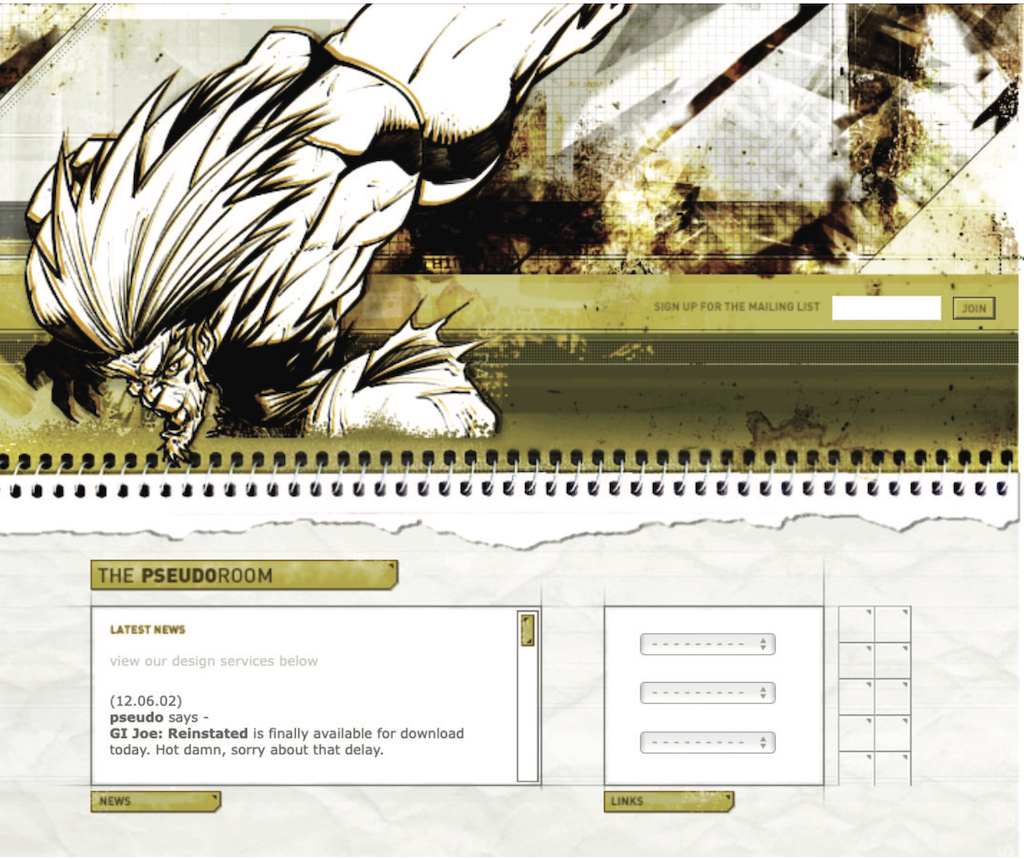
    For instance, this iteration of my personal portfolio site (” the pseudoroom” ) from that time was experimental if not a little overt in terms of the visual presentation of the idea of a living sketchbook. Very skeuomorphic. On this one, I worked with fellow designer and dear friend Marc Clancy, who is now a co-founder of the creative project organizing app Milanote, to sketch and then play with various user interactions. Then, I’d break it down and code it into a digital layout.

    Along with design folio pieces, the site also offered free downloads for Mac OS customizations: desktop wallpapers that were effectively design experimentation, custom-designed typefaces, and desktop icons.

    GUI Galaxy was a design, pixel art, and Mac-centric news portal that graphic designer friends and I developed from around the same time.

    Design news portals were incredibly popular at the time, and they now accept tweet-sized, small-format excerpts from relevant news from the categories I previously covered. If you took Twitter, curated it to a few categories, and wrapped it in a custom-branded experience, you’d have a design news portal from the late 90s / early 2000s.

    We as designers had changed and developed a bandwidth-sensitive, award-winning, much more accessibility-conscious website. Still ripe with experimentation, yet more mindful of equitable engagement. Below are some content panes that show general news (tech, design ) and news centered on Mac. We also offered many of the custom downloads I cited before as present on my folio site but branded and themed to GUI Galaxy.

    The presentation layer of the website’s backbone was made up of global design + illustration + news author collaboration. The backbone was a homegrown CMS. And the collaboration effort here, in addition to experimentation on a’ brand’ and content delivery, was hitting my core. We were creating a global audience by creating something bigger than just one of us.

    Collaboration and connection transcend medium in their impact, immensely fulfilling me as a designer.

    Why am I going down this design memory lane with you, now? Two reasons.

    First of all, there’s a reason for the nostalgia for that design era ( the” Wild West” era, as I put it ): the inherent exploration, personality, and creativity that dominated many design portals and personal portfolio websites. Ultra-finely detailed pixel art UI, custom illustration, bespoke vector graphics, all underpinned by a strong design community.

    The web design industry has experienced a period of stagnation in recent years. I suspect there’s a strong chance you’ve seen a site whose structure looks something like this: a hero image / banner with text overlaid, perhaps with a lovely rotating carousel of images ( laying the snark on heavy there ), a call to action, and three columns of sub-content directly beneath. Perhaps an icon library is used with selections that only vaguely relate to their respective content is used.

    Design, as it’s applied to the digital landscape, is in dire need of thoughtful layout, typography, and visual engagement that goes hand-in-hand with all the modern considerations we now know are paramount: usability. accessibility. Load times and bandwidth- sensitive content delivery. A user-friendly presentation that connects with people wherever they are. We must be mindful of, and respectful toward, those concerns—but not at the expense of creativity of visual communication or via replicating cookie-cutter layouts.

    Pixel Issues

    Websites during this period were often designed and built on Macs whose OS and desktops looked something like this. Although Mac OS 7.5 is available, 8 and 9 are not very different.

    How could any single icon, at any given moment, stand out and grab my attention? That is a fascinating question. In this example, the user’s desktop is tidy, but think of a more realistic example with icon pandemonium. Or, let’s say an icon was a part of a larger system group ( fonts, extensions, control panels ): how did it maintain cohesion within the group as well?

    These were 32 x 32 pixel creations, utilizing a 256-color palette, designed pixel-by-pixel as mini mosaics. Under such absurd constraints, this seemed to me to be the embodiment of digital visual communication. And often, ridiculous restrictions can yield the purification of concept and theme.

    So I started doing my homework and conducting research. I was a student of this new medium, hungry to dissect, process, discover, and make it my own.

    I wanted to see how I could use that 256-color palette to push the boundaries of a 32×32 pixel grid, expanding upon the idea of exploration. Those ridiculous constraints forced a clarity of concept and presentation that I found incredibly appealing. I was thrown the digital gauntlet, and that challenge fueled my determination. And so, in my dorm room into the wee hours of the morning, I toiled away, bringing conceptual sketches into mini mosaic fruition.

    These are some of my creations that made use of ResEdit, the only program I had at the time, to create icons. ResEdit was a clunky, built-in Mac OS utility not really made for exactly what we were using it for. Research is at the center of all of this endeavor. Challenge. solving problems. Again, these core connection-based values are agnostic of medium.

    There’s one more design portal I want to talk about, which also serves as the second reason for my story to bring this all together.

    This is the Kaliber 1000, or K10k, abbreviated. K10k was founded in 1998 by Michael Schmidt and Toke Nygaard, and was the design news portal on the web during this period. It was the place to be, my friend, with its pixel art-fueled presentation, ultra-focused care given to every aspect of every detail, and many of the more influential designers of the time who were invited to be news authors on the site. With respect where respect is due, GUI Galaxy’s concept was inspired by what these folks were doing.

    For my part, the combination of my web design work and pixel art exploration began to get me some notoriety in the design scene. K10k eventually figured out and added me as one of their very limited group of news writers to add content to the website.

    Amongst my personal work and side projects —and now with this inclusion—in the design community, this put me on the map. Additionally, my design work has started to appear on other design news portals, as well as be published in various printed collections, in domestic and international magazines, and in various printed collections. With that degree of success while in my early twenties, something else happened:

    I actually changed into a massive asshole in about a year of high school, not less. The press and the praise became what fulfilled me, and they went straight to my head. My ego was inflated by them. I actually felt somewhat superior to my fellow designers.

    The casualties? My design stagnated. Its evolution, which is what I evolved, has stagnated.

    I felt so supremely confident in my abilities that I effectively stopped researching and discovering. When my first instinct was to sketch concepts or iterate ideas in lead, I instead leaped right into Photoshop. I drew my inspiration from the smallest of sources ( and with blinders on ). Any criticism of my work from my fellow students was frequently vehemently dissented. The most tragic loss: I had lost touch with my values.

    My ego almost destroyed some of my friendships and blossoming professional relationships. I was toxic in talking about design and in collaboration. But thankfully, candor was a gift from those same friends. They called me out on my unhealthy behavior.

    It’s true, I initially didn’t accept it, but after much reflection, I was able to accept it. I was soon able to accept, and process, and course correct. Although the realization made me feel uneasy, the re-awakening was necessary. I let go of the “reward” of adulation and re-centered upon what stoked the fire for me in art school. Most importantly, I regained my fundamental values.

    Always Students

    Following that temporary decline, my personal and professional design journey advanced. And I could self-reflect as I got older to facilitate further growth and course correction as needed.

    Let’s take the Large Hadron Collider as an example. The LHC was designed” to help answer some of the fundamental open questions in physics, which concern the basic laws governing the interactions and forces among the elementary objects, the deep structure of space and time, and in particular the interrelation between quantum mechanics and general relativity”. Thank you, Wikipedia.

    Around fifteen years ago, in one of my earlier professional roles, I designed the interface for the application that generated the LHC’s particle collision diagrams. These diagrams are the depiction of what is actually happening inside the Collider during any given particle collision event and are frequently regarded as works of art by themselves.

    Designing the interface for this application was a fascinating process for me, in that I worked with Fermilab physicists to understand what the application was trying to achieve, but also how the physicists themselves would be using it. In order to accomplish this, this role requires,

    I cut my teeth on usability testing, working with the Fermilab team to iterate and improve the interface. To me, how they spoke and what they talked about was like an alien tongue. And by making myself humble and working under the mindset that I was but a student, I made myself available to be a part of their world to generate that vital connection.

    I also had my first ethnographic observational experience, where I observed how the physicists used the tool in their own environments, on their own terminals. For example, one takeaway was that due to the level of ambient light-driven contrast within the facility, the data columns ended up using white text on a dark gray background instead of black text-on-white. They were able to focus on their eyes while working during the day while poring over enormous amounts of data. And Fermilab and CERN are government entities with rigorous accessibility standards, so my knowledge in that realm also grew. Another crucial form of communication was the barrier-free design.

    So to those core drivers of my visual problem-solving soul and ultimate fulfillment: discovery, exposure to new media, observation, human connection, and evolution. Before I entered those values, I had to check my ego before entering it, which opened the door to those values.

    An evergreen willingness to listen, learn, understand, grow, evolve, and connect yields our best work. I want to pay attention to the phrases “grow” and “evolve” in particular. If we are always students of our craft, we are also continually making ourselves available to evolve. Yes, we have years of practical design experience behind us. Or the focused lab sessions from a UX bootcamp. or the work portfolio with monograms. Or, ultimately, decades of a career behind us.

    However, with all that being said, experience does not make one an “expert.”

    As soon as we close our minds via an inner monologue of’ knowing it all’ or branding ourselves a” #thoughtleader” on social media, the designer we are is our final form. The creator who we can be will never be there.

  • Personalization Pyramid: A Framework for Designing with User Data

    Personalization Pyramid: A Framework for Designing with User Data

    As a UX professional in today’s data-driven landscape, it’s increasingly likely that you’ve been asked to design a personalized digital experience, whether it’s a public website, user portal, or native application. Yet while there continues to be no shortage of marketing hype around personalization platforms, we still have very few standardized approaches for implementing personalized UX.

    That’s where we come in. After completing dozens of personalization projects over the past few years, we gave ourselves a goal: could you create a holistic personalization framework specifically for UX practitioners? The Personalization Pyramid is a designer-centric model for standing up human-centered personalization programs, spanning data, segmentation, content delivery, and overall goals. By using this approach, you will be able to understand the core components of a contemporary, UX-driven personalization program (or at the very least know enough to get started). 

    Getting Started

    For the sake of this article, we’ll assume you’re already familiar with the basics of digital personalization. A good overview can be found here: Website Personalization Planning. While UX projects in this area can take on many different forms, they often stem from similar starting points.      

    Common scenarios for starting a personalization project:

    • Your organization or client purchased a content management system (CMS) or marketing automation platform (MAP) or related technology that supports personalization
    • The CMO, CDO, or CIO has identified personalization as a goal
    • Customer data is disjointed or ambiguous
    • You are running some isolated targeting campaigns or A/B testing
    • Stakeholders disagree on personalization approach
    • Mandate of customer privacy rules (e.g. GDPR) requires revisiting existing user targeting practices

    Regardless of where you begin, a successful personalization program will require the same core building blocks. We’ve captured these as the “levels” on the pyramid. Whether you are a UX designer, researcher, or strategist, understanding the core components can help make your contribution successful.  

    From top to bottom, the levels include:

    1. North Star: What larger strategic objective is driving the personalization program? 
    2. Goals: What are the specific, measurable outcomes of the program? 
    3. Touchpoints: Where will the personalized experience be served?
    4. Contexts and Campaigns: What personalization content will the user see?
    5. User Segments: What constitutes a unique, usable audience? 
    6. Actionable Data: What reliable and authoritative data is captured by our technical platform to drive personalization?  
    7. Raw Data: What wider set of data is conceivably available (already in our setting) allowing you to personalize?

    We’ll go through each of these levels in turn. To help make this actionable, we created an accompanying deck of cards to illustrate specific examples from each level. We’ve found them helpful in personalization brainstorming sessions, and will include examples for you here.

    Starting at the Top

    The components of the pyramid are as follows:

    North Star

    A north star is what you are aiming for overall with your personalization program (big or small). The North Star defines the (one) overall mission of the personalization program. What do you wish to accomplish? North Stars cast a shadow. The bigger the star, the bigger the shadow. Example of North Starts might include: 

    1. Function: Personalize based on basic user inputs. Examples: “Raw” notifications, basic search results, system user settings and configuration options, general customization, basic optimizations
    2. Feature: Self-contained personalization componentry. Examples: “Cooked” notifications, advanced optimizations (geolocation), basic dynamic messaging, customized modules, automations, recommenders
    3. Experience: Personalized user experiences across multiple interactions and user flows. Examples: Email campaigns, landing pages, advanced messaging (i.e. C2C chat) or conversational interfaces, larger user flows and content-intensive optimizations (localization).
    4. Product: Highly differentiating personalized product experiences. Examples: Standalone, branded experiences with personalization at their core, like the “algotorial” playlists by Spotify such as Discover Weekly.

    Goals

    As in any good UX design, personalization can help accelerate designing with customer intentions. Goals are the tactical and measurable metrics that will prove the overall program is successful. A good place to start is with your current analytics and measurement program and metrics you can benchmark against. In some cases, new goals may be appropriate. The key thing to remember is that personalization itself is not a goal, rather it is a means to an end. Common goals include:

    • Conversion
    • Time on task
    • Net promoter score (NPS)
    • Customer satisfaction 

    Touchpoints

    Touchpoints are where the personalization happens. As a UX designer, this will be one of your largest areas of responsibility. The touchpoints available to you will depend on how your personalization and associated technology capabilities are instrumented, and should be rooted in improving a user’s experience at a particular point in the journey. Touchpoints can be multi-device (mobile, in-store, website) but also more granular (web banner, web pop-up etc.). Here are some examples:

    Channel-level Touchpoints

    • Email: Role
    • Email: Time of open
    • In-store display (JSON endpoint)
    • Native app
    • Search

    Wireframe-level Touchpoints

    • Web overlay
    • Web alert bar
    • Web banner
    • Web content block
    • Web menu

    If you’re designing for web interfaces, for example, you will likely need to include personalized “zones” in your wireframes. The content for these can be presented programmatically in touchpoints based on our next step, contexts and campaigns.

    Contexts and Campaigns

    Once you’ve outlined some touchpoints, you can consider the actual personalized content a user will receive. Many personalization tools will refer to these as “campaigns” (so, for example, a campaign on a web banner for new visitors to the website). These will programmatically be shown at certain touchpoints to certain user segments, as defined by user data. At this stage, we find it helpful to consider two separate models: a context model and a content model. The context helps you consider the level of engagement of the user at the personalization moment, for example a user casually browsing information vs. doing a deep-dive. Think of it in terms of information retrieval behaviors. The content model can then help you determine what type of personalization to serve based on the context (for example, an “Enrich” campaign that shows related articles may be a suitable supplement to extant content).

    Personalization Context Model:

    1. Browse
    2. Skim
    3. Nudge
    4. Feast

    Personalization Content Model:

    1. Alert
    2. Make Easier
    3. Cross-Sell
    4. Enrich

    We’ve written extensively about each of these models elsewhere, so if you’d like to read more you can check out Colin’s Personalization Content Model and Jeff’s Personalization Context Model

    User Segments

    User segments can be created prescriptively or adaptively, based on user research (e.g. via rules and logic tied to set user behaviors or via A/B testing). At a minimum you will likely need to consider how to treat the unknown or first-time visitor, the guest or returning visitor for whom you may have a stateful cookie (or equivalent post-cookie identifier), or the authenticated visitor who is logged in. Here are some examples from the personalization pyramid:

    • Unknown
    • Guest
    • Authenticated
    • Default
    • Referred
    • Role
    • Cohort
    • Unique ID

    Actionable Data

    Every organization with any digital presence has data. It’s a matter of asking what data you can ethically collect on users, its inherent reliability and value, as to how can you use it (sometimes known as “data activation.”) Fortunately, the tide is turning to first-party data: a recent study by Twilio estimates some 80% of businesses are using at least some type of first-party data to personalize the customer experience. 

    First-party data represents multiple advantages on the UX front, including being relatively simple to collect, more likely to be accurate, and less susceptible to the “creep factor” of third-party data. So a key part of your UX strategy should be to determine what the best form of data collection is on your audiences. Here are some examples:

    There is a progression of profiling when it comes to recognizing and making decisioning about different audiences and their signals. It tends to move towards more granular constructs about smaller and smaller cohorts of users as time and confidence and data volume grow.

    While some combination of implicit / explicit data is generally a prerequisite for any implementation (more commonly referred to as first party and third-party data) ML efforts are typically not cost-effective directly out of the box. This is because a strong data backbone and content repository is a prerequisite for optimization. But these approaches should be considered as part of the larger roadmap and may indeed help accelerate the organization’s overall progress. Typically at this point you will partner with key stakeholders and product owners to design a profiling model. The profiling model includes defining approach to configuring profiles, profile keys, profile cards and pattern cards. A multi-faceted approach to profiling which makes it scalable.

    Pulling it Together

    While the cards comprise the starting point to an inventory of sorts (we provide blanks for you to tailor your own), a set of potential levers and motivations for the style of personalization activities you aspire to deliver, they are more valuable when thought of in a grouping. 

    In assembling a card “hand”, one can begin to trace the entire trajectory from leadership focus down through a strategic and tactical execution. It is also at the heart of the way both co-authors have conducted workshops in assembling a program backlog—which is a fine subject for another article.

    In the meantime, what is important to note is that each colored class of card is helpful to survey in understanding the range of choices potentially at your disposal, it is threading through and making concrete decisions about for whom this decisioning will be made: where, when, and how.

    Lay Down Your Cards

    Any sustainable personalization strategy must consider near, mid and long-term goals. Even with the leading CMS platforms like Sitecore and Adobe or the most exciting composable CMS DXP out there, there is simply no “easy button” wherein a personalization program can be stood up and immediately view meaningful results. That said, there is a common grammar to all personalization activities, just like every sentence has nouns and verbs. These cards attempt to map that territory.

  • User Research Is Storytelling

    User Research Is Storytelling

    I’ve been fascinated by shows since I was a child. I loved the heroes and the excitement—but most of all the stories. I aspired to be an artist. And I believed that I’d get to do the things that Indiana Jones did and go on fascinating experiences. I also came up with concept movies that my friends and I could render and sun in. But they never went any farther. However, I did end up working in user experience ( UI). Today, I realize that there’s an element of drama to UX— I hadn’t actually considered it before, but consumer research is story. And to get the most out of customer studies, you must tell a compelling story that involves stakeholders, including the product team and decision-makers, and piques their interest in learning more.

    Think of your favourite film. It probably follows a three-act narrative architecture: the layout, the conflict, and the resolution, which is prevalent in literature. The second act shows what exists now, and it helps you get to know the figures and the challenges and problems that they face. Act two sets the scene for the fight and introduces the behavior. Here, issues grow or get worse. The decision is the third and final action. This is where the issues are resolved and the figures learn and change. This construction, in my opinion, is also a fantastic way to think about consumer research, and it might be particularly useful for introducing user research to others.

    Use story as a framework when conducting study.

    It’s sad to say, but many have come to view studies as being inconsequential. Research is typically one of the first things to go when finances or deadlines are tight. Instead of investing in study, some goods professionals rely on manufacturers or—worse—their personal judgment to make the “right” options for users based on their experience or accepted best practices. That may lead some groups, but that approach can so easily miss the chance to solve people ‘ real issues. To be user-centered, this is something we really avoid. User study improves style. It keeps it on trail, pointing to problems and opportunities. Being aware of the problems with your goods and taking action can help you keep ahead of your competition.

    In the three-act structure, each action corresponds to a part of the process, and each part is important to telling the whole story. Let’s take a look at the various functions and how they relate to consumer research.

    Act one: layout

    The rig consists entirely in comprehending the history, and that’s where fundamental research comes in. Basic research ( also called conceptual, discovery, or original research ) helps you understand people and identify their problems. Like in the movies, you’re learning about the problems users face, what options are available, and how they are affected by them. To do basic research, you may conduct cultural inquiries or journal studies ( or both! ), which may assist you in identifying both challenges and opportunities. It doesn’t need to get a great investment in time or money.

    Erika Hall discusses the most effective anthropology, which can be as straightforward as spending 15 hours with a customer and asking them to” Walk me through your morning yesterday.” That’s it. Give that one ask. Opened up and listen to them for 15 days. Do everything in your power to keep yourself and your pursuits out of it. Bam, you’re doing ethnography”. According to Hall, “[This ] will definitely prove quite fascinating. In the very unlikely event that you didn’t learn anything new or helpful, carry on with increased confidence in your way”.

    This makes perfect sense to me. And I love that this makes consumer studies so visible. You don’t need to make a lot of paperwork; you can only attract people and do it! This can offer a wealth of knowledge about your customers, and it’ll help you better understand them and what’s going on in their life. That’s what action one is really all about: understanding where people are coming from.

    Maybe Spool talks about the importance of basic research and how it may type the bulk of your research. If you can supplement what you’ve heard in the fundamental studies by using any more user data that you can obtain, such as surveys or analytics, or if you can identify areas that need more investigation. Together, all this information creates a clearer picture of the state of things and all its inadequacies. And that’s the start of a gripping tale. It’s the place in the story where you realize that the principal characters—or the people in this case—are facing issues that they need to conquer. This is where you begin to develop compassion for the figures and support their success, much like in the movies. And finally participants are now doing the same. Their business may lose money because users can’t finish particular tasks, which may be their love. Or probably they do connect with customers ‘ problems. In either case, action one serves as your main strategy for piqueing interest and investment from the participants.

    When partners begin to understand the value of basic research, that is open doors to more opportunities that involve users in the decision-making approach. And that can help goods team become more user-centric. This rewards everyone—users, the goods, and partners. It’s similar to winning an Oscar for a film because it frequently results in a favorable and productive outcome for your item. And this can be an opportunity for participants to repeat this process with different products. The secret to this method is storytelling, and knowing how to tell a compelling story is the only way to entice partners to do more research.

    This brings us to work two, where you incrementally examine a design or idea to see whether it addresses the problems.

    Act two: issue

    Act two is all about digging deeper into the issues that you identified in operate one. In order to evaluate a potential alternative ( such as a design ), you typically conduct vertical research, such as usability tests, to see if it addresses the problems you identified. The issues may include unfulfilled needs or problems with a circulation or procedure that’s tripping users off. More problems will come up in the process, much like in the second action of a film. It’s here that you learn more about the figures as they grow and develop through this action.

    Usability tests should generally consist of five participants, according to Jakob Nielsen, who found that that number of users can usually identify the majority of the issues:” As you add more and more users, you learn less and less because you will keep seeing the same things again and again… After the second user, you are wasting your time by observing the same findings regularly but hardly learning much new.”

    There are parallels with storytelling here too, if you try to tell a story with too many characters, the plot may get lost. With fewer participants, each user’s struggles will be more memorable and accessible to other stakeholders when presenting the research. This can help convey the issues that need to be addressed while also highlighting the value of doing the research in the first place.

    Usability tests have been conducted in person for decades, but you can also conduct them remotely using software like Microsoft Teams, Zoom, or other teleconferencing software. This approach has become increasingly popular since the beginning of the pandemic, and it works well. You might consider in-person usability tests like watching a movie as opposed to remote testing like attending a play. There are advantages and disadvantages to each. Usability research in person is a much more extensive experience. Stakeholders can experience the sessions with other stakeholders. You also get real-time feedback on what they’re seeing, including surprises, disagreements, and discussions about them. Much like going to a play, where audiences get to take in the stage, the costumes, the lighting, and the actors ‘ interactions, in-person research lets you see users up close, including their body language, how they interact with the moderator, and how the scene is set up.

    If conducting usability testing in the field is like watching a play that is staged and controlled, where any two sessions may be very different from one another. You can take usability testing into the field by creating a replica of the space where users interact with the product and then conduct your research there. Or you can conduct your research by meeting users at their locations. With either option, you get to see how things work in context, things come up that wouldn’t have in a lab environment—and conversion can shift in entirely different directions. You have less control over how these sessions run as researchers, but this can occasionally improve your understanding of users. Meeting users where they are can provide clues to the external forces that could be affecting how they use your product. Usability tests in person offer a level of detail that is frequently absent from remote testing.

    That’s not to say that the “movies” —remote sessions—aren’t a good option. A wider audience can be obtained from remote sessions. They allow a lot more stakeholders to be involved in the research and to see what’s going on. Additionally, they make the doors accessible to a much wider range of users. But with any remote session there is the potential of time wasted if participants can’t log in or get their microphone working.

    You can ask real users questions to understand their thoughts and understanding of the solution as a result of usability testing, whether it is conducted remotely or in person. This can help you not only identify problems but also glean why they’re problems in the first place. You can also test your own ideas and determine whether they are true. By the end of the sessions, you’ll have a much clearer picture of how usable the designs are and whether they work for their intended purposes. The excitement centers on Act 2, but there are also potential surprises in that Act. This is equally true of usability tests. Unexpected things that are said by participants frequently alter how you view things, and these unexpected developments in the story can lead to unexpected turns in your perception.

    Unfortunately, user research is sometimes seen as expendable. Usability testing is often the only method of research that some stakeholders believe they ever need, especially in this regard. In fact, if the designs that you’re evaluating in the usability test aren’t grounded in a solid understanding of your users ( foundational research ), there’s not much to be gained by doing usability testing in the first place. Because you’re narrowing the scope of what you’re receiving feedback on without understanding the needs of the users. As a result, there’s no way of knowing whether the designs might solve a problem that users have. In the context of a usability test, it’s only feedback on a particular design.

    On the other hand, if you only do foundational research, while you might have set out to solve the right problem, you won’t know whether the thing that you’re building will actually solve that. This demonstrates the value of conducting both directional and foundational research.

    In act two, stakeholders will—hopefully—get to watch the story unfold in the user sessions, which creates the conflict and tension in the current design by surfacing their highs and lows. And in turn, this can encourage stakeholders to take action on the issues raised.

    Act three: resolution

    The third act is about resolving the issues from the first two acts, while the first two acts are about understanding the background and the tensions that can compel stakeholders to take action. While it’s important to have an audience for the first two acts, it’s crucial that they stick around for the final act. That includes all members of the product team, including developers, UX experts, business analysts, delivery managers, product managers, and any other parties who have a say in the coming development. It allows the whole team to hear users ‘ feedback together, ask questions, and discuss what’s possible within the project’s constraints. Additionally, it enables the UX design and research teams to clarify, suggest alternatives, or provide more context for their decisions. So you can get everyone on the same page and get agreement on the way forward.

    This act is primarily told through voiceover with some audience participation. The researcher is the narrator, who paints a picture of the issues and what the future of the product could look like given the things that the team has learned. They offer the stakeholders their suggestions and suggestions for how to create this vision.

    Nancy Duarte in the Harvard Business Review offers an approach to structuring presentations that follow a persuasive story. The most effective presenters” set up a conflict that needs to be resolved” using the same methods as great storytellers, Duarte writes. ” That tension helps them persuade the audience to adopt a new mindset or behave differently”.

    This type of structure aligns well with research results, and particularly results from usability tests. It provides proof for “what is “—the issues you’ve identified. And “what could be “—your recommendations on how to address them. And so forth and forth.

    You can reinforce your recommendations with examples of things that competitors are doing that could address these issues or with examples where competitors are gaining an edge. Or they can be as visual as quick sketches of a potential solution to a problem. These can help generate conversation and momentum. And this continues until the session is over when you’ve concluded by bridging the gaps and offering suggestions for improvement. This is the part where you reiterate the main themes or problems and what they mean for the product—the denouement of the story. The stakeholders will now have the opportunity to take the next steps, and hopefully the will-power to do so!

    While we are nearly at the end of this story, let’s reflect on the idea that user research is storytelling. The three-act structure of user research contains all the components of a good story:

      Act one: You meet the protagonists ( the users ) and the antagonists ( the problems affecting users ). The plot begins here. In act one, researchers might use methods including contextual inquiry, ethnography, diary studies, surveys, and analytics. These techniques can produce personas, empathy maps, user journeys, and analytics dashboards as output.
      Act two: Next, there’s character development. The protagonists face problems and difficulties, which they must overcome, and there is conflict and tension. In act two, researchers might use methods including usability testing, competitive benchmarking, and heuristics evaluation. Usability findings reports, UX strategy documents, usability guidelines, and best practices can be included in the output of these.
      Act three: The protagonists triumph and you see what a better future looks like. Researchers may use techniques like presentation decks, storytelling, and digital media in act three. The output of these can be: presentation decks, video clips, audio clips, and pictures.

    The researcher plays a variety of roles, including producer, director, and storyteller. The participants have a small role, but they are significant characters ( in the research ). And the audience are the stakeholders. But the most important thing is to get the story right and to use storytelling to tell users ‘ stories through research. By the end, the parties should leave with a goal and an eagerness to address the product’s flaws.

    So the next time that you’re planning research with clients or you’re speaking to stakeholders about research that you’ve done, think about how you can weave in some storytelling. In the end, user research is beneficial for everyone, and all you need to do is pique stakeholders ‘ interest in how the story ends.

  • To Ignite a Personalization Practice, Run this Prepersonalization Workshop

    To Ignite a Personalization Practice, Run this Prepersonalization Workshop

    This is in the photo. You’ve joined a club at your business that’s designing innovative product features with an focus on technology or AI. Or perhaps your business only started using a personalization website. Either way, you’re designing with statistics. What then? When it comes to designing for personalization, there are many warning stories, no immediately achievement, and some guidelines for the baffled.

    The personalization space is true, between the dream of getting it right and the worry of it going wrong ( like when we encounter “persofails” similar to a company’s constant plea to regular people to purchase additional bathroom seats ). It’s an particularly confusing place to be a modern professional without a map, a map, or a strategy.

    There are no Lonely Planet and some tour guides for those of you who want to personalize because successful personalization depends so much on each group’s talent, technology, and market position.

    But you can ensure that your group has packed its bags rationally.

    There’s a DIY method to increase your chances for victory. You’ll at least at least disarm your boss ‘ irrational exuberance. Before the group you’ll need to properly plan.

    We refer to it as prepersonalization.

    Behind the audio

    Take into account Spotify’s DJ element, which was introduced last month.

    We’re used to seeing the polished final outcome of a personalization have. A personal have had to be conceived, budgeted, and prioritized before the year-end prize, the making-of-backstory, or the behind-the-scenes success chest. Before any customisation have goes live in your product or service, it lives amid a delay of valuable ideas for expressing consumer experiences more automatically.

    How do you decide where to position customisation wagers? How do you design regular interactions that didn’t journey up users or—worse—breed mistrust? We’ve found that for many well-known budgeted programs to support their continued investments, they initially required one or more workshops to join vital technologies users and stakeholders. Make it matter.

    We’ve witnessed the same evolution up near with our clients, from big tech to budding companies. In our experience with working on small and large personalization work, a program’s best monitor record—and its capacity to weather tough questions, work steadily toward shared answers, and manage its design and engineering efforts—turns on how successfully these prepersonalization activities play out.

    Effective workshops consistently distinguish successful future endeavors from unsuccessful ones, saving countless hours of time, resources, and overall well-being in the process.

    A personalization practice involves a multiyear effort of testing and feature development. It’s not a switch-flip in your tech stack. It’s best managed as a backlog that often evolves through three steps:

    1. customer experience optimization ( CXO, also known as A/B testing or experimentation )
    2. always-on automations ( whether rules-based or machine-generated )
    3. mature features or standalone product development ( such as Spotify’s DJ experience )?

    This is why we created our progressive personalization framework and why we’re field-testing an accompanying deck of cards: we believe that there’s a base grammar, a set of “nouns and verbs” that your organization can use to design experiences that are customized, personalized, or automated. These cards are not necessary for you. But we strongly recommend that you create something similar, whether that might be digital or physical.

    Set the timer for your kitchen.

    How long does it take to cook up a prepersonalization workshop? The evaluation activities that we suggest including can ( and frequently do ) last for weeks. For the core workshop, we recommend aiming for two to three days. Here are a summary of our broad approach and information on the most crucial first-day activities.

    The full arc of the wider workshop is threefold:

      Kickstart: This specifies the terms of engagement as you concentrate on both the potential and the team’s and leadership’s readiness and drive.
    1. Plan your work: This is the heart of the card-based workshop activities where you specify a plan of attack and the scope of work.
    2. Work your plan: This stage consists of making it possible for team members to individually present their own pilots, which each include a proof-of-concept project, business case, and operating model.

    Give yourself at least a day, split into two large time blocks, to power through a concentrated version of those first two phases.

    Kickstart: Apt your appetite

    We call the first lesson the “landscape of connected experience“. It looks at the possibilities for personalization at your company. A connected experience, in our parlance, is any UX requiring the orchestration of multiple systems of record on the backend. This might be a marketing-automation platform combined with a content-management system. It could be a digital-asset manager combined with a customer-data platform.

    Give examples of connected experience interactions that you admire, find familiar, or even dislike, as examples of consumer and business-to-business examples. This should cover a representative range of personalization patterns, including automated app-based interactions ( such as onboarding sequences or wizards ), notifications, and recommenders. These cards contain a catalog, which we have. Here’s a list of 142 different interactions to jog your thinking.

    The table must be set up for this. What are the possible paths for the practice in your organization? Here’s a long-form primer and a strategic framework for a broader perspective.

    Assess each example that you discuss for its complexity and the level of effort that you estimate that it would take for your team to deliver that feature ( or something similar ). In our cards, we break down connected experiences into five categories: functions, features, experiences, complete products, and portfolios. Size your own build here. This will help to draw attention to the benefits of ongoing investment as well as the difference between what you currently offer and what you intend to offer in the future.

    Next, have your team plot each idea on the following 2×2 grid, which lays out the four enduring arguments for a personalized experience. This is crucial because it emphasizes how personalization can affect your own methods of working as well as your external customers. It’s also a reminder ( which is why we used the word argument earlier ) of the broader effort beyond these tactical interventions.

    Each team member should decide where their focus should be placed for your product or service. Naturally, you can’t prioritize all of them. Here, the goal is to show how various departments may view their own benefits from the effort, which can vary from one department to the next. Documenting your desired outcomes lets you know how the team internally aligns across representatives from different departments or functional areas.

    The third and final kickstart activity is about filling in the personalization gap. Is your customer journey well documented? Will data and privacy protection be a significant challenge? Do you have content metadata needs that you have to address? ( We’re pretty sure you do; it’s just a matter of acknowledging the magnitude of that need and finding a solution. ) In our cards, we’ve noted a number of program risks, including common team dispositions. For instance, our Detractor card lists six intractable stakeholder attitudes that prevent progress.

    Effectively collaborating and managing expectations is critical to your success. Consider the potential obstacles to your advancement in the future. Press the participants to name specific steps to overcome or mitigate those barriers in your organization. As research has shown, personalization initiatives face a number of common obstacles.

    At this point, you’ve hopefully discussed sample interactions, emphasized a key area of benefit, and flagged key gaps? You’re all set to go on, good.

    Hit that test kitchen

    Next, let’s take a look at what you’ll need to create personalization recipes. Personalization engines, which are robust software suites for automating and expressing dynamic content, can intimidate new customers. They give you a variety of options for how your organization can conduct its activities because of their broad and potent capabilities. This presents the question: Where do you begin when you’re configuring a connected experience?

    The key here is to avoid treating the installed software like some imagined kitchen from a fantasy remodeling project ( as one of our client executives humorously put it ). These software engines are more like test kitchens where your team can begin devising, tasting, and refining the snacks and meals that will become a part of your personalization program’s regularly evolving menu.

    Over the course of the workshop, the final menu of the prioritized backlog will be created. And creating “dishes” is the way that you’ll have individual team stakeholders construct personalized interactions that serve their needs or the needs of others.

    The dishes will be made using recipes that have predetermined ingredients.

    Verify your ingredients

    Like a good product manager, you’ll make sure you have everything you need to make your desired interaction ( or that you can figure out what needs to be added to your pantry ) and that you validate with the right stakeholders present. These ingredients include the audience that you’re targeting, content and design elements, the context for the interaction, and your measure for how it’ll come together.

    This is not just about identifying needs. Documenting your personalizations as a series of if-then statements lets the team:

    1. compare findings to a common strategy for developing features, similar to how artists paint with the same color palette,
    2. specify a consistent set of interactions that users find uniform or familiar,
    3. and establish parity among performance indicators and key performance indicators as well.

    This helps you streamline your designs and your technical efforts while you deliver a shared palette of core motifs of your personalized or automated experience.

    Create a recipe.

    What ingredients are important to you? Consider the construct of a who-what-when-why

    • Who are your key audience segments or groups?
    • What content, what design elements, and under what circumstances will you give them?
    • And for which business and user benefits?

    Five years ago, we created these cards and card categories. We regularly play-test their fit with conference audiences and clients. And we still come across fresh possibilities. But they all follow an underlying who-what-when-why logic.

    In the cards in the accompanying photo below, you can typically follow along with right to left in three examples of subscription-based reading apps.

    1. Nurture personalization: When a guest or an unknown visitor interacts with a product title, a banner or alert bar appears that makes it easier for them to encounter a related title they may want to read, saving them time.
    2. Welcome automation: An email is sent when a newly registered user is a subscriber and is able to highlight the breadth of the content catalog.
    3. Winback automation: Before their subscription lapses or after a recent failed renewal, a user is sent an email that gives them a promotional offer to suggest that they reconsider renewing or to remind them to renew.

    We’ve also found that sometimes this process comes together more effectively by cocreating the recipes themselves, so a good preworkshop activity might be to think about what these cards might be for your organization. Start with a set of blank cards, and begin labeling and grouping them through the design process, eventually distilling them to a refined subset of highly useful candidate cards.

    The workshop’s later stages could be characterized as shifting from focusing on a cookbook to a more nuanced customer-journey mapping. Individual” cooks” will pitch their recipes to the team, using a common jobs-to-be-done format so that measurability and results are baked in, and from there, the resulting collection will be prioritized for finished design and delivery to production.

    Architecture must be improved to produce better kitchens.

    Simplifying a customer experience is a complicated effort for those who are inside delivering it. Beware of anyone who contradicts your advice. With that being said,” Complicated problems can be hard to solve, but they are addressable with rules and recipes“.

    A team overfitting: they aren’t designing with their best data, is what causes personalization to become a laugh line. Like a sparse pantry, every organization has metadata debt to go along with its technical debt, and this creates a drag on personalization effectiveness. For instance, your AI’s output quality is in fact impacted by your IA. Spotify’s poster-child prowess today was unfathomable before they acquired a seemingly modest metadata startup that now powers its underlying information architecture.

    You can’t stand the heat, unquestionably…

    Personalization technology opens a doorway into a confounding ocean of possible designs. Only a deliberate and cooperative approach will produce the desired outcome. So banish the dream kitchen. Instead, head to the test kitchen to burn off the fantastical ideas that the doers in your organization have in store for time, to preserve job satisfaction and security, and to avoid unnecessary distractions. There are meals to serve and mouths to feed.

    This framework of the workshop gives you a strong chance at long-term success as well as solid ground. Wiring up your information layer isn’t an overnight affair. However, if you use the same cookbook and the same recipe combination, you’ll have solid ground for success. We designed these activities to make your organization’s needs concrete and clear, long before the hazards pile up.

    Although there are costs associated with purchasing this type of technology and product design, time well spent on sizing up and confronting your unique situation and digital skills. Don’t squander it. The pudding is the proof, as they say.

  • The Wax and the Wane of the Web

    The Wax and the Wane of the Web

    When you begin to believe you have everything figured out, everything will change. This is a one piece of advice I can give to friends and family when they become fresh families. Simply as you start to get the hang of injections, diapers, and ordinary sleep, it’s time for solid foods, potty training, and nighttime sleep. When those are determined, school and occasional naps are in order. The cycle goes on and on.

    The same holds true for those of us who are currently employed in design and development. Having worked on the web for about three years at this point, I’ve seen the typical wax and wane of concepts, strategies, and systems. Every day we as developers and designers re-enter the familiar pattern, a brand-new engineering or thought emerges to shake things up and completely alter the world.

    How we got below

    I built my first website in the mid-’90s. Design and development on the web back then was a free-for-all, with few established norms. For any layout aside from a single column, we used table elements, often with empty cells containing a single pixel spacer GIF to add empty space. We styled text with numerous font tags, nesting the tags every time we wanted to vary the font style. And we had only three or four typefaces to choose from: Arial, Courier, or Times New Roman. When Verdana and Georgia came out in 1996, we rejoiced because our options had nearly doubled. The only safe colors to choose from were the 216 “web safe” colors known to work across platforms. The few interactive elements (like contact forms, guest books, and counters) were mostly powered by CGI scripts (predominantly written in Perl at the time). Achieving any kind of unique look involved a pile of hacks all the way down. Interaction was often limited to specific pages in a site.

    website requirements were born.

    At the turn of the century, a new cycle started. Crufty code littered with table layouts and font tags waned, and a push for web standards waxed. Newer technologies like CSS got more widespread adoption by browsers makers, developers, and designers. This shift toward standards didn’t happen accidentally or overnight. It took active engagement between the W3C and browser vendors and heavy evangelism from folks like the Web Standards Project to build standards. A List Apart and books like Designing with Web Standards by Jeffrey Zeldman played key roles in teaching developers and designers why standards are important, how to implement them, and how to sell them to their organizations. And approaches like progressive enhancement introduced the idea that content should be available for all browsers—with additional enhancements available for more advanced browsers. Meanwhile, sites like the CSS Zen Garden showcased just how powerful and versatile CSS can be when combined with a solid semantic HTML structure.

    Server-side language like PHP, Java, and.NET took Perl as the primary back-end computers, and the cgi-bin was tossed in the garbage bin. With these improved server-side software, the first period of internet programs started with content-management techniques (especially those used in blogs like Blogger, Grey Matter, Movable Type, and WordPress ) In the mid-2000s, AJAX opened gates for sequential interaction between the front end and back close. Websites now no longer needed to refresh their pages ‘ content. A grain of Script frameworks like Prototype, YUI, and ruby arose to aid developers develop more credible client-side conversation across browsers that had wildly varying levels of standards support. Techniques like photo replacement enable skilled manufacturers and developers to show fonts of their choosing. And technology like Flash made it possible to include movies, sports, and even more engagement.

    These new methods, requirements, and solutions greatly boosted the sector’s growth. Web style flourished as manufacturers and designers explored more different styles and designs. However, we also relied heavily on tricks. Early CSS was a huge improvement over table-based layouts when it came to basic layout and text styling, but its limitations at the time meant that designers and developers still relied heavily on images for complex shapes ( such as rounded or angled corners ) and tiled backgrounds for the appearance of full-length columns (among other hacks ). All kinds of nested floats or absolute positioning were required for complicated layouts ( or both ). Display and photo substitute for specialty styles was a great start toward varying the designs from the big five, but both tricks introduced convenience and efficiency issues. And JavaScript libraries made it simple for anyone to add a dash of interaction to pages, even at the expense of double, even quadrupling, the download size of basic websites.

    The web as software platform

    The interplay between the front end and the back end continued to grow, which led to the development of the current era of modern web applications. Between expanded server-side programming languages ( which kept growing to include Ruby, Python, Go, and others ) and newer front-end tools like React, Vue, and Angular, we could build fully capable software on the web. Along with these tools, there were additional options, such as shared package libraries, build automation, and collaborative version control. What was once primarily an environment for linked documents became a realm of infinite possibilities.

    Mobile devices increased in their capabilities as well, and they gave us access to the internet while we were traveling. Mobile apps and responsive design opened up opportunities for new interactions anywhere and any time.

    The development of social media and other centralized tools for people to connect and use resulted from this combination of potent mobile devices and potent development tools. As it became easier and more common to connect with others directly on Twitter, Facebook, and even Slack, the desire for hosted personal sites waned. Social media provided connections on a global scale, with both the positive and negative effects.

    Want a much more extensive history of how we got here, with some other takes on ways that we can improve? ” Of Time and the Web” was written by Jeremy Keith. Or check out the” Web Design History Timeline” at the Web Design Museum. A fun tour through” Internet Artifacts” is also provided by Neal Agarwal.

    Where we are now

    It seems like we’ve reached yet another significant turning point in the last couple of years. As social-media platforms fracture and wane, there’s been a growing interest in owning our own content again. There are many different ways to create websites, from the tried-and-true classic of hosting plain HTML files to static site generators to content management systems of all kinds. The fracturing of social media also comes with a cost: we lose crucial infrastructure for discovery and connection. Webmentions, RSS, ActivityPub, and other IndieWeb tools can be useful in this regard, but they’re still largely underdeveloped and difficult to use for the less geeky. We can build amazing personal websites and add to them regularly, but without discovery and connection, it can sometimes feel like we may as well be shouting into the void.

    Browser support for standards like web components like CSS, JavaScript, and other standards has increased, particularly with efforts like Interop. New technologies gain support across the board in a fraction of the time that they used to. I frequently find out about a new feature and check its browser support only to discover that its coverage is already over 80 %. Nowadays, the barrier to using newer techniques often isn’t browser support but simply the limits of how quickly designers and developers can learn what’s available and how to adopt it.

    With a few commands and a few lines of code, we can currently prototype almost any concept. All the tools that we now have available make it easier than ever to start something new. However, as we upgrade and maintain these frameworks, we eventually pay the upfront costs that these frameworks may initially save in terms of our technical debt.

    If we rely on third-party frameworks, adopting new standards can sometimes take longer since we may have to wait for those frameworks to adopt those standards. These frameworks, which once made it easier to adopt new techniques sooner, have since evolved into obstacles. These same frameworks often come with performance costs too, forcing users to wait for scripts to load before they can read or interact with pages. And when scripts fail ( whether due to poor code, network issues, or other environmental factors ), users frequently have no choice but to use blank or broken pages.

    Where do we go from here?

    Hacks of today help to shape standards for tomorrow. And there’s nothing inherently wrong with embracing hacks —for now—to move the present forward. Problems only arise when we refuse to acknowledge that they are hacks or when we choose not to replace them. So what can we do to create the future we want for the web?

    Build for the long haul. Optimize for performance, for accessibility, and for the user. weigh the costs of those user-friendly tools. They may make your job a little easier today, but how do they affect everything else? What is the price to the users? To future developers? to the adoption of standards? Sometimes the convenience may be worth it. Sometimes it’s just a hack that you’ve gotten used to. And sometimes it’s holding you back from even better options.

    Start with standards. Standards continue to evolve over time, but browsers have done a remarkably good job of continuing to support older standards. The same holds true for third-party frameworks, though. Sites built with even the hackiest of HTML from the’ 90s still work just fine today. The same can’t always be said of websites created with frameworks even after a few years.

    Design with care. Consider the effects of each choice, whether it is your craft, which is code, pixels, or processes. The convenience of many a modern tool comes at the cost of not always understanding the underlying decisions that have led to its design and not always considering the impact that those decisions can have. Use the time saved by modern tools to consider more carefully and design with consideration rather than rush to “move fast and break things”

    Always be learning. If you constantly learn, you also develop. Sometimes it may be hard to pinpoint what’s worth learning and what’s just today’s hack. Even if you were to concentrate solely on learning standards, you might end up focusing on something that won’t matter next year. ( Remember XHTML? ) However, ongoing learning opens up new neural connections, and the techniques you learn in one day may be useful for guiding future experiments.

    Play, experiment, and be weird! The ultimate experiment is this web that we’ve created. It’s the single largest human endeavor in history, and yet each of us can create our own pocket within it. Be brave and try something new. Build a playground for ideas. In your own bizarre science lab, conduct absurd experiments. Start your own small business. There is no better place for being more creative, risk-taking, and expressing our creativity.

    Share and amplify. As you play, experiment, and learn, share what has worked for you. Write on your own website, post on whichever social media site you prefer, or shout it from a TikTok. Write something for A List Apart! But take the time to amplify others too: find new voices, learn from them, and share what they’ve taught you.

    Go ahead and create a masterpiece.

    As designers and developers for the web ( and beyond ), we’re responsible for building the future every day, whether that may take the shape of personal websites, social media tools used by billions, or anything in between. Let’s incorporate our values into the products we produce, and let’s improve the world for everyone. Create that thing that only you are uniquely qualified to make. Then, share it, improve it, re-create it, or create something new. Learn. Make. Share. Grow. Rinse and repeat. Everything will change whenever you believe you’ve mastered the web.

  • Opportunities for AI in Accessibility

    Opportunities for AI in Accessibility

    I was completely moved by Joe Dolson’s subsequent article on the crossroads of AI and convenience, both in terms of the suspicion he has regarding AI in general and how many people have been using it. In fact, I’m very skeptical of AI myself, despite my role at Microsoft as an accessibility technology strategist who helps manage the AI for Accessibility award program. AI can be used in quite creative, inclusive, and accessible ways, as well as harmful, exclusive, and harmful ways, just like with any tool. And there are a lot of uses for the poor center as well.

    I’d like you to consider this a “yes … and” piece to complement Joe’s post. Instead of refuting everything he’s saying, I’m pointing out some areas where AI may produce real, positive impacts on people with disabilities. To be clear, I’m not saying that there aren’t real challenges or pressing problems with AI that need to be addressed; there are, and we’ve needed to address them, like, yesterday; instead, I want to take a moment to talk about what’s possible so that we can find it one day.

    Other text

    Joe’s article spends a lot of time addressing computer-vision types ‘ ability to create alternative words. He raises a lot of legitimate points regarding the state of the world right now. And while computer-vision concepts continue to improve in the quality and complexity of information in their information, their benefits aren’t wonderful. He argues to be accurate that the state of image research is currently very poor, especially for some graphic types, in large part due to the absence of contextual contexts in which to look at images ( as a result of having separate “foundation” models for words analysis and image analysis ). Today’s models aren’t trained to distinguish between images that are contextually relevant ( should probably have descriptions ) and those that are purely decorative ( couldn’t possibly need a description ) either. However, I still think there’s possible in this area.

    As Joe points out, alt text editing via human-in-the-loop should be a given. And if AI can intervene and provide a starting point for alt text, even if the rapid reads,” What is this BS?” That’s not correct at all … Let me try to offer a starting point— I think that’s a win.

    If we can specifically station a design to examine image usage in context, this may help us more quickly determine which images are likely to be elegant and which ones are likely to be descriptive. That will help clarify which situations require image descriptions, and it will increase authors ‘ effectiveness in making their sites more visible.

    While complex images—like graphs and charts—are challenging to describe in any sort of succinct way ( even for humans ), the image example shared in the GPT4 announcement points to an interesting opportunity as well. Let’s say you came across a map that merely stated the chart’s name and the type of representation it was:” Pie chart comparing smartphone use to have phone usage in US households making under$ 30, 000 annually.” ( That would be a pretty bad alt text for a chart because it would frequently leave many unanswered questions about the data, but let’s just assume that that was the description in place. ) If your website knew that that picture was a pie graph ( because an ship model concluded this ), imagine a world where people could ask questions like these about the creative:

    • Do more people use smartphones or other types of smartphones?
    • How many more?
    • Is there a group of people that don’t fall into either of these buckets?
    • How many people are that?

    For a moment, the chance to learn more about images and data in this way could be revolutionary for people who are blind and low vision as well as for those with various forms of color blindness, cognitive disabilities, and other issues. Putting aside the realities of large language model ( LLM) hallucinations. It could also be useful in educational contexts to help people who can see these charts, as is, to understand the data in the charts.

    What if you could ask your browser to make a complicated chart simpler? What if you demanded that the line graph be isolated into just one line? What if you could ask your browser to transpose the colors of the different lines to work better for form of color blindness you have? What if you could ask it to switch colors for patterns? That seems like a possibility given the chat-based interfaces and our current ability to manipulate images in today’s AI tools.

    Now imagine a purpose-built model that could extract the information from that chart and convert it to another format. Perhaps it could convert that pie chart (or, better yet, a series of pie charts ) into more usable ( and useful ) formats, like spreadsheets, for instance. That would be incredible!

    Matching algorithms

    When Safiya Umoja Noble chose to write her book Algorithms of Oppression, she hit the nail on the head. Although her book focused on how search engines can foster racism, I believe it’s equally true that all computer models have the potential to foster conflict, prejudice, and intolerance. Whether it’s Twitter always showing you the latest tweet from a bored billionaire, YouTube sending us into a Q-hole, or Instagram warping our ideas of what natural bodies look like, we know that poorly authored and maintained algorithms are incredibly harmful. A large portion of this is attributable to the lack of diversity in those who create and shape them. However, when these platforms are built with inclusive features in mind, there is real potential for algorithm development to help people with disabilities.

    Take Mentra, for example. They serve as a network of people with disabilities. They match job seekers with potential employers using an algorithm based on more than 75 data points. On the job-seeker side of things, it considers each candidate’s strengths, their necessary and preferred workplace accommodations, environmental sensitivities, and so on. On the employer side, it takes into account each work environment, communication issues relating to each job, and other factors. Mentra made the decision to change the script when it came to traditional employment websites because it was run by neurodivergent people. They use their algorithm to propose available candidates to companies, who can then connect with job seekers that they are interested in, reducing the emotional and physical labor on the job-seeker side of things.

    More people with disabilities can be used to create algorithms, which can lessen the likelihood that they will harm their communities. That’s why diverse teams are so crucial.

    Imagine that a social media company’s recommendation engine was tuned to analyze who you’re following and if it was tuned to prioritize follow recommendations for people who talked about similar things but who were different in some key ways from your existing sphere of influence. For instance, if you follow a group of white men who are not white or aren’t white and who also discuss AI, it might be wise to follow those who are also disabled or who are not white. If you followed its advice, you might gain a more in-depth and nuanced understanding of what’s happening in the AI field. These same systems should also use their understanding of biases about particular communities—including, for instance, the disability community—to make sure that they aren’t recommending any of their users follow accounts that perpetuate biases against (or, worse, spewing hate toward ) those groups.

    Other ways that AI can assist people with disabilities

    I’m sure I could go on and on about using AI to assist people with disabilities, but I’m going to make this last section into a bit of a lightning round. In no particular order:

      Voice preservation You may be aware of the voice-prescribing options from Microsoft, Acapela, or others, or you may have seen the announcement for VALL-E or Apple’s Global Accessibility Awareness Day. It’s possible to train an AI model to replicate your voice, which can be a tremendous boon for people who have ALS ( Lou Gehrig’s disease ) or motor-neuron disease or other medical conditions that can lead to an inability to talk. We need to approach this tech responsibly because it has the potential to have a truly transformative impact, which is why it can also be used to create audio deepfakes.
    • voice recognition Researchers like those in the Speech Accessibility Project are paying people with disabilities for their help in collecting recordings of people with atypical speech. As I type, they are currently hiring people with Parkinson’s and related conditions, and they intend to expand this list as the project develops. More people with disabilities will be able to use voice assistants, dictation software, and voice-response services as a result of this research, which will result in more inclusive data sets that will enable them to use their computers and other devices more easily and with just their voices.
    • Text transformation. The most recent generation of LLMs is quite capable of changing existing text without giving off hallucinations. This is incredibly empowering for those who have cognitive disabilities and who may benefit from text summaries or simplified versions, or even text that has been prepared for bionic reading.

    The importance of diverse teams and data

    We must acknowledge that our differences matter. The intersections of the identities we live in have an impact on our lived experiences. These lived experiences—with all their complexities ( and joys and pain ) —are valuable inputs to the software, services, and societies that we shape. Our differences must be reflected in the data we use to develop new models, and those who provide that valuable information must be compensated for doing so. More robust models are produced by inclusive data sets, which promote more justifiable outcomes.

    Want a model that doesn’t demean or patronize or objectify people with disabilities? Make sure that you include information about disabilities that is written by people who have a range of disabilities and that is well represented in the training data.

    Want a model that doesn’t speak in ableist language? You may be able to use existing data sets to build a filter that can intercept and remediate ableist language before it reaches readers. Despite this, AI models won’t soon replace human copy editors when it comes to sensitivity reading.

    Want a copilot for coding that provides recommendations that are accessible after the jump? Train it on code that you know to be accessible.


    I have no doubt that AI has the potential to harm people today, tomorrow, and long into the future. However, I also think we should acknowledge this and make thoughtful, thoughtful, and intentional changes to our approaches to AI that will reduce harm over time as well. Today, tomorrow, and well into the future.


    Many thanks to Kartik Sawhney for supporting the development of this article, Ashley Bischoff for providing me with invaluable editorial support, and of course, Joe Dolson for the prompt.

  • I am a creative.

    I am a creative.

    I am imaginative. What I do involves chemistry. It is a puzzle. I prefer to let it be done through me rather than through me.

    I have a creative side. No all creative people approve of this brand. Not all people see themselves in this manner. Some innovative people practice technology in their work. I honor their assertion, which is true. Perhaps I also have a little bit of fear for them. However, my staying and approach are different.

    It distracts one to apologize and qualify in progress. My brain uses that to destroy me. I’ll leave it alone for today. I may regret and be qualified at any time. after I’ve said what I should have. which is sufficient.

    Except when it flows like a beverage valley and is simple.

    Sometimes it does. Maybe what I need to make arrives right away. I’ve learned to avoid saying it right away because people think you don’t work hard enough when you know it’s the best idea when you’re on the go and you know it’s the best idea.

    Sometimes I just work until the thought strikes me. Maybe it arrives right away and I don’t remind people for three days. Maybe I get so excited about something that just happened that I blurt it out and didn’t stop myself. like a child who discovered a prize in a box of Cracker Jacks. I occasionally manage to escape this. Yes, that is the best plan, but often others disagree. The majority of the time, they don’t, and I regret that joy has faded.

    Joy should only be saved for the meet, when it matters. not the informal gathering that two different gatherings precede that appointment. Nothing understands why we hold these gatherings. We keep saying we’re going to get rid of them, but we end up merely trying to. They occasionally yet are good. Sometimes they detract from the real function, though. Depending on what you do and where you do it, the ratio between when conferences are valuable and when they are a sad distraction vary. also who you are and what you do. I’ll go back and forth once more. I am imaginative. That is the design.

    Often, a lot of hours of diligent and diligent work ends up with something that is barely useful. Often I have to accept that and move on to the next task.

    Don’t inquire about the procedure. I am imaginative.

    I have a creative side. I have no control over my desires. And I have no power over my best tips.

    I may hammer away and often find it useful to surround myself with images or information. I can go for a move, which occasionally works. There is a Eureka that has nothing to do with sizzling fuel and flowing pots. I may be making dinner. I frequently know what to do when I awaken. The idea that may have saved me disappears almost as frequently as I become aware and a part of the world once more as a senseless wind of oblivion. For imagination, in my opinion, comes from that other planet. The one that we enter in goals, and possibly before and after death. But writers should be asking this, and I am not a writer. I am imaginative. Theologians are encouraged to build massive armies in their artistic globe, which they insist is genuine. That is yet another tangent, though. And a miserable one. Whether or not I am innovative or not, this may be on a much larger issue. But that’s also a step backwards from what I’m trying to say.

    Often the result is evasion. also suffering. Do you know the designer who is tortured by the cliché? Even when the artist attempts to create a soft drink song, a callback in a worn-out sitcom, or a budget request, that noun is correct.

    Some individuals who detest the idea of being called artistic perhaps been closeted artists, but that’s between them and their gods. No act here. Your assertions are also accurate. My needs are own, though.

    Creatives identify artists.

    Disadvantages know cons, just like real rappers recognize true rappers, just like queers recognize queers. People have a lot of regard for designers. We respect, follow, and almost deify the excellent ones. Of course, it is dreadful to revere any person. We’ve been given a warning. We are more knowledgeable. We are aware that people are really people. Because they are clay, like us, they squabble, they are depressed, they regret making the most important decisions, they are weak and hungry, they can be cruel, and they can be as ridiculous as we can. But. But. However, they produce this incredible issue. They give birth to something that was unable to occur before them or otherwise. They are the inspirations of thought. And I suppose I should add that they are the mother of technology because it’s just lying it. Ba ree backside! Okay, that’s all done. Continue.

    Because we compare our personal small accomplishments to those of the great ones, artists denigrate our individual. Wonderful video! I‘m not Miyazaki, so I‘m not. Greatness is then that. That is glory directly from God’s heart. I created this drained small thing. It essentially fell off the back of the pumpkin truck. The carrots weren’t actually new, either.

    Artists is aware that they are at best Some. Yet Mozart’s original artists hold that opinion.

    I have a creative side. In my hallucinations, my previous artistic managers are the ones who judge me because I haven’t worked in advertising in 30 times. They are correct in doing so. When it really matters, my mind goes flat because I am too lazy and complacent. There is no treatment for innovative mania.

    I have a creative side. Every experience I create has the potential to make Indiana Jones look older while snoring in a balcony seat. The more I pursue creativity, the faster I can complete my work, and the longer I obsess over my ideas and whizz around in circles before I can complete that task.

    I can move ten times more quickly than those who aren’t creative, those who have just been creative for a short while, and those who have just had a short time of creative work. Simply that I spend twice as long putting the work off as they do before I work ten times as quickly as they do. When I put my mind to it, I am so confident in my ability to do a great career. I have an addiction to the delay rush. The climb also terrifies me.

    I am hardly a painter.

    I have a creative side. Never a performer. Though as a child, I had a dream that I would one day become that. Some of us like and criticize our talents because we are not Michelangelos and Warhols. That is narcissism, but at least we don’t practice elections.

    I have a creative side. Despite my belief in reason and science, I make decisions based on my own senses and instincts. and survive in the aftermath of both the triumphs and disasters.

    I have a creative side. Every term I’ve said these may irritate another artists who have different viewpoints. Ask a question to two artists, and three thoughts will be formed. No matter how we perhaps think about it, our debate, our passion for it, and our responsibility to our own truth, at least in my opinion, are the best indications that we are artists.

    I have a creative side. I lament my lack of taste in almost all of the areas of human understanding, which I know very little about. And I put my ego before everything else in the places that are most important to me, or perhaps more precisely, to my passions. Without my passions, I had probably have to spend time staring living in the eye, which almost none of us can do for very long. No seriously. No truly. Because living is so difficult to handle when you really look at it.

    I have a creative side. I think that when I am gone, some of the good parts of me will stay in the head of at least one additional person, just like a family does.

    Working frees me from worrying about my job.

    I have a creative side. I fear that my little product will disappear without warning.

    I have a creative side. I spend way too much time making the next thing, given that almost nothing I create did achieve the level of brilliance I conceive of.

    I have a creative side. I think that method is the greatest secret. I think it is so important that I’m actually foolish enough to publish an essay I wrote into a little machine without having to go through or edit it. I swear I didn’t do this frequently. But I did it right away because I was even more scared of forgetting what I was saying because I was as scared as I might be of you seeing through my sad gestures toward the gorgeous.

    There. I believe I’ve said it.